..fEEplifierControl
System
/
:~
"~t;~::
~1,':*,,:.li:~~:i:j
.
__
..
,.,~
'-~
..
~'~
......
:
."
: -.
=:::
'."
."
..
" .
."
·ro
"'
.....
.,,""
"
......
"'
..
..;,
........
...,
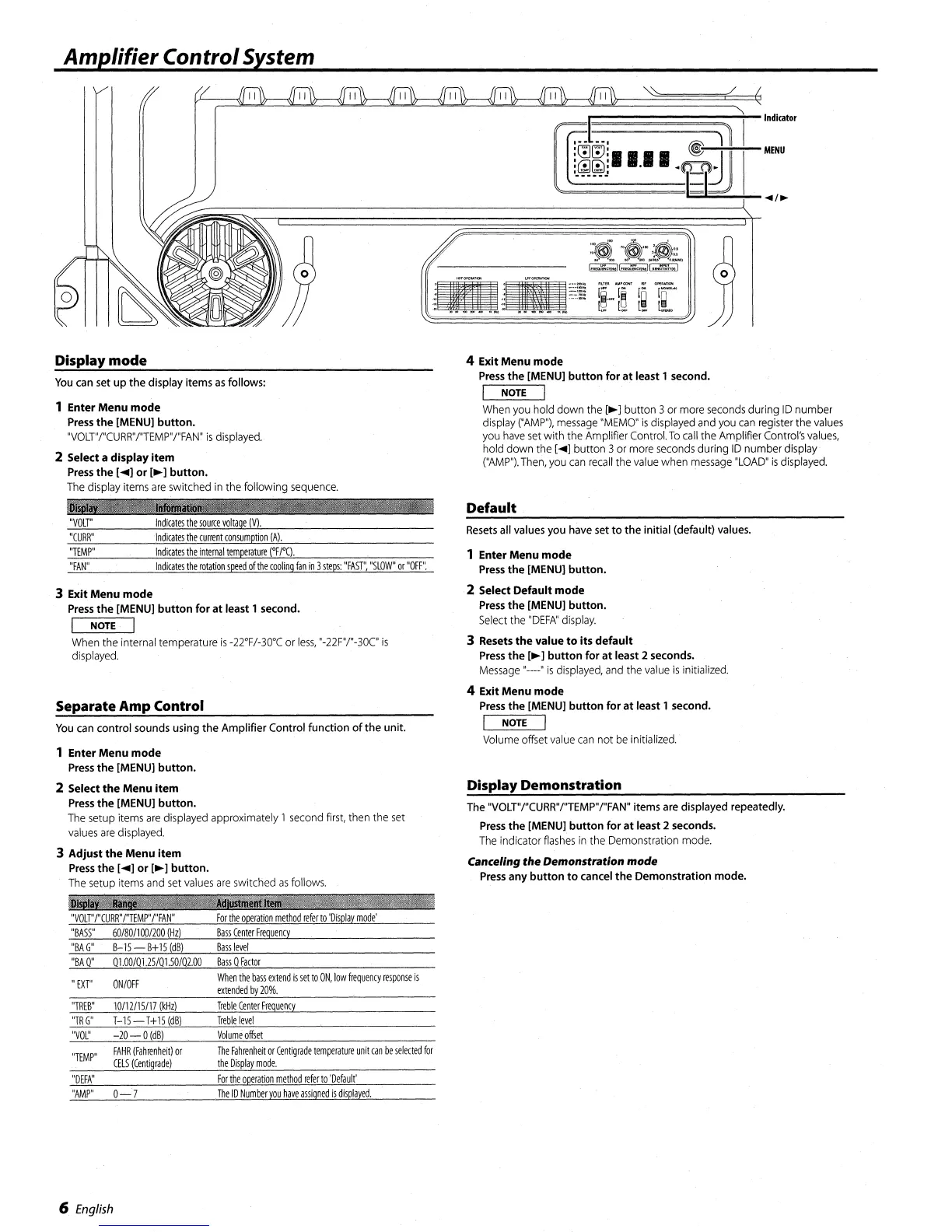
r,::::::::::::::::~~t-Indl(ator
,
..
t..,
~
)1
I
'~[!'J'
~-""';-+-:--MENU
~~~~II.II.t.[D.111
I
••
-._-
~I;;~;;;;;"'-+-~/~
Display mode
You
can
set
up the display items
as
follows:
1 Enter Menu mode
Press
the [MENU] button.
"VOLT"/"CURR"/"TEMP"/"FAN"
is
displayed.
2 Select a display
item
Press
the [
....
]
or
[~
] button.
The
display
items
are
switched
in
the following
sequence.
&Cas","M!!
j
jiii'
1161EI6
"I
"VOLT"
Indicates
the
source
voltage
(V).
"CURR"
Indicates
the
current
consumption
(A).
"TEMP"
Indicates
the
internal
temperature
("Fro.
"FAN"
Indicates
the
rotation
speed
of
the
cooling
fan
in
3
steps:
"FAST",
"SLOW"
or
"OFF".
3 Exit Menu mode
Press
the [MENU]
button
for at least 1 second.
I NOTE I
When
the
internal temperature
is
-22'F/-30'C or
less,
"-22F"/"-30C"
is
displayed.
Separate Amp Control
You
can
control sounds using the Amplifier Control function
of
the unit.
1 Enter Menu mode
Press
the [MENU] button.
2 Select
the
Menu
item
Press
the [MENU] button.
The
setup
items
are
displayed
approximately 1
second
first,
then the
set
values
are
displayed.
3 Adjust
the
Menu
item
Press
the [
....
]
or
[~]
button.
The
setup
items
and
set
values
are
switched
as
follows.
1l'
...
!IIM!!'!'...,
.........
"VOLT"I"CURR"I"TEMP"I"FAN"
For
the
operation
method
referro
'Display
mode'
4 Exit Menu mode
Press
the [MENU]
button
for
at
least 1 second.
I NOTE I
When
you
hold down the
[~]
button 3or
more
seconds
during
10
number
display
("AMP"),
message
"MEMO"
is
displayed
and
you
can
register
the
values
you
have
set
with
the
Amplifier Control.
To
call
the Amplifier
Control's
values,
hold down the [
....
] button 3 or
more
seconds
during
10
number display'
("AMP").
Then,
you
can
recall
the
value
when
message
"LOAD"
is
displayed.
Default
Resets
all
values
you
have
set
to the initial (default)
values.
1 Enter Menu mode
Press
the
[MENU] button.
·2 Select Default mode
Press
the [MENU] button.
Select
the
"DEFA"
display.
3 Resets
the
value
to
its
default
Press
the
[~]
button
for
at
least 2 seconds.
Message
,,----"
is
displayed,
and
the
value
is
initialized.
4 Exit Menu mode
Press
the [MENU]
button
for
at
least 1 second.
I NOTE I
Volume
offset
value
can
not
be
initialized.
Display Demonstration
The
"VOLT"I"CURR"I"TEMP"I"FAN"
items
are
displayed repeatedly.
Press
the [MENU] button for
at
least 2 seconds.
The
indicator
flashes
in
the
Demonstration
mode.
Canceling
the
Demonstration
mode
Press
any
button
to
cancel the Demonstration mode.
"BASS"
60/801100/200
(Hz)
Bass
Center
Freguency
"BA
G"
B-1S
-
B+
15
(dB)
Basslevel
"BA
0"
01.00/01,25/01.50/02.00
Bass
0
Factor
"
EXT"
ONIOFF
When
the
bass
extend
is
set
to
ON,
low
frequency
response
is
extended
by
20%.
"TREB"
10/12115/17
(kHz)
Treble
Center
Freguency
"TRG"
T-1S
-
T+
15
(dB)
Treble
level
"VOL"
-20-0
(dB)
Volume
offset
"TEMP"
FAHR
(Fahrenheit)
or
CELS
(Centigrade)
The
Fahrenheit
or
Centigrade
temperature
unit
can
be
selected
for
the
Display
mode.
"DEFA"
For
the
operation
method
refer
to
'Default'
"AMP"
0-7
The
ID
Number
you
have
assigned
is
displayed.
6
English




 To Next Page