ENGLISH
27
AUDIO SETTINGS
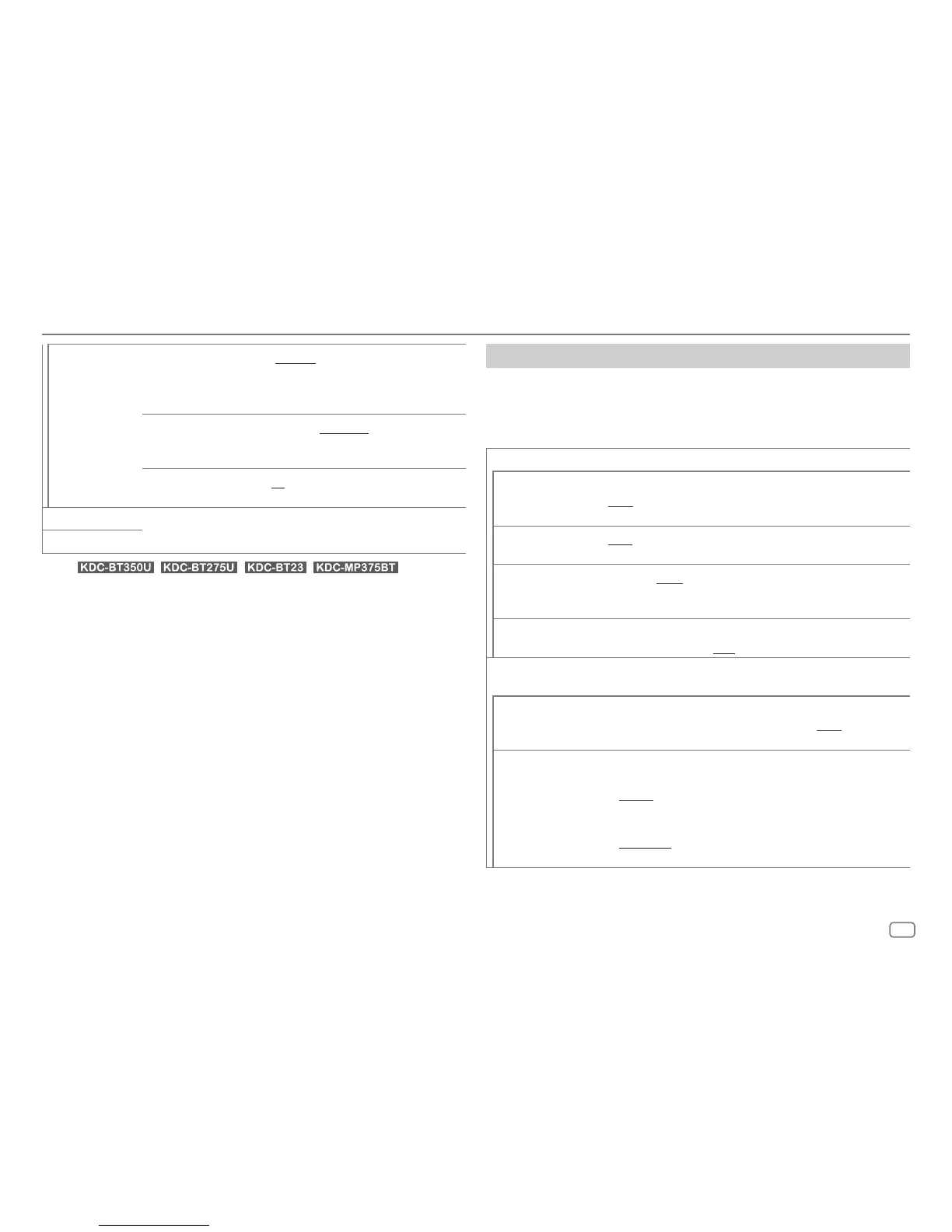
[SW LPF SLOPE] [–6DB]/[–12DB]/[–18DB]/[–24DB]: Adjusts the
crossover slope.
(Selectable only if a setting other than [THROUGH] is
selected for [SW LPF FRQ].)
[SW LPF
PHASE]
[REVERSE] (180°)/[NORMAL] (0°): Selects the
phase of the subwoofer output to be in line with the
speaker output for optimum performance.
[SW LPF GAIN]
[–8] to [0]: Adjusts the output volume of the
subwoofer.
[DTA SETTINGS] For settings, see “Digital Time Alignment settings” on the right column.
[CAR SETTINGS]
• (For / / / )
The following item is selectable only if
[SWITCH PREOUT]
is set to
[SUB-W]
(page 4):
–
[SUB-W LEVEL]
–
[SUBWOOFER SET]
–
[SW LEVEL]
of
[EASY EQ]
–
[SUBWOOFER]
of
[SPEAKER SIZE]
–
[SUBWOOFER LPF]
of
[X ‘ OVER]
–
[SUBWOOFER]
of
[DISTANCE]
and
[GAIN]
in
[DTA SETTINGS]
• The following item is selectable only if
[SUBWOOFER SET]
is set to
[ON]
(page25):
–
[SUB-W LEVEL]
–
[SW LEVEL]
of
[EASY EQ]
–
[SUBWOOFER]
of
[SPEAKER SIZE]
–
[SUBWOOFER LPF]
of
[X ‘ OVER]
–
[SUBWOOFER]
of
[DISTANCE]
and
[GAIN]
in
[DTA SETTINGS]
• The following item is selectable only if a setting other than
[NONE]
is
selected for
[TWEETER]
,
[REAR]
and
[SUBWOOFER]
of
[SPEAKER SIZE]
:
–
[TWEETER]
,
[REAR HPF]
,
[SUBWOOFER LPF]
of
[X ‘ OVER]
Digital Time Alignment settings
Digital Time Alignment sets the delay time of the speaker output to create a
more suitable environment for your vehicle.
• For more information, see “Determining the value for
[DISTANCE]
and
[GAIN]
of
[DTA SETTINGS]
” on page 28.
[DTA SETTINGS]
[POSITION]
Selects your listening position (reference point).
[ALL]: Not compensating ; [FRONT RIGHT]: Front right seat ;
[FRONT LEFT]: Front left seat ; [FRONT ALL]: Front seats
[DISTANCE]
[0FT] to [20.01FT]: Fine adjust the distance to compensate.
(Before making an adjustment, select the speaker you want to adjust.)
[GAIN]
[–8DB] to [0DB]: Fine adjust the output volume of the selected
speaker.
(Before making an adjustment, select the speaker you want to adjust.)
[DTA RESET]
[YES]: Resets the settings ([DISTANCE] and [GAIN]) of the selected
[POSITION] to default. ; [NO]: Cancels.
[CAR SETTINGS] Identify your car type and rear speaker location in order to make the
adjustment for [DTA SETTINGS].
[CAR TYPE]
[COMPACT]/[FULL SIZE CAR]/[WAGON]/[MINIVAN]/[SUV]/
[MINIVAN(LONG)]: Selects the type of vehicle. ; [OFF]: Not
compensating.
[R-SP LOCATION]
Selects the location of the rear speakers in your vehicle to calculate the
furthest distance from the listening position selected (reference point).
• [DOOR]/[REAR DECK]: Selectable only when [CAR TYPE] is
selected as [OFF], [COMPACT], [FULL SIZE CAR], [WAGON] or
[SUV].
• [2ND ROW]/[3RD ROW]: Selectable only when [CAR TYPE] is
selected as [MINIVAN] or [MINIVAN(LONG)].





 To Next Page