EasyManua.ls Logo

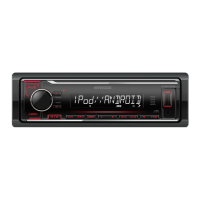
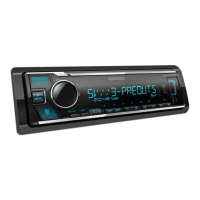
Kenwood KMM-U11 - User Manual

Kenwood KMM-U11
50 pages
Print Icon
To Next Page IconTo Next Page
Loading...
Data Size: B6L (182 mm x 128 mm)
Book Size: B6L (182 mm x 128 mm)
KMM-U21
KMM-U11
DIGITAL MEDIA RECEIVER
INSTRUCTION MANUAL
B5A-0164-00 (MN)© 2014 JVC KENWOOD Corporation
“Made for iPod,” and “Made for iPhone” mean that an electronic accessory has been designed to connect specifically to iPod, or iPhone, respectively, and has
been certified by the developer to meet Apple performance standards. Apple is not responsible for the operation of this device or its compliance with safety and
regulatory standards. Please note that the use of this accessory with iPod or iPhone may affect wireless performance.
iPhone, iPod, iPod classic, iPod nano, and iPod touch are trademarks of Apple Inc., registered in the U.S. and other countries.
Lightning is a trademark of Apple Inc.
Pandora, the Pandora logo, and the Pandora trade dress are trademarks or registered trademarks of Pandora Media, Inc., used with permission.
Android is trademark of Google Inc.
JS_KWD_KMM_U21_MN_C00_1.indd 1JS_KWD_KMM_U21_MN_C00_1.indd 1 31/7/2014 2:49:31 PM31/7/2014 2:49:31 PM


Questions and Answers

  • B
    bonealSep 10, 2025
    Why can't I playback in [BROWSE MODE] on my Kenwood KMM-U11 Car Receiver?
    • J
      John HarrisonSep 10, 2025
      If you cannot playback in [BROWSE MODE] on your Kenwood Car Receiver: - Make sure KENWOOD MUSIC PLAY APP is installed on the Android device. - Reconnect the Android device and make the appropriate setting in [ANDROID SETUP]. - If this does not solve the problem, the connected Android device does not support [BROWSE MODE].
  • E
    Elizabeth DonaldsonAug 23, 2025
    What to do if my Kenwood KMM-U11 does not work at all?
    • S
      Seth SchroederAug 23, 2025
      If your Kenwood Car Receiver does not work at all, reset the unit.
  • D
    Denise PattersonAug 25, 2025
    Why does 'READING' keep flashing on my Kenwood KMM-U11 Car Receiver?
    • M
      Melissa CummingsAug 25, 2025
      If “READING” keeps flashing on your Kenwood Car Receiver, do not use too many hierarchical levels or folders.
  • M
    Michelle BrownAug 26, 2025
    What to do if my Kenwood KMM-U11 Car Receiver shows 'NO DEVICE' or 'READING' keeps flashing?
    • C
      Crystal LarsonAug 26, 2025
      If your Kenwood Car Receiver displays “NO DEVICE” or “READING” keeps flashing: - Switch off the developer options on the Android device. - Reconnect the Android device. - If this does not solve the problem, the connected Android device does not support [BROWSE MODE].
  • W
    Wendy SolomonAug 28, 2025
    Why is playback intermittent on my Kenwood KMM-U11 Car Receiver?
    • D
      Dr. Daniel GomezAug 28, 2025
      If the playback is intermittent or the sound skips on your Kenwood Car Receiver, turn off the power saving mode on the Android device.
  • A
    Alexandra RodriguezAug 29, 2025
    Why does 'MISWIRING CHECK WIRING THEN PWR ON' appear on my Kenwood Car Receiver?
    • C
      Christina WilliamsAug 29, 2025
      If the message “MISWIRING CHECK WIRING THEN PWR ON” appears, turn the power off. Then, check to be sure the terminals of the speaker wires are insulated properly before turning the power back on.
  • A
    Anthony MooreSep 18, 2025
    How to clean connectors in Kenwood Car Receiver?
    • M
      Mario GutierrezSep 19, 2025
      Clean the connectors.
  • K
    Kevin PhillipsSep 12, 2025
    Why is the elapsed playing time incorrect on my Kenwood KMM-U11 Car Receiver?
    • T
      triveraSep 12, 2025
      The incorrect elapsed playing time on your Kenwood Car Receiver is caused by how the files are recorded.
  • R
    Robert JonesSep 8, 2025
    Why is sound not playing during Android playback on my Kenwood KMM-U11 Car Receiver?
    • J
      Jonathon BoydSep 8, 2025
      If you cannot hear sound during playback from an Android device on your Kenwood Car Receiver: - Reconnect the Android device. - If in [HAND MODE], launch any media player application and start the Android device. - If in [HAND MODE], relaunch the current media player application or use another media player application. - Restart the Android device. - If this does not solve the problem, the connected Android device is unable to route the audio signal to unit.
  • K
    Keith PerezSep 5, 2025
    Why does my Kenwood KMM-U11 Car Receiver say 'NO MUSIC'?
    • J
      Jennifer ArnoldSep 5, 2025
      If your Kenwood Car Receiver displays “NO MUSIC”, connect a USB device that contains playable audio files.

Summary

BEFORE USE

Safety Precautions

Important safety warnings for driving, volume, and general operation.

BASICS

Unit Operations

How to detach/attach faceplate, reset unit, turn power on/off, adjust volume, select source.

GETTING STARTED

Initial Setup

Guide to initial setup, including cancelling demo, setting clock, and configuring basic settings.

RADIO

Tuning Methods

Methods for searching and selecting radio stations manually and automatically.

USB; iPod; ANDROID

Connecting and Playing Media

How to connect and play audio/video from USB, iPod, and Android devices.

Media Playback Controls

Operations for playback, seeking, file/folder selection, repeat, and random modes.

USB; iPod; ANDROID Operations

PANDORA INTEGRATION

Pandora Setup and Playback

Instructions for preparing, starting, and playing Pandora music.

TROUBLESHOOTING

Common Issues and Solutions

Troubleshooting guide for general, radio, USB/iPod, and Android related problems.

TROUBLESHOOTING AND SPECIFICATIONS

INSTALLATION AND CONNECTION

Unit Installation Guide

Step-by-step instructions for installing the unit in-dash and without sleeve.

WIRING AND INSTALLATION ACCESSORIES

Wiring Diagram

Detailed diagram showing electrical connections for the unit.

Kenwood KMM-U11 Specifications

General IconGeneral
BrandKenwood
ModelKMM-U11
CategoryCar Receiver
LanguageEnglish

Related product manuals