EasyManua.ls Logo

Kenwood KRF-V5200D - Connecting a DVD Player (6-Channel Input)

Kenwood KRF-V5200D
40 pages
Print Icon
To Next Page IconTo Next Page
To Previous Page IconTo Previous Page
Loading...
10
English
C
ENTE
R
U
WOO
FER
SURROUND
FR
O
N
T
O
UT
DVD
IN
V
IDE
O1
IN
V
IDEO2
IN
M
O
NIT
OR
OUT
O
PTI
C
AL
C
D
/
DV
D
CO
AXIAL
DVD
/
6
C
H
DVD
/
6CH IN
C
VIDE
O
D
I
G
ITAL IN
Setting up the system
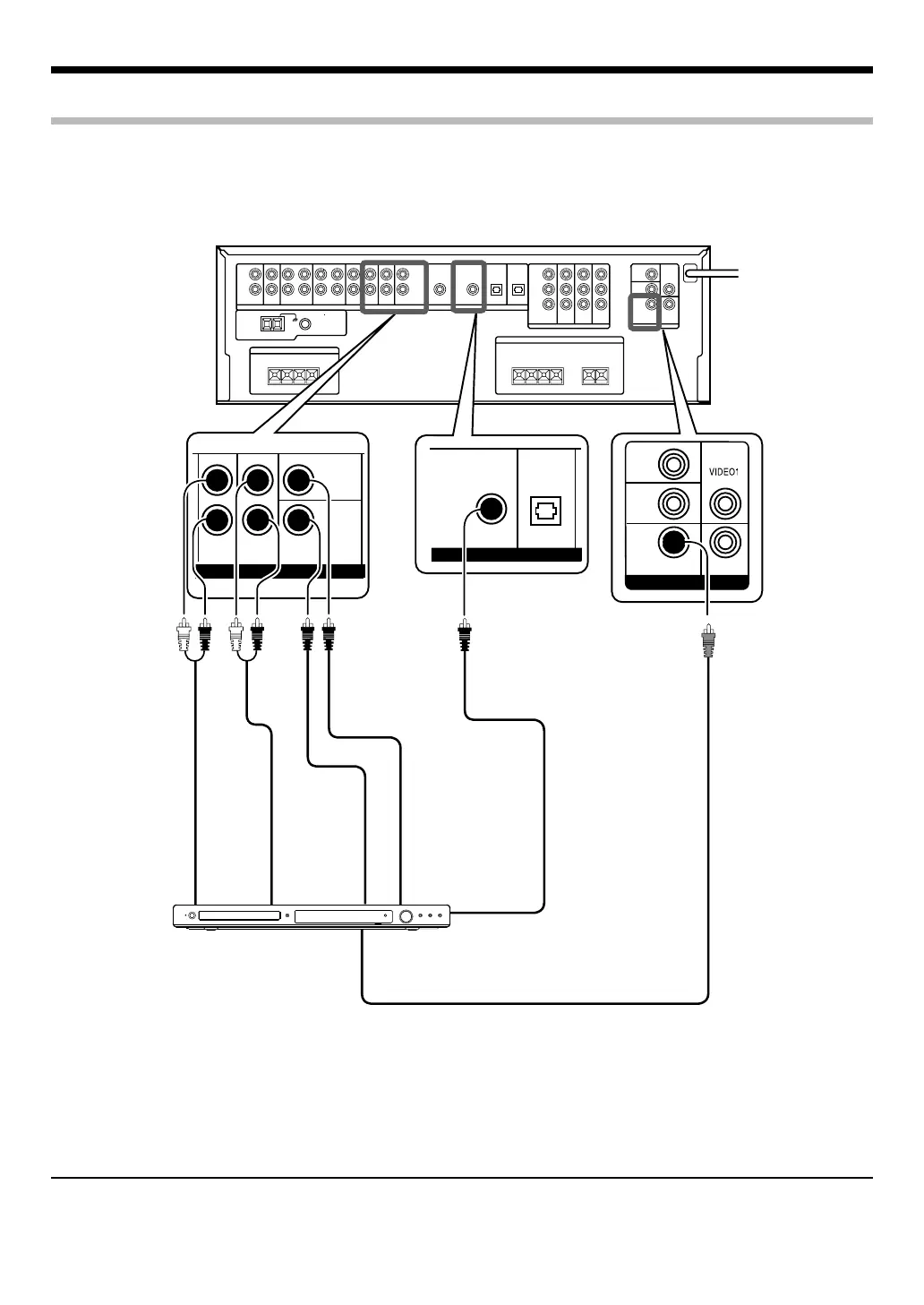
Connecting a DVD player (6-channel input)
If you have connected a DVD player to this unit with digital connection, be sure to read the <Selecting the input mode> ) carefully.
VIDEO OUT
(Yellow RCA
pin cord)
FRONT
OUT L/R
SURROUND
OUT L/R
CENTER
OUT
SUBWOOFER
OUT
COAXIAL DIGITAL
OUT (AUDIO)
DVD player
To AC wall outlet
Note:
For Australia only
If the DVD player has COMPONENT VIDEO OUT, COMPONENT VIDEO connection is possible. (<Connecting video components (COMPONENT
VIDEO)> #)
B60-5676-0000.indd10B60-5676-0000.indd10 07.4.129:57:09AM07.4.129:57:09AM

Table of Contents

Other manuals for Kenwood KRF-V5200D

Related product manuals