English
7
Preparing the remote control
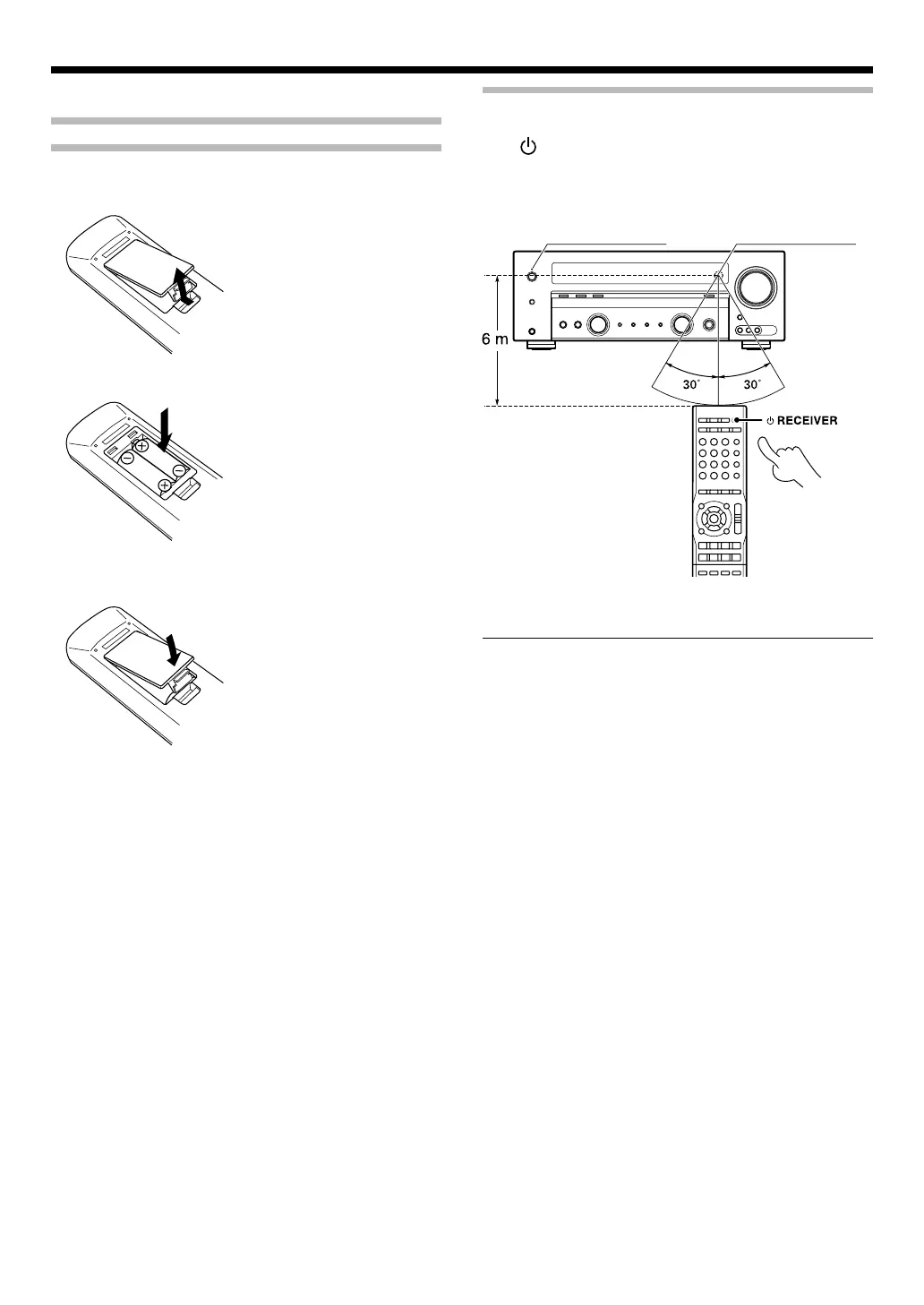
Loading batteriesLoading batteries
œ Remove the cover.
∑ Insert batteries.
• Insert two (R03) batteries following the polarity indications.
é Close the cover.
OperationOperation
When the Standby indicator is lit, the power turns ON when you
press [ RECEIVER] on the remote control unit. When the power
comes ON, press the key you want to operate.
Operating range (Approx.)
Remote sensor
Infrared ray system
Standby indicator
• When pressing more than one remote control key successively,
press the keys securely by leaving an interval of 1 second or more
between keys.
Notes:
1. The supplied batteries may have shorter lives than ordinary
batteries due to use during operation checks.
2. When the remote-controllable distance gets shorter than before,
replace both batteries with new ones.
3. Placing the remote sensor in direct sunlight, or in direct light from
a high frequency fluorescent lamp may cause a malfunction.
In such a case, change the location of the system installation to
prevent malfunction.
B60-5676-0000.indd7B60-5676-0000.indd7 07.4.129:57:05AM07.4.129:57:05AM


 To Next Page
 Loading...