EasyManua.ls Logo

Kenwood TK-7162 E - REALIGNMENT (Continued)

Kenwood TK-7162 E
57 pages
Print Icon
To Next Page IconTo Next Page
To Previous Page IconTo Previous Page
Loading...
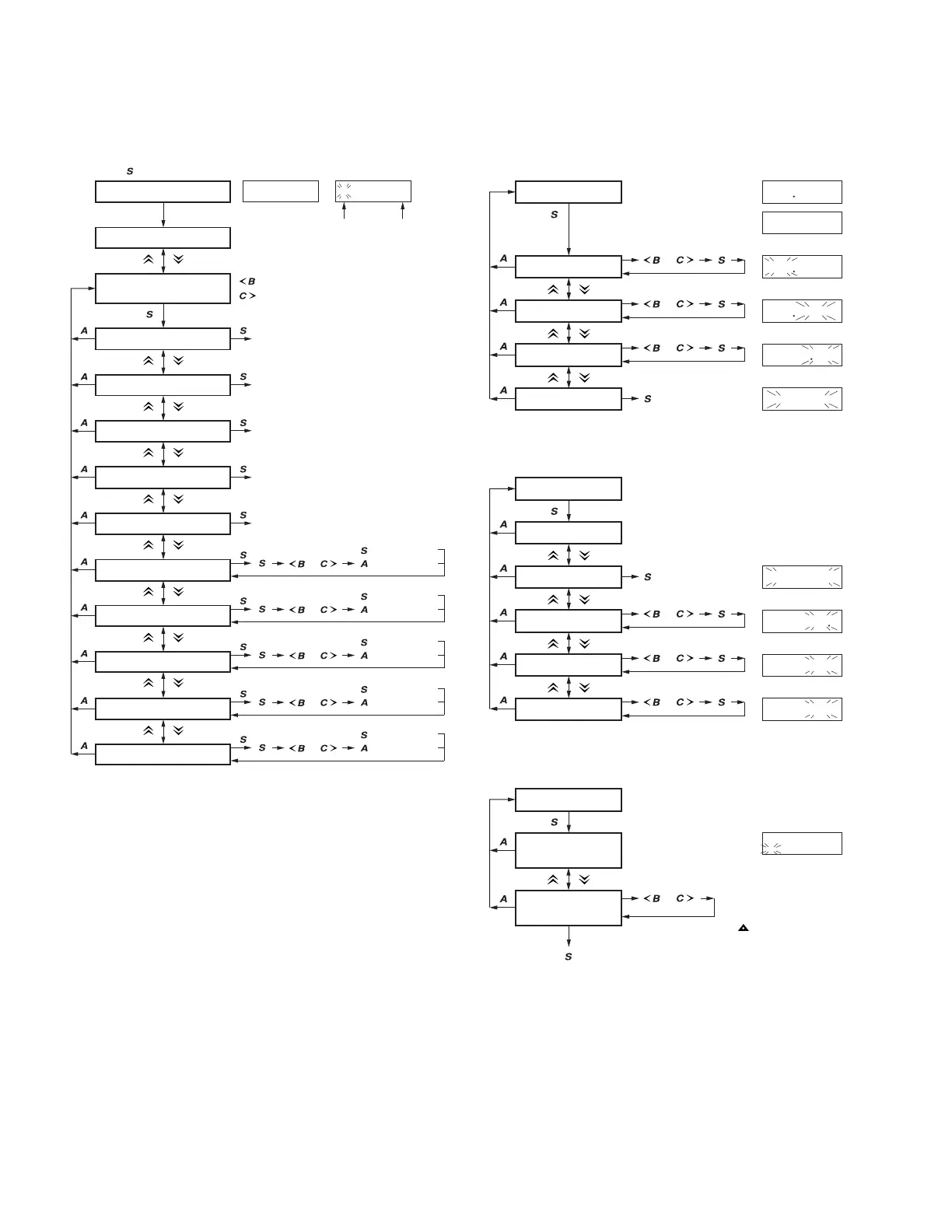
TK-7160/7162
8
Self programming mode
Zone No. /
Channel No. selection
1. RX frequency
Zone / Channel selection
3. TX frequency
4. TX signaling
2. RX signaling
[ ] [ ]
[ ]
[ ]
[ ]
[ ]
[ ]
[ ] + Power on
[ ]
[ ]
[ ]
[ ]
[ ]
[ ]
5. Channel name
[ ][ ]
6. Wide 5k / Wide 4k / Narrow
[ ]
7. RF power
[ ]
8. Scan Del/Add
[ ]
9. Beat shift on/off
[ ]
10. Compander on/off
[ ]
[ ] [ ]
[ ] [ ]
[ ] [ ]
[ ] [ ]
[ ] [ ]
[ ] [ ]
[ ] [ ]
[ ] [ ]
[ ] [ ]
: Down
: Up
Zone Channel
Refer to the
“Item setting mode”.
Refer to the
“Item setting mode”.
Refer to the
“Item setting mode”.
Same operation as the
“RX frequency”.
Same operation as the
“RX signaling”.
[ ]
[ ]
[ ] : Stored
[ ] :
Not stored
Display
SEL F
1- 1
[ ] / [ ]
[ ]
[ ]
[ ] : Stored
[ ] :
Not stored
[ ] / [ ]
[ ]
[ ]
[ ] : Stored
[ ] :
Not stored
[ ] / [ ]
[ ]
[ ]
[ ] : Stored
[ ] :
Not stored
[ ] / [ ]
[ ]
[ ]
[ ] : Stored
[ ] :
Not stored
[ ] / [ ]
1. RX frequency
kHz setting
kHz step
MHz setting
[ ]
[ ]
[ ]
[ ]
[ ]
Frequency clear
[ ]
[ ] [ ]
[ ] [ ]
[ ] [ ]
[ ] / [ ]
[ ]
[ ] / [ ]
[ ]
[ ] / [ ]
[ ]
: Cleared
13600000
136
*****
STPD500K
––––––––
––––––––
Display
Current
setting value
Value is not set
136
*****
2. RX signaling
Off
QT normal
Signaling setting
[ ]
[ ]
[ ]
[ ]
DQT normal
[ ]
[ ] [ ]
[ ] [ ]
[ ] [ ]
DQT inverse
[ ]
[ ] [ ]
[ ]
[ ] / [ ]
[ ]
[ ] / [ ]
[ ]
[ ] / [ ]
[ ]
: Tone off
Display
TONEDOFF
QTDD
****
DQTD
***
N
DQTD
***
I
5. Channel name
1~8 digit
selection
Channel name
setting
[ ]
[ ]
[ ]
[ ] [ ]
[ ] / [ ]
[ ]
: Stored
Display
________
Character selection
If the [ ] key held down
(2 seconds), the blinking
character clears.
REALIGNMENT
Item Selection Mode Item Setting Mode

Related product manuals