11.3 Low temperature calibration
⇒ scales must be in the control room of low temperature
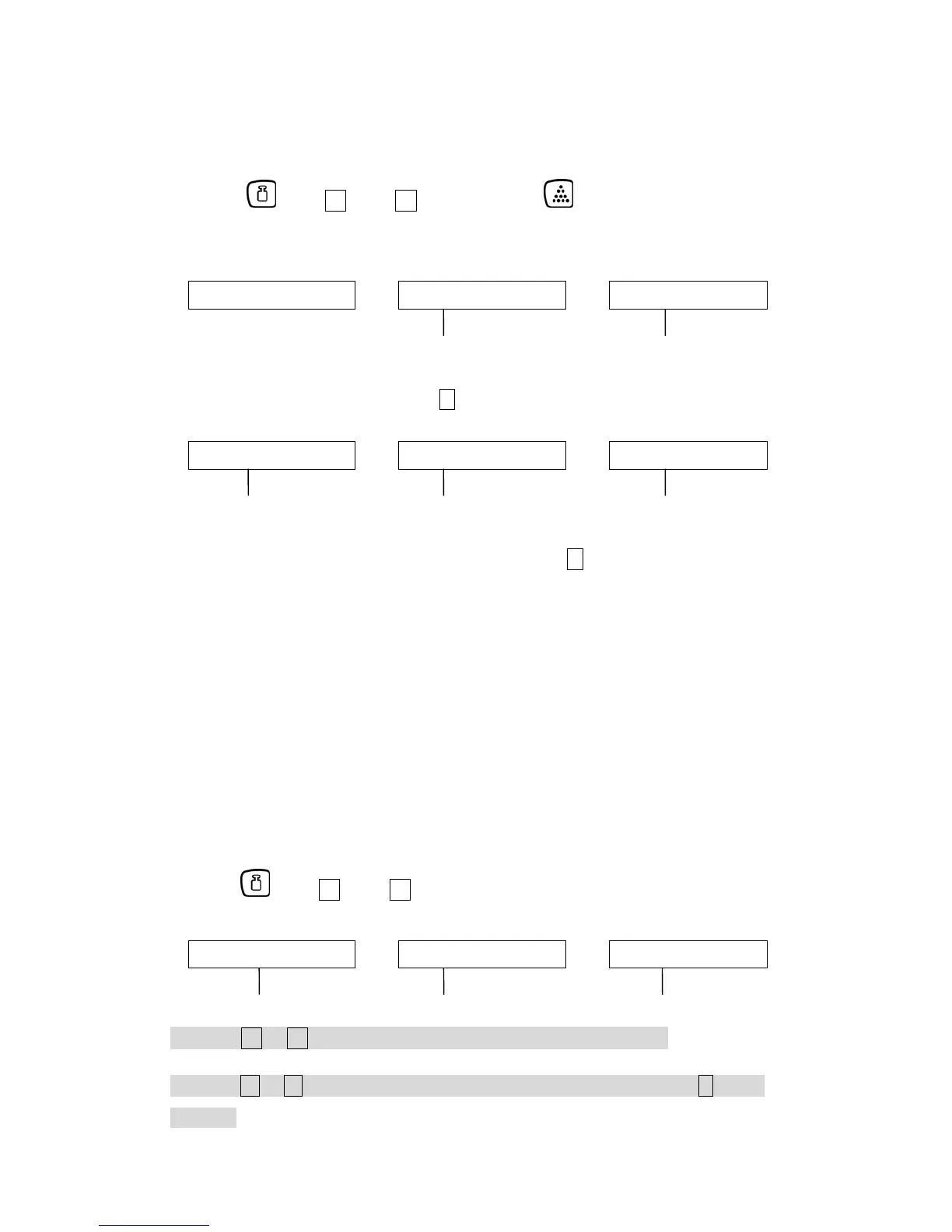
n Press key+ 1 key+ 5 key, then press key to enter the temperature
calibration mode
Weight Piece Weight Pcs
0. 0 0 0 XX XXXXXX
low temperature(°C) zero internal value
o No weight on the platter, press . key to calibrate zero
Weight Piece Weight Pcs
3 0. 0 0 0 XX XXXXXX
full capacity value low temperature(°C) internal value of full capacity
p Put the full capacity weight on the platter, press . key to calibrate full capacity
value.
q After scale is stable, it will reset back to zero automatically (remove the weight
mass from the platter before it resets back to zero), then the procedures
finished. Put the weight mass on the platter again to check if the display
showing the accurate weight. If it’s correct, turn off the power, then re-adjust
the mini jumper SWA1 to “LOCK” position.
11.4 Check / Delete temperature calibration data
n Press key+ 1 key+ 5 key
Weight Piece Weight Pcs
Sho t 0 0 XXXXXX
show temperature temperature (°C) internal value
o Press 2 or 8 key to check the temperature calibration data.
p Press 2 or 8 key to select the desirable data, and double-press . key to
delete it.
20 CXB-SH-e-0913


 To Next Page