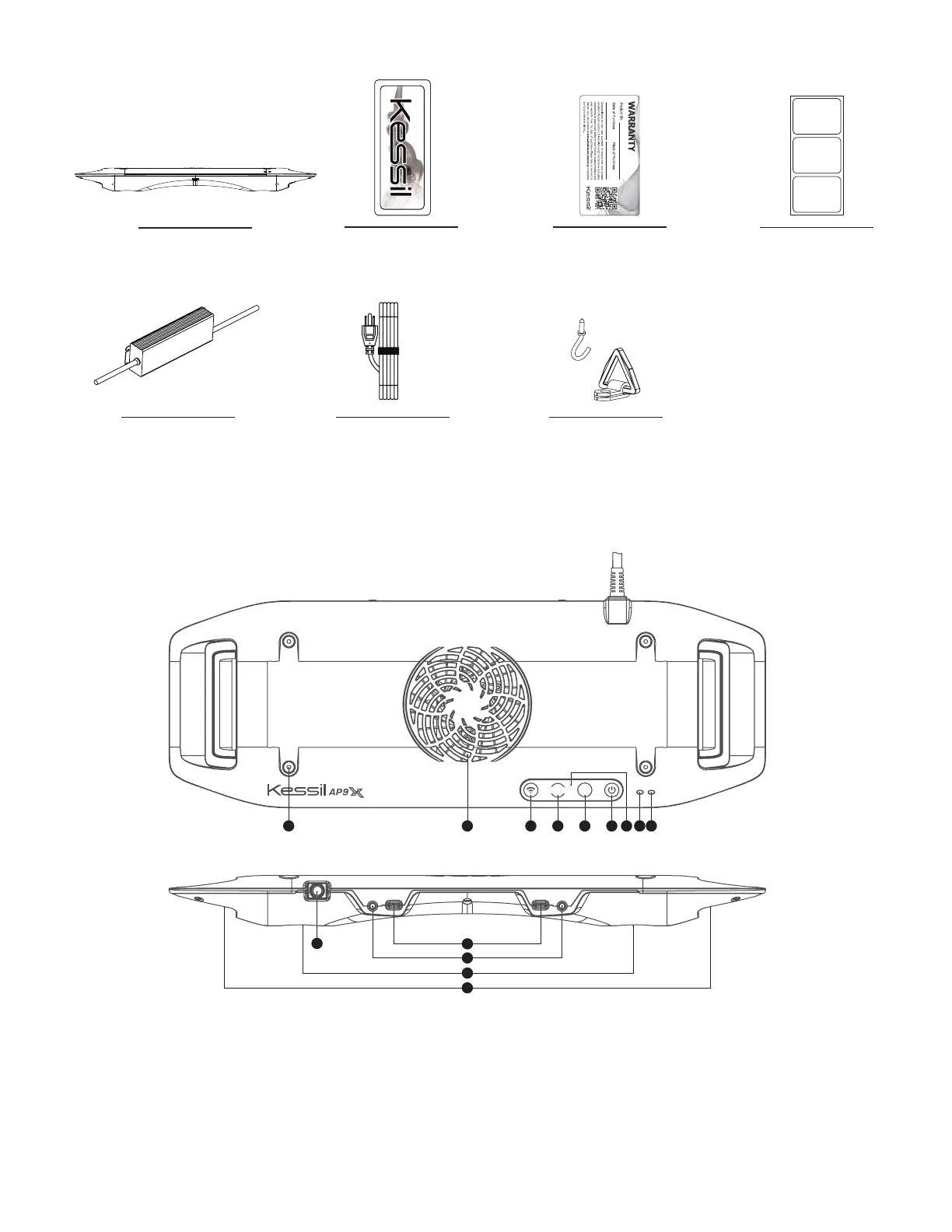
INSIDE THE BOX
AP9X
Power Adapter
Warranty Card
Kessil Sticker
Screw Hook &
Hanging Bracket x4
PARTS DIAGRAM
A Mode Indicator
B Wi-Fi Indicator
C Touch Panel - Touch once to activate
D Power - Turn the AP9X on or off.
E Intensity - Adjust the intensity of the light.
F Color - Adjust the color of the light.
G Wi-Fi - Turn on/off the Wi-Fi signal.
H Fan (Air Inlet)
I Screw Holes - For AP9X Mounting Arm
/ Hanging Kit / Brackets
J K-Link Ports
K 0-10V Output Ports
L LED Arrays + Reflectors
M Vents (Air Outlet)
N Power Cord
AC Adapter Cable
(Plug type varies from
country to country)
INT
COLOR
Wi-Fi
Mode
K-Link0-10V(R) K-Link 0-10V(L)
C B ADEFGH
N
L
L
K
I
M
J
QR Code Stickers
(This is for wireless
connection process, please
SAVE these stickers)


 To Next Page