Wi-Fi Mode
Wi-Fi Mode
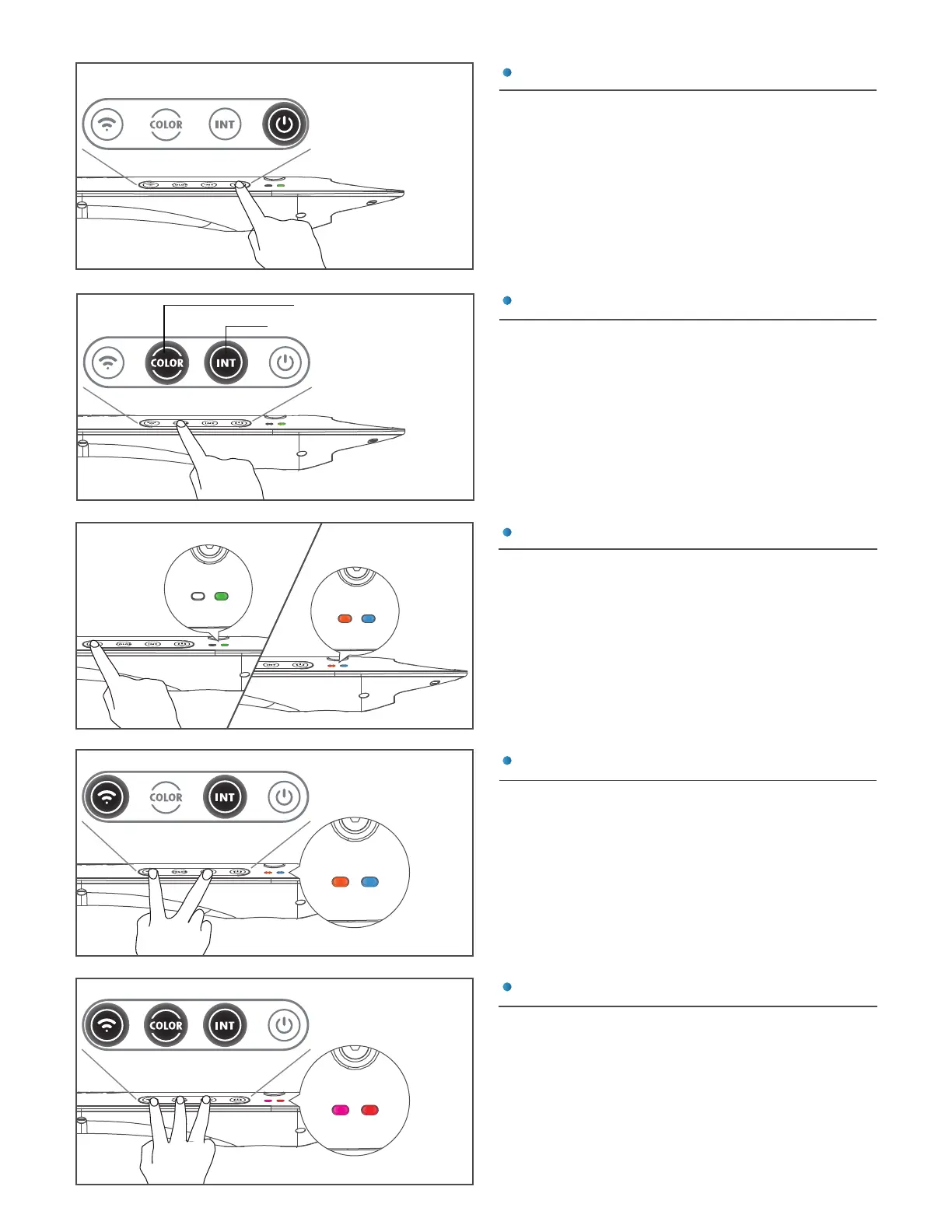
TOUCH PANEL
Manual Control
COLOR : 9 color modes
INTENSITY : 5 intensity levels
Touch the Power (D) button to turn on/off the
AP9X. When the AP9X is off, the Power (D),
Intensity (E), or Color (F) buttons can be
used to turn on the AP9X.
Turn On/Off the AP9X
1% / 25% /50% /75%/100%
Touch and hold the Wi-Fi (G) button for 3
seconds to turn on Wi-Fi signal. Do the same
to turn off Wi-Fi signal.
Turn On Wi-Fi for App Connection
Touch the Intensity (E) button and Color (F)
button to adjust the intensity and color of the
AP9X. Intensity levels and color modes are in
cycles.
Reset the AP9X Wi-Fi Configuration
Factory Reset the
AP9X
Wi-Fi Mode
Touch and hold the Intensity (E) & Wi-Fi (G)
buttons simultaneously for 3 seconds to reset
the Wi-Fi configuration (i.e. to reconnect). The
Mode indicator (A) will first disappear and
then blink red at 3 seconds. User's settings
will not be deleted. The Wi-Fi Indicator (B) will
change to solid orange.
Touch and hold the Intensity (E), Color (F) &
Wi-Fi (G) buttons simultaneously for more
than 10 seconds to reset the AP9X. The Mode
indicator (A) will first disappear and then blink
red at 10 seconds. User's settings will be
deleted. The Wi-Fi indicator (B) will be solid
purple to indicate booting mode (may take up
to 40 seconds) - See INSTALLATION Step 2.
4
Touch the Touch Panel (C) once to activate
Wi-Fi OFF Wi-Fi ON


 To Next Page