Programming Connection Methods
The NETCOM2 Rev. B can be programmed using one of the following connection methods:
Programmed using a local network connection via the RJ45 terminal
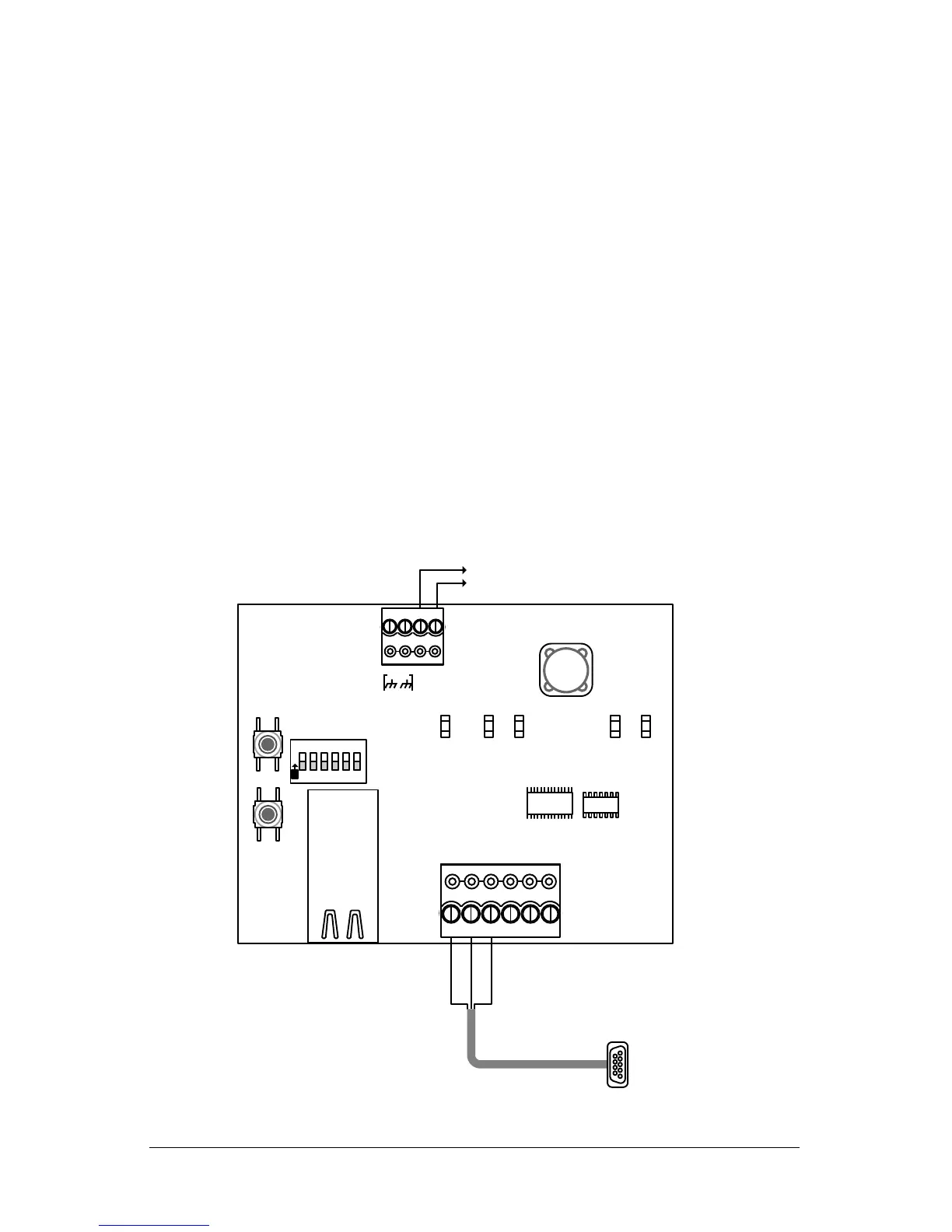
Programmed using a serial data cable (Keyscan part # 40-2322) via the TB2 terminal
block
Programmed using a network crossover cable via the RJ45 terminal
This document outlines the procedures for programming the NETCOM2 Rev. B using the
local network connection method which starts on page 4.
If you elect to use either the serial data cable or the network crossover programming
methods see the notes below.
Notes on Serial Data Cable Programming
The NETCOM2 Rev. B can be programmed with a serial data cable connected from the
server/laptop with the NETCOM Program Utility to the NETCOM2 Rev. B’s TB2 terminal
block as shown below. The NETCOM2 Rev. B requires a 12VDC power source. Ensure that
the DIP switch S2.1 is in the OFF position (Run mode). After establishing the connection,
open the NETCOM Program Utility, complete the necessary settings and program the
device. See Figure 3 or Figure 4 for permanent operating connections.
Figure 1 – Serial Data Cable Connection


 To Next Page