25
STEERING WHEEL CONTROLS
STEERING WHEEL
CONTROLS
CRUISE
RES
OK
SET
CANCEL
OK
I
K
J
REMINDER: Cruise Control will not activate until the
brake pedal has been depressed at least once after
the ignition is ON or engine starting
§ Cruise Control is designed to function above
approximately 20 mph only
§ Cruise Control will not activate until the brake
pedal has been depressed at least once after
ignition ON or engine start
QUICK TIPS
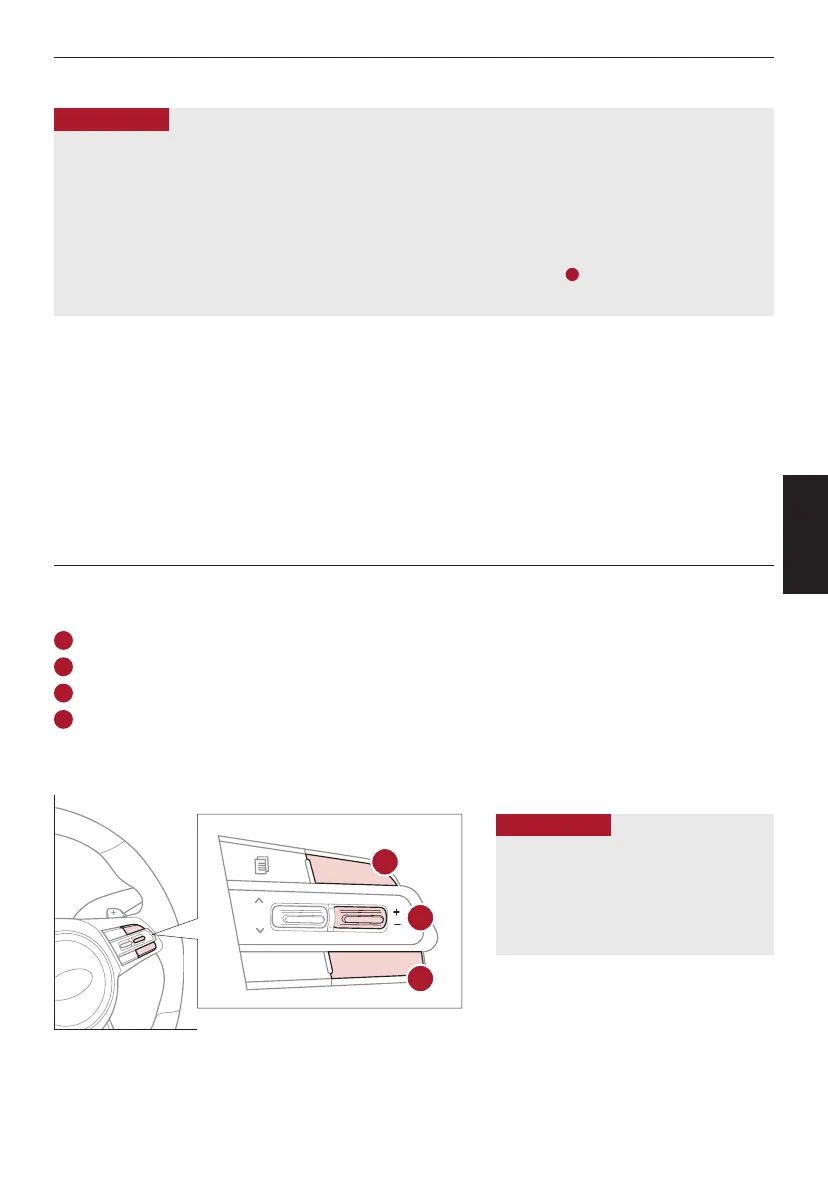
I
Driving Assist button: Press the CRUISE button up to turn the cruise control ON/OFF
J
RES+ button: Press up to resume or increase cruising speed
J
SET- button: Press down to set or decrease cruising speed
K
CANCEL button: To cancel cruise control setting, do one of the following:
§ Press the brake pedal
§ Press the CANCEL button
Cruise Control (CC)
§ The speed setting for SCC can be adjusted under the following conditions:
§ With no vehicle in front, you must be travelling at a minimum speed of 20 mph
§ When following a vehicle, there is no minimum speed requirement
§ When following a vehicle, the system can automatically adjust your cruise speed based on the vehicle detected in front. It will even
bring the vehicle to a complete stop if necessary. If the vehicle remains at a standstill for more than 3 seconds, you must depress the
accelerator pedal or press the RES+/SET- button up/down to start the vehicle
§ To change the cruise control mode from SCC to standard cruise control, press and hold button
C
. Repeat to switch back to SCC
mode. (SCC must not be activated to change modes)
QUICK TIPS
Smart Cruise Control (SCC)
†6
(Continued)
REMINDERS:
§ CRUISE indicator must be ON in order to operate SCC
§ SCC remains ON when ignition is cycled. The speed setting will need to be reset when ignition is cycled
§ The distance settings are approximations and may vary depending on vehicle speed. See the owner’s manual for more information
§ SCC is also canceled when the driver’s door is opened, gear shift is changed out of D (Drive), Electronic Parking Brake (EPB) is activated
and various other conditions. See owner’s manual for other conditions
§ If SCC is left on, it can be activated inadvertently. Keep the system off when not in use to avoid setting a speed which the driver is not
aware of
§ SCC is a supplemental system and is not a substitute for safe driving. It is the responsibility of the driver to always check the speed and
distance to the vehicle ahead
ALWAYS CHECK THE OWNER’S MANUAL FOR COMPLETE
OPERATING INFORMATION AND SAFETY WARNINGS.
*IF EQUIPPED
†LEGAL DISCLAIMERS ON BACK INSIDE COVER



 To Next Page