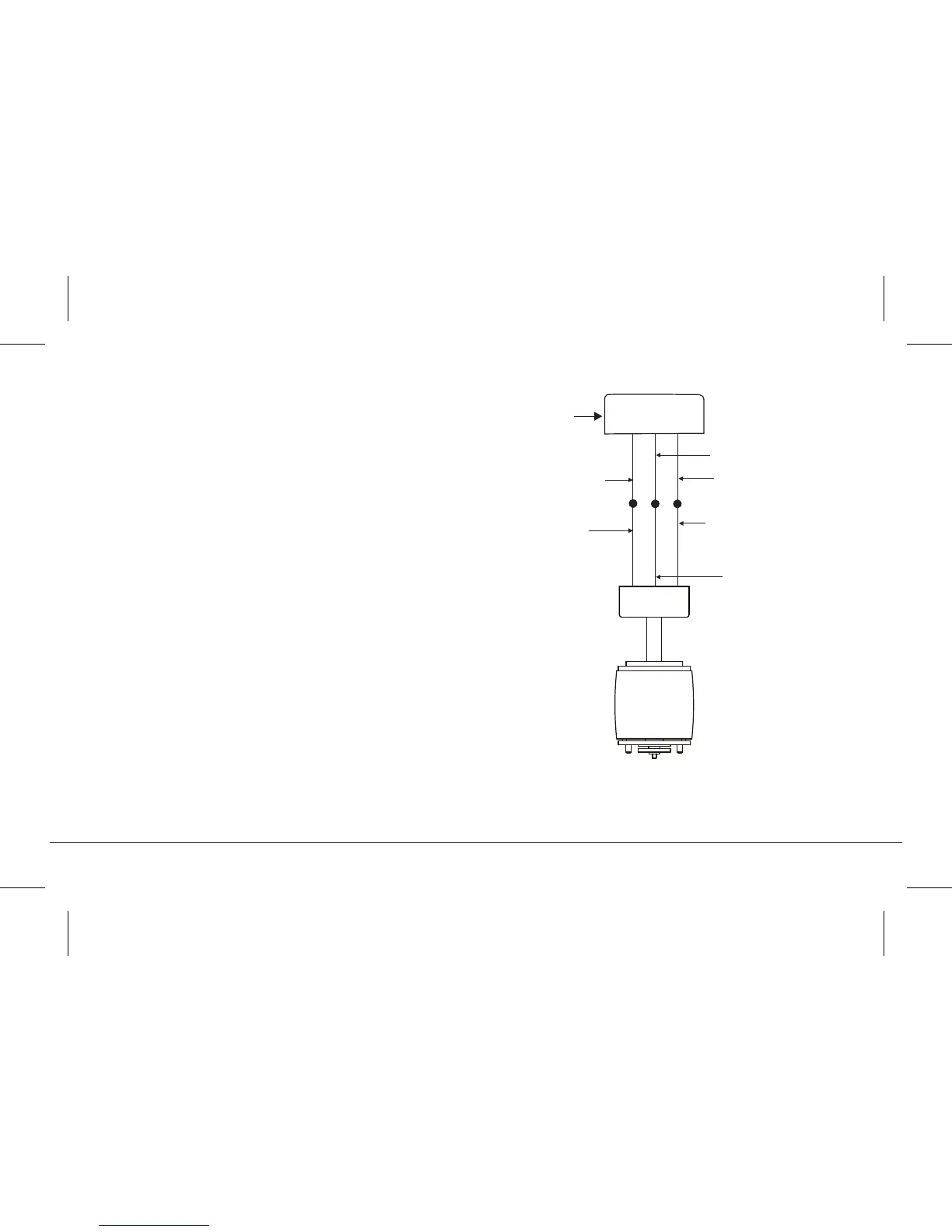
ELECTRICAL CONNECTIONS
WARNING: To avoid possible electrical shock, be sure you have turned
o the power at the main circuit panel.
Follow the steps below to connect the fan to your household wiring. Use
the wire connecting nuts suppled with your fan. Secure the connectors
with electrical tape. Make sure there are no loose wire strands or
connections.
Step 1. Connect the fan supply (black) wire to the black household
supply wire as shown in Figure 13.
Step 2. Connect the neutral fan (white) wire to the neutral household
(white) wire.
Step 3. Connect the fan ground wire (green) to the household ground
wire.
Step 4. After connecting the wires, spread them apart so that the green
and white wires are on one side of the outlet box and the black and blue
wires are on the other side.
Step 5. Turn the connecting nuts upward and push the wiring into the
outlet box.
Fig. 13
White (neutral)
Green or bare
copper (ground)
White ("AC IN N")
Ground (green)
(Connect to ground wire
on hanger bracket if no
house ground wire exists.)
Outlet box
Black ("AC IN L")
Black (motor)
60" FERRON
TM
| 11




 To Next Page