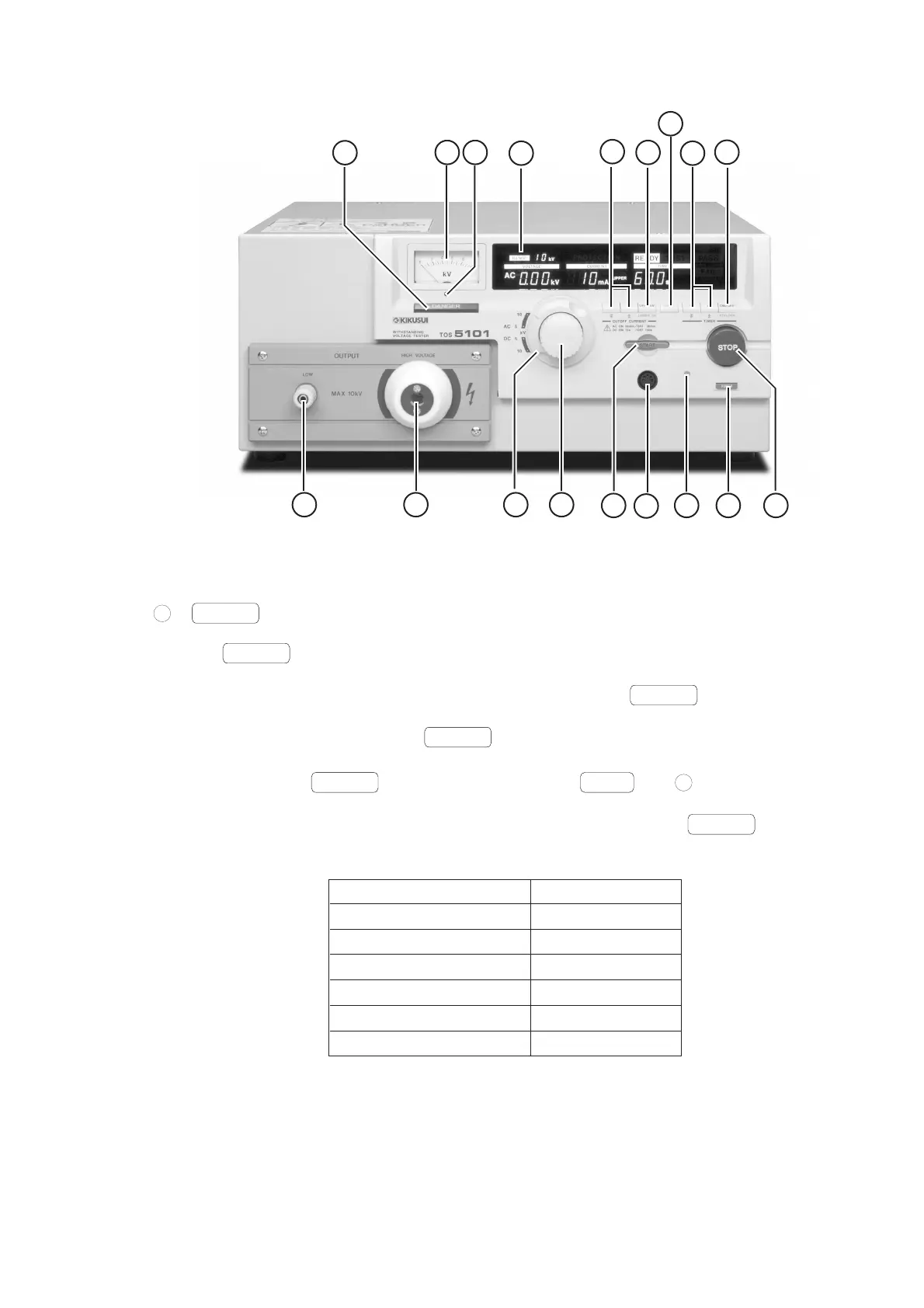
Chapter 4 DESCRIPTION OF FRONT AND REAR PANEL ITEMS
4-3
9
10 11
18
12
13
16
14
15
31172
4
5 678
Figure 4.3 TOS5101 Front Panel
4.1.1 Turning ON/OFF the AC Input Power
1
POWER
Switch
The
POWER
switch turns ON/OFF the AC mains power of the Tester.
The Tester has a “resume” function. When you turn ON the
POWER
switch, the Tester
automatically resumes the conditions of test (settings of cutoff current, test period, etc.) that
existed when you turned OFF the
POWER
switch last time.
By pressing the
POWER
switch while keeping the
SHIFT
key
16
depressed, you can
initialize the test conditions to the initial setup (factory default setup) as shown below. If you do
this, the data on the test conditions that existed when you turned OFF the
POWER
switch last
time is lost.
Item Initial setup data
Upper cutoff current 0.2mA
Lower cutoff current 0.1mA
Lower pass/fail judgement OFF
Test period 0.5 s
Timer function ON
Keylock function OFF



 To Next Page