Issue: 04/2011
X
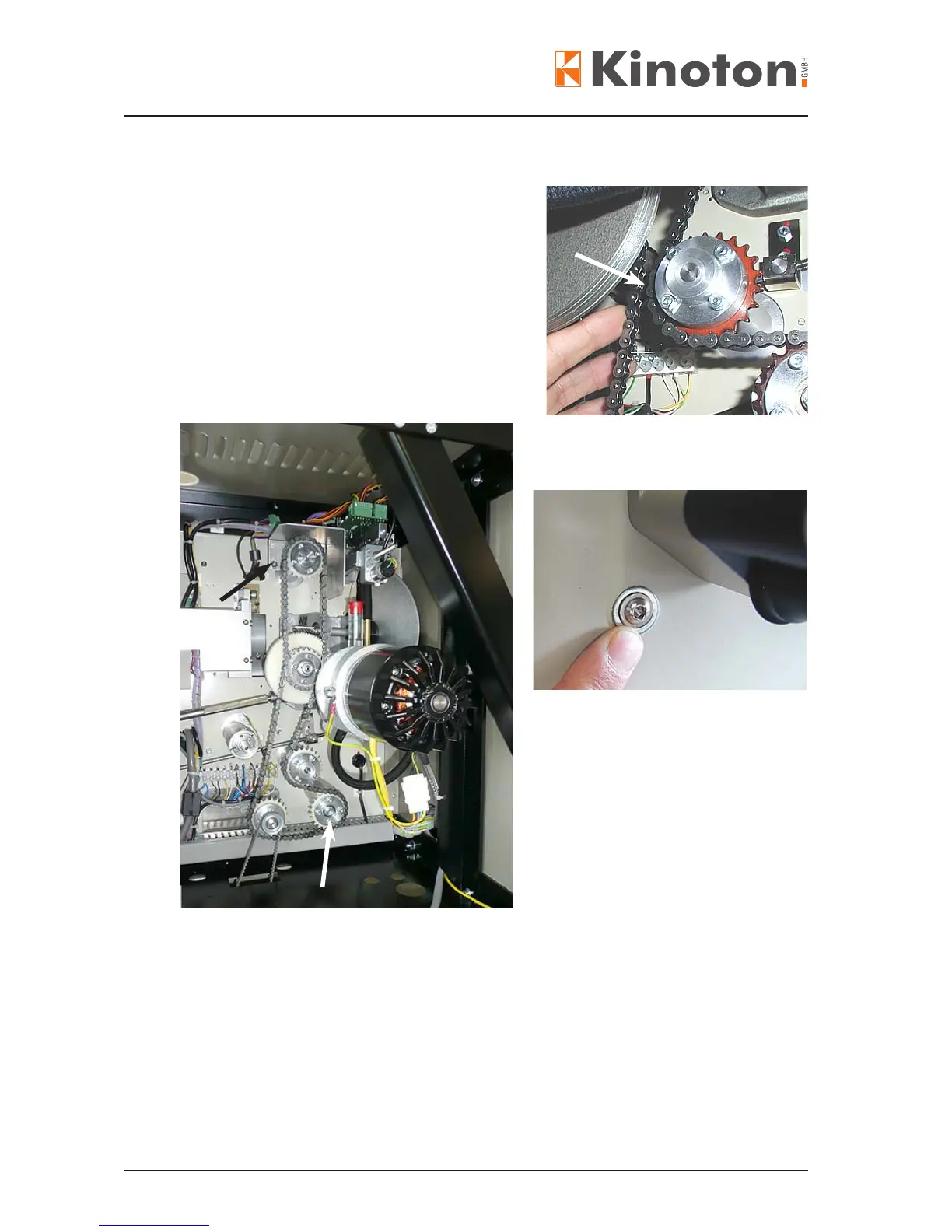
The chains must not be taut, but they must not
ap during the movement. The chain should be
tension in a way that a distance of about 1 cm
remains, when the chain is pressed towards the
bottom sprocket (arrow).
• Open the projector head rear cover.
• Remove the chain case by loosening the 2
Allen screws (black arrow) and then remove
the hexagonal rod nuts.
• Loosen the feed sprocket
assembly by turning the Allen
screw from the projector front side.
• Slide the assembly vertically until the
chain is tension correctly.
• Then fasten the Allen screw again.
• Loosen the centre Allen locking screw on the eccentric gear (white arrow) and move
the eccentric gear until the chain tension is correct.
• Tighten the lock screw again.
X
Z Chains should not be extremely tight; they just need to be tight enough that they can
not jump over the cog teeth.
Z If the projector is equipped with a friction drive and the tension of the friction belt has
been changed, the chain tension has to be checked and if necessary adjusted too.



 To Next Page