Charging the Battery
Installing the Battery
Installing/Uninstalling the Battery
Installing/Uninstalling Belt Clip
To install the antenna, plug the threaded end into the antenna interface, and
rotate the antenna clockwise until it is tight.
To uninstall the antenna, rotate it counterclockwise.
Installing a SIM Card
①
②
③
④
LED Indicator
Icon
Description
Received signal strength indication
2G/3G/4G network
Wi-Fi received signal strength indication
Searching GPS satellite signals
GPS signals acquired and locked up
In group call
In individual call
In all call
Under dispatching
Remaining battery capacity
Short message
Bluetooth on
Bluetooth device paired
Alarm message
In emergency alarm
1.Powering On/Off
To power on/off the device, hold down the Power/Volume knob and
release after 2 seconds.
The screen and green LED indicator light will be on, and the message
“initializing” will be displayed.
Note: If no SIM card is installed or the card is unregistered or invalid,
you will hear the voice prompt “No SIM card”
2.Adjusting the Volume
3.Initiating a Call
Hold down the PTT key to initiate a call on the selected channel.
4.Receiving a Call
Power-on failed
Low voice during
a call
PTT service
unavailable
1. The battery is out. Charge or replace
the battery.
2. The volume knob is faulty, or there is
another problem. Get the device repaired
at an authorized service station.
1. Speak too far from the microphone.
Please keep a distance of 3 ~ 10cm.
2. Inappropriate volume setting. Increase
the volume by rotating the volume knob
clockwise.
1. The SIM card is expired. Refill or
replace it.
2. Incorrect group setting. Choose a
correct group and try again.
3. The device is expired. Renew it.
Take the following steps to charge the battery.
1. Plug the power adapter into an AC power socket of the required specifications.
2. Connect the power adapter to the charger, and green power indicator
light will be on.
3. Put a battery solely or attached to the device into the charger.
4. Ensure the battery contacts well with the charging terminals.
Red charging indicator light is on.
5. After charging for about 6 hours, the charging indicator will turn green.
The battery is fully charged.
6. After the indicator light turns green, wait 1 to 2 hours before taking
out the battery, so as to achieve the best battery performance.
7. Disconnect the power adapter from the socket.
1. Press the upper part of the belt clip gently so that it goes up. (Figure ①)
2. Align the battery with the battery holder at the back of the device, and insert
the battery. (Figure ②)
3. Push the battery in the direction indicated until the latch is in position. (Figure ③)
4. Press the lower part of the battery until it is latched. (Figure ④)
To install the belt clip, align the two screw holes on the belt clip with the two at
the back of the device, and fasten the screws.
To uninstall the belt clip, loosen the screws, and then take off the belt clip.
Note: Please use a standard Nano-SIM card.
1. Unscrew the screw on the TF card cover using the supplied screwdriver,
open the cover, and take out the instructions card.
2. Insert a SIM card into the slot of the card holder (Figure ①), and close the
card holder cover. (Figure ②)
3. Lock the card holder cover by sliding it in the indicated direction. (Figure ③)
4. Close the TF card cover and screw up the screw (Figure ④)
Installing an Accessory
To use an audio accessory or the programming cable, screw down the screw
on the earphone cover, take down the accessory cover, plug the accessory or
cable into the interface, and screw up the screw.
Indicator state
Device State
Red light on
Green light on
Yellow light on
Red light flashing fast
A. No SIM card is installed, or it is installed
improperly. There is a voice prompt “No SIM card”.
B. Fail to unlock the PIN code of the SIM card.
Green light flashing slow
Idle
A. During a call (i.e. individual/group/all call).
B. A voice record is being downloaded/played.
A. The device is in individual-call standby state.
B. The device is in call setup state.
C. The device is unregistered or expired, so that it
is not deployed on the server.
Network registration fails because the SIM card is
inactivated or a bill is unpaid.
Device registration fails because of poor wireless
network connection.
The device is registered to a network successfully
and enters standby state.
The device is idle or powered off.
After power-on, rotate the Power/Volume knob clockwise to increase
the volume or counterclockwise to decrease it.
When a call is received, green indicator light will be on.
5.Network Type
To choose a network type, in the standby interface, press the Menu/OK
key to enter the menu, select Setting – Network Type.
成型 尺寸:165*95mm
Main unit
Battery
Antenna
Power adapter
User manual
Safety Information
Strap
Desktop charger
Belt clip
Battery
Accessory
interface
Battery
latch
Programmable
top key
LED
indicator
Power/volume knob
Speaker
LCD
screen
Numeric
keypad
Pick-up key
Menu/OK
key
Navigation keys
Back
key
Hang-
up key
Micro-
phone
1
2
3
4
2G,3G,4G
6.Low-Power Alert
To choose a network type, in the standby interface, press the Menu/OK
key to enter the menu, select Setting – Network Type.
7.Positioning
To enable/disable positioning, in the standby interface press the
Menu/OK key to enter the menu, and select Setting – GPS.
The built-in GPS module locates the device and reports position
information to the network management system. The real-time location
and movement track of the device can be displayed on a GIS map on
the network management system or dispatcher software.
8.Wi-Fi
To enable/disable Wi-Fi, in the standby interface press the Menu/OK
key to enter the menu, and select Setting – Wi-Fi.
After enabling Wi-Fi, you can search and connect to a nearby Wi-Fi
network in real time and set a password.
9.Bluetooth
To enable/disable Bluetooth, in the standby interface press the
Menu/OK key, and select Setting – Bluetooth.
After enabling Bluetooth, you can scan for and pair with a BT
earphone that is in pairing mode.
10.Short Message
To send the message, in the standby interface press the Menu/OK
key, select Message – Short Message, write a message, select a
contact, and send the message.
To view the short messages received/sent, press the Menu/Ok key,
and select Inbox/Outbox.
11.Advanced Functions
Via dispatcher software, you can revive, stun or kill the device, play
back voice, or perform background monitoring on another device.
12. Others
【*】key: Press it to turn off the screen and enter Power Saver mode;
hold it down for seconds to lock/unlock the keypad.
Programmable side key 1: By default, press it to announce the
selected channel; hold it down for seconds to announce remaining
battery capacity.
Programmable side key 2: By default, press it to announce the user
name; hold it down for seconds to enter individual-call mode.
PoC Trunked Two-way Radio
GP700
Quick Guide
Please read carefully the Safety Information before using the product.
Appearance
Antenna
PTT key
Programmable
side key 1
Programmable
side key 2
Aluminum-shelled battery holder
Stop block at the edge of the battery
167W06000213
Version:V1.0
This document is only for reference, and actual product prevails.
Kirisun reserves the right to the final interpretation of this document.
No. Name
Attachments
TroubleshootingBasic Operation
Icons
No. Problem Solution

 Need help?
 General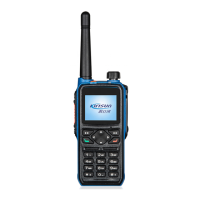

 To Next Page