28
USING YOUR OVEN
WARNING
Food Poisoning Hazard
Do not let food sit in oven more than one hour before
or after cooking.
Doing so can result in food poisoning or sickness.
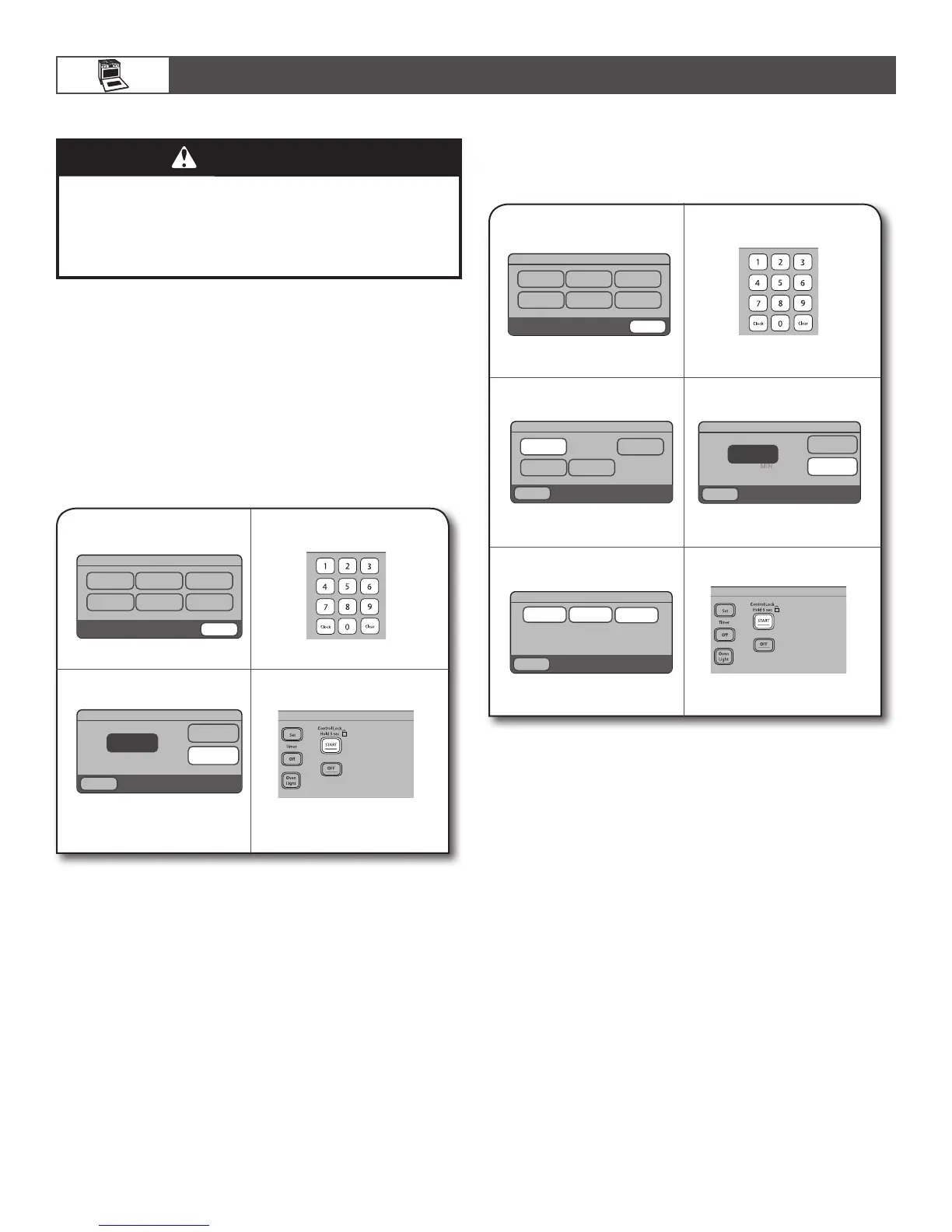
To Set a Delay Cooking Time:
Before setting, make sure the clock is set to the correct time of
day. See “Clock” section.
Before selecting cooking mode:
1.
Touch MORE.
2.
Touch DELAY COOK.
3.
Select cooking mode.
4.
Enter cook temperature, and
then touch COOK TIME.
5.
Enter desired cook time, and
then touch DELAY TIME.
6.
Enter desired delay time,
and then touch START.
MAIN MENU
More
Steam Cook Convert Bake
Broil Bread Proof Keep Warm
Delay Cook Self Clean
Settings Contact Info
MAIN MENU
< Back
DELAY COOK
Convect
Bake
< Back
Bake
Convect
Roast
Enter cooktime
DELAY BAKE
< Back
Cook Time
HR
Delay
Time
-:--
2:30
Temp
375°
Timed/Delay Cooking
Timed Cooking allows the oven(s) to cook for a set length of
time. Delay Cooking allows the oven(s) to be set to turn on at a
certain time of day. Delay Start should not be used for food such
as breads and cakes because they may not bake properly.
Timed Cooking is available on most cycles including: Bake,
Convect Bake, Convect Roast, EasyConvect™ Conversion,
Bread Proof, and Keep Warm.
Delay Cooking is available on the Bake, Convect Bake, and
Convect Roast cycles.
NOTE: For best cooking results, when the temperature probe is
being used, the Cook Time function cannot be used.
To Set a Cooking Time:
1.
Select baking cycle.
2.
Touch COOK TIME at the
Entry Selection Menu of the
cooking function being used.
3.
Enter desired cook time.
4.
Touch START.
MAIN MENU
More
Steam Cook Convect Bake
Broil Bread Proof Keep Warm
Enter temperature 170° - 500°F
BAKE
< Back
Temp
Cook
Time
Off
Probe:
Off
350°









 To Next Page