4-2
REMOVING THE CONSOLE AND
THE TOUCHPAD / LED ASSEMBLY
Electrical Shock Hazard
Disconnect power before servicing.
Replace all parts and panels before
operating.
Failure to do so can result in death or
electrical shock.
WARNING
1. Unplug washer or disconnect power.
2. Turn off the water supply to the washer.
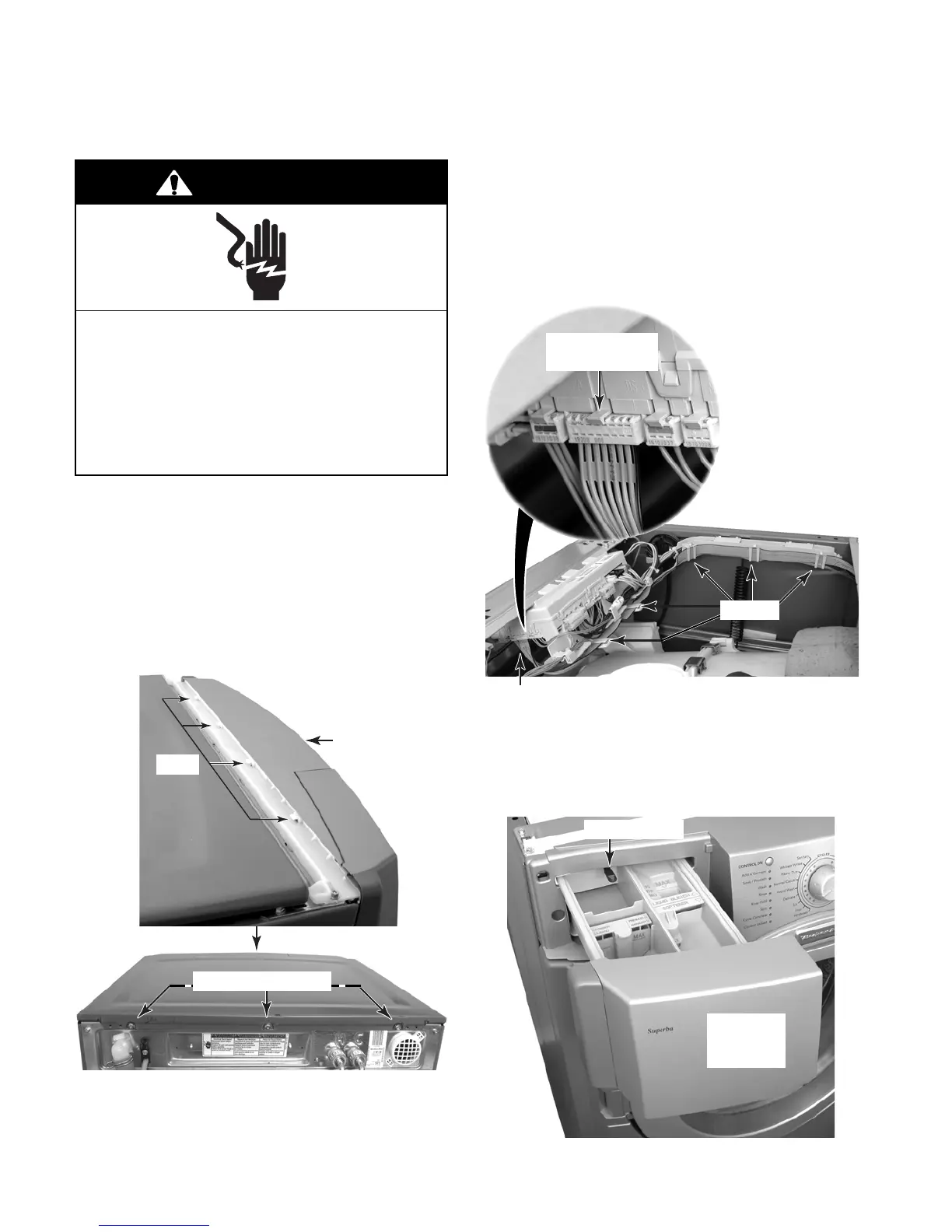
3. Remove the three T-20 hex-head torx
screws from the top cover of the washer.
4. Pull back on the cover and release the
tabs in the console from the slots in the
cover, then lift the cover off the unit.
5. To remove the console:
a) Lift the locking tab and disconnect the
ribbon cable connector from the cen-
tral control unit.
b) Remove the ribbon cable from the five
clips.
c) Pull the detergent dispenser drawer
out as far as it will go, then press down
on the release tab, and remove the
drawer from the unit.
Top Cover Screws
Tabs
Console
Connector @ DS3
Touchpad/LED
Ribbon Cable
5 Clips
Release Tab
Detergent
Dispenser
Drawer




 To Next Page