8-1
TECH TIPS
MANUAL DOOR LATCH
To manually unlock the door lock system,
perform the following steps.
1. Unplug the power cord from the outlet.
2. Remove the lower toe panel.
3. Reach up along the inside of the front
panel and locate the bottom of the door
latch assembly.
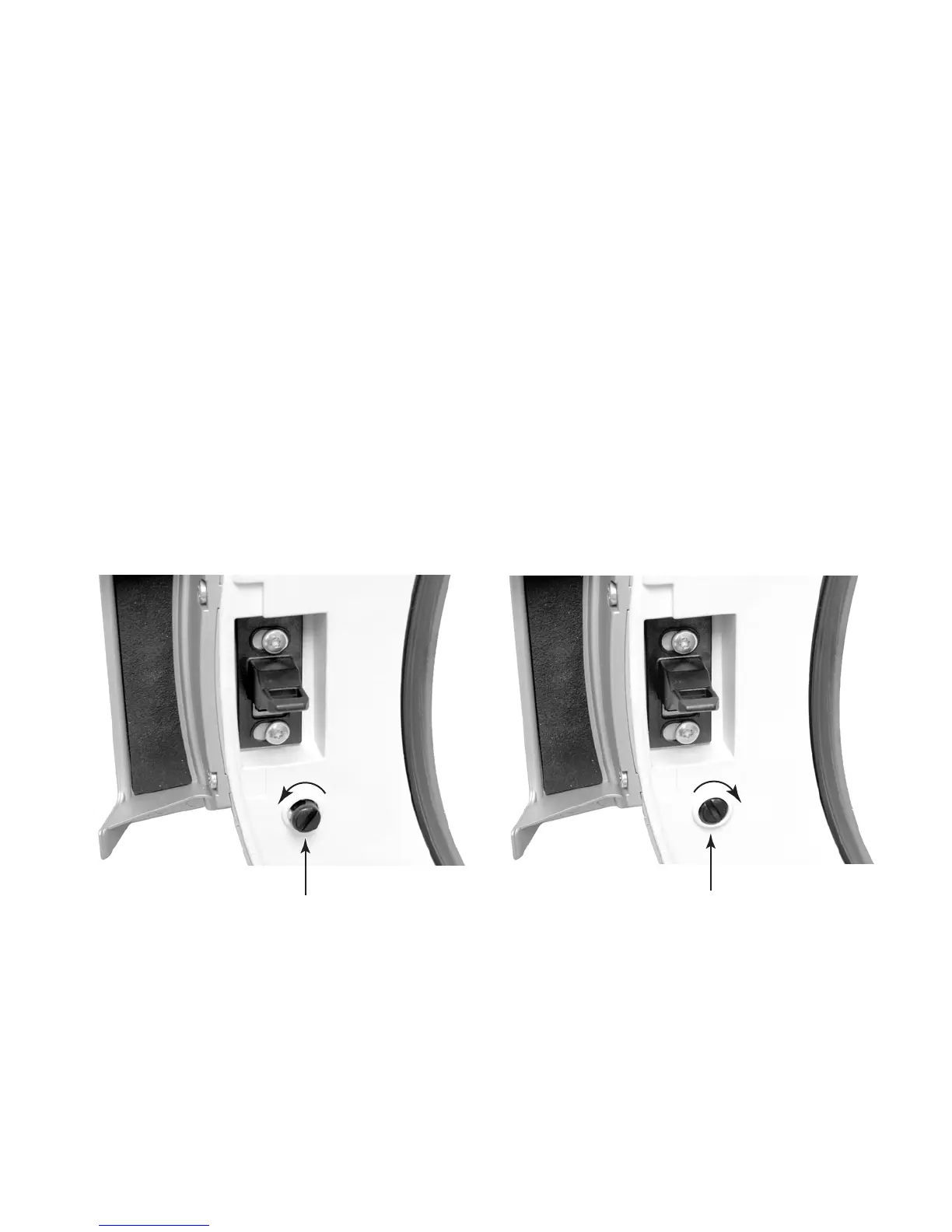
A manual door plunger (child safety device) is
available to prevent door closure. When the
plunger is in the OUT position, it prevents the
door from latching.
4. Located on the bottom of the door latch
assembly is a teardrop shaped tab. Gently
pull the tab down approximately 1/4″, or
until a click is heard.
5. The door may now be manually opened.
DOOR PLUNGER
To activate the child lock feature, insert a coin
in the plunger slot, and rotate it counterclock-
wise until the button pops out (left photo). To
deactivate the child lock feature, press the
button in, and rotate the coin clockwise until it
locks (right photo).
Child Lock Activated (Button Out)
Child Lock Deactivated (Button In)




 To Next Page