4-16
REMOVING THE TEMPERATURE SENSOR
& THE HEATING ELEMENT
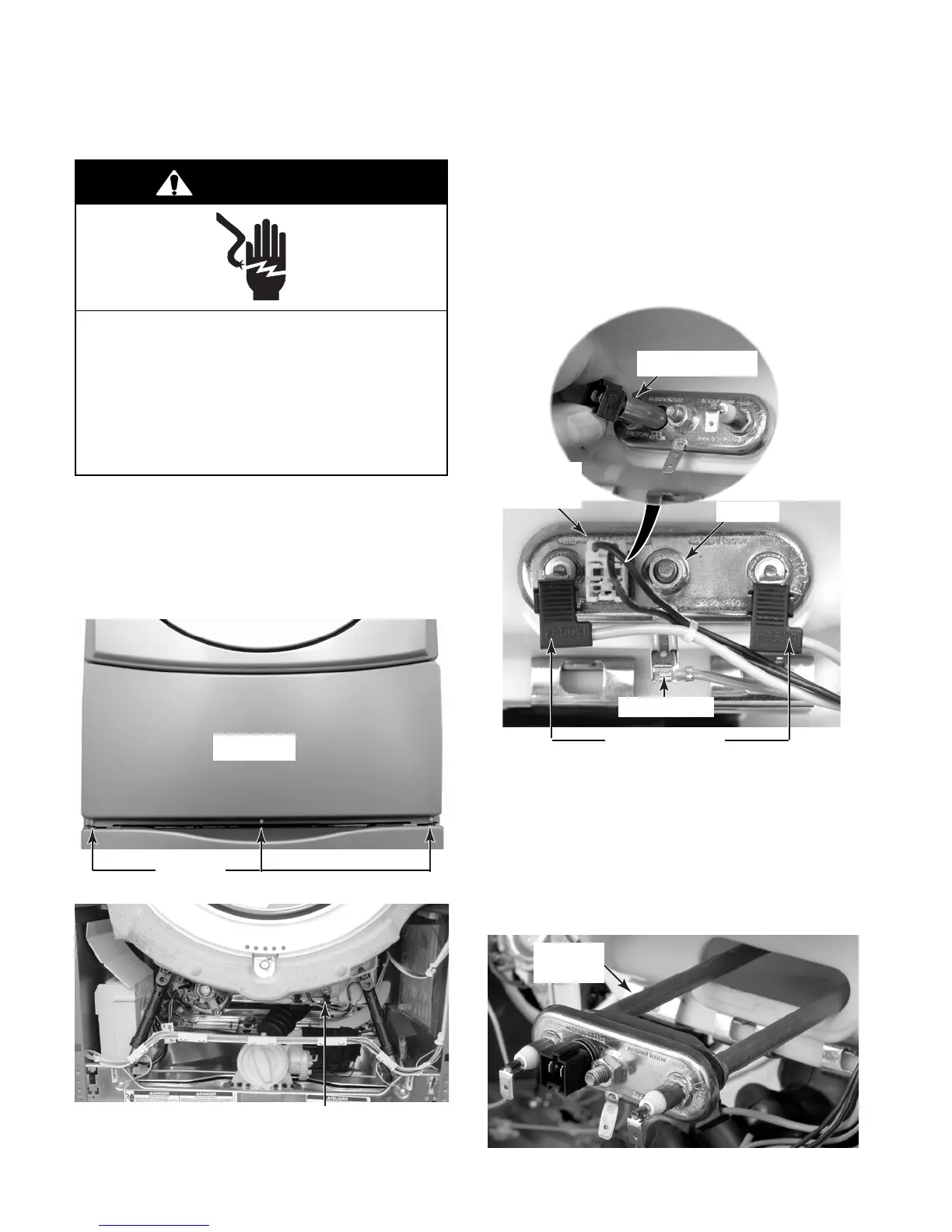
1. Unplug washer or disconnect power.
2. Turn off the water supply to the washer.
3. Remove the three T-20 hex-head torx
screws from the toe panel and remove the
panel.
Heating Element & Temperature Sensor
4. Use a 13/32″ (10 mm) socket and loosen
the hex nut on the heating element bracket.
5. To remove the temperature sensor:
a) Disconnect the sensor connector.
b) Pull the sensor out of the heating ele-
ment bracket hole.
Element Wires
Ground Wire
Electrical Shock Hazard
Disconnect power before servicing.
Replace all parts and panels before
operating.
Failure to do so can result in death or
electrical shock.
WARNING
6. To remove the heating element:
a) Remove the temperature sensor (see
step 5).
b) Disconnect the element wires and the
green ground wire from the terminals.
c) Pull the heating element and tempera-
ture sensor out of the tub.
Hex Nut
Sensor
Connector
Pull Out Sensor
Heating
Element
Toe Panel
Screws




 To Next Page