25
6th Sensor
Settings
Manual
Sensor assisted cooking
6th Sensor Reheat
6th Sensor Crisp
6th Sensor Steam
For reheating readymade food
CONTROL
Automatic
6th Sensor Reheat
6
TH
SENSOR REHEAT
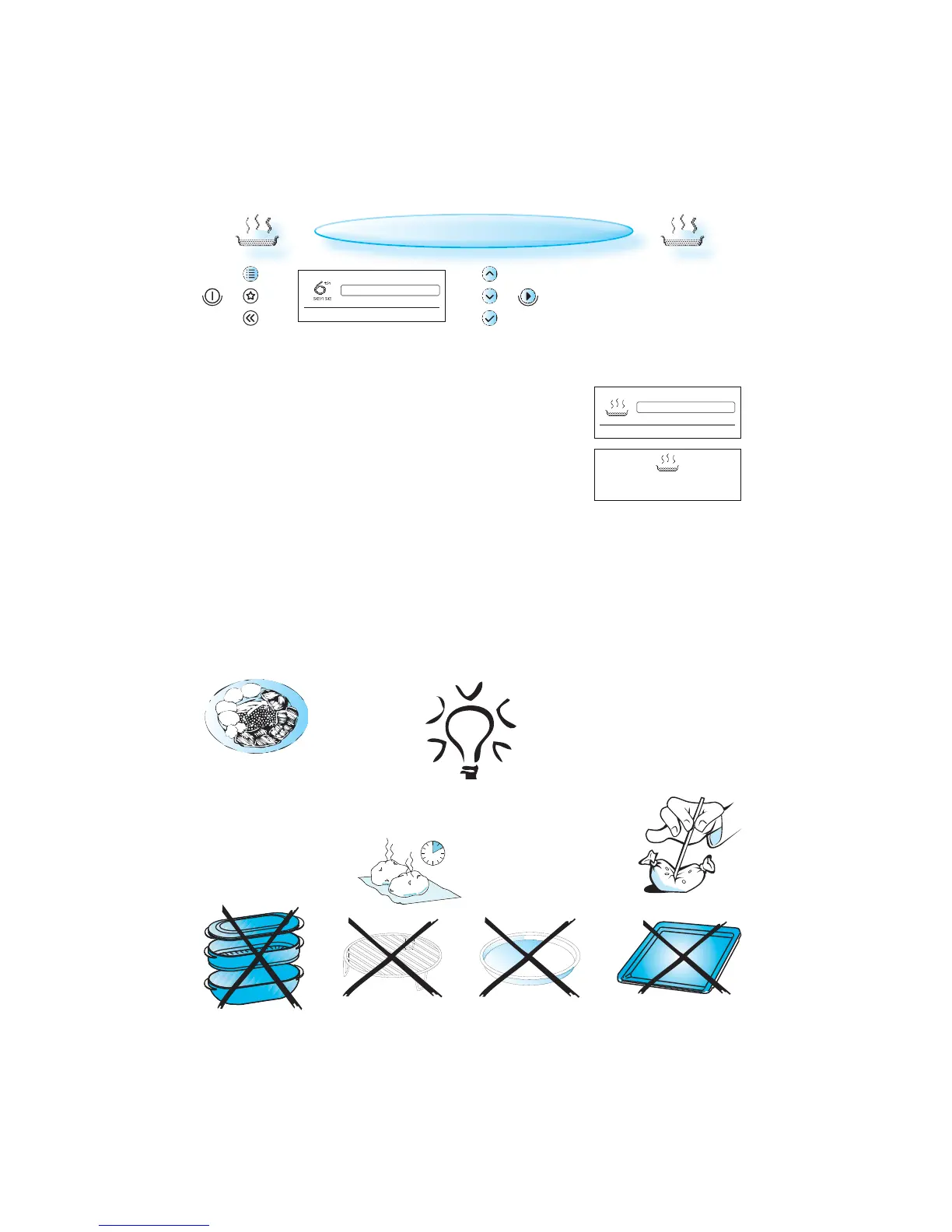
PRESS THE MENU BUTTON.
USE THE UP / DOWN BUTTONS until 6th Sensor is shown.
PRESS THE OK BUTTON to confirm your selection.
USE THE UP / DOWN BUTTONS until 6th Sensor Reheat is shown.
PRESS THE OK BUTTON to confirm your selection.
PRESS THE START BUTTON.
U
SE THIS FUNCTION when reheating
ready-made food either frozen,
chilled or room tempered.
PLACE FOOD onto a microwave-safe
heat proof dinner plate or dish.
W
HEN YOU ARE SAVING a meal in the refrigerator
or ”plating” a meal for reheating, arrange the
thicker, denser food to the out-
side of the plate and
the thinner or less
dense food in the
middle.
ALWAYS COVER FOOD when using this function.
IF THE FOOD IS PACKAGED in such way that it al-
ready have a cover, the package should be
cut with 2-3 scores to allow for excess
pressure to escape during reheating.
P
LACE THIN SLICES of meat on top of each
other or interlace them.
THICKER SLICES such as meat loaf and sausages
have to be placed close to each other.
P
LASTIC FOIL should be scored or
pricked with a fork, to relieve
the pressure and to prevent
bursting, as steam builds-up
during cooking.
1-2
MINUTES STANDING TIME ALWAYS
IMPROVES the result, especially
for frozen food.
THE PROGRAM SHOULD NOT be interrupted.
THE NET WEIGHT shall be kept within 250 - 600 g when using this func-
tion. If not you should consider using the manual function to obtain
the best result.
ENSURE the oven is at room temperature before using this function
in order to obtain the best result.



 To Next Page