10
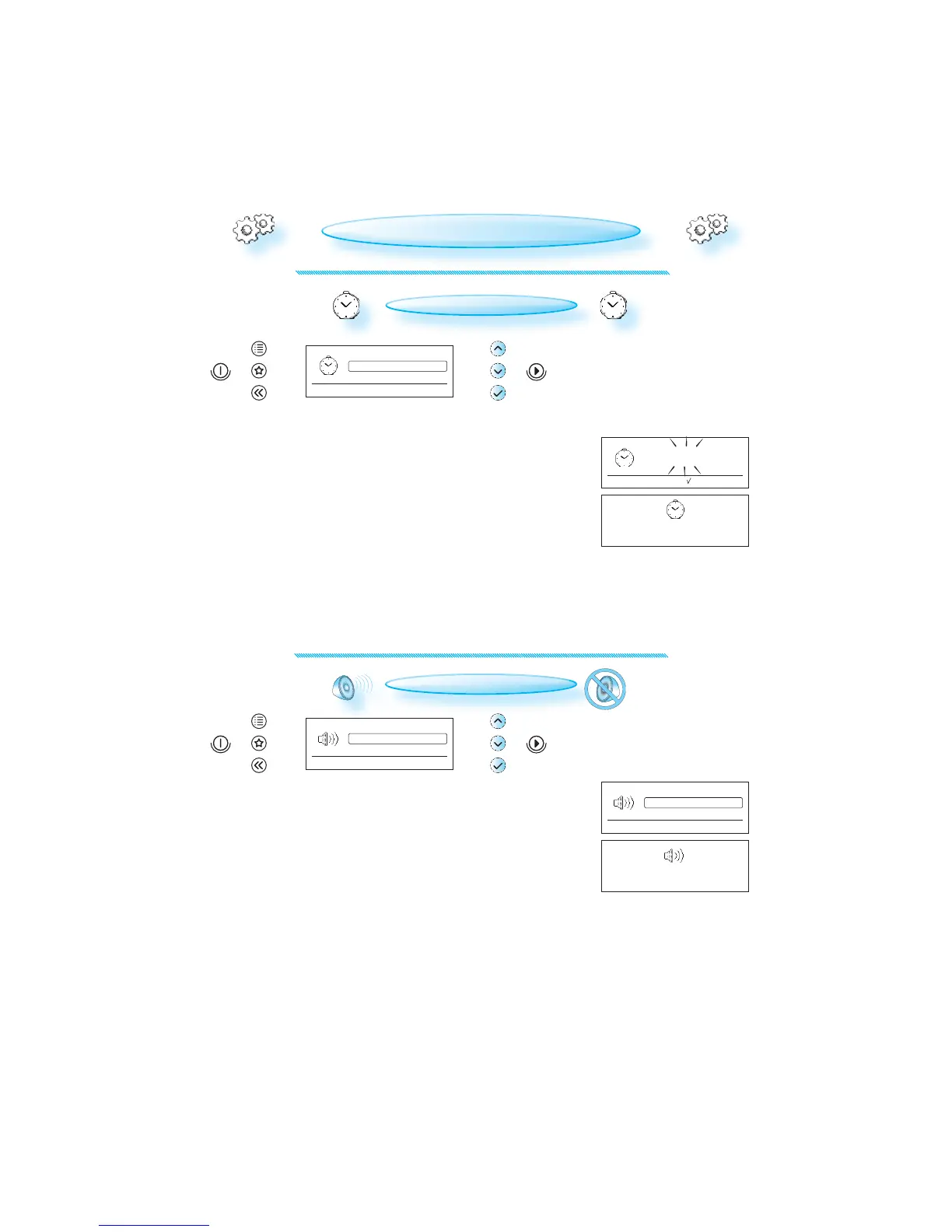
Time
Volume
Language
Appliance and display settings
Volume
Brightness
Time
Appliance and display settings
Press to set time, to confirm
^
^
00 : 00
(HH) (MM)
Time
has been set
Low
High
For normal living conditions
Medium
Volume
has been set
CLOCK SETTING
PRESS THE OK BUTTON . (The left right hand digits (hours) flicker).
USE THE UP / DOWN BUTTONS to set the 24 hour clock.
PRESS THE OK BUTTON again to confirm the change.
T
HE CLOCK IS SET AND IN OPERATION.
CHANGING SETTINGS
SOUND SETTING
PRESS THE OK BUTTON .
USE THE UP / DOWN BUTTONS to set the volume on high, medium,
low or mute.
PRESS THE OK BUTTON again to confirm the change.



 To Next Page