4-17
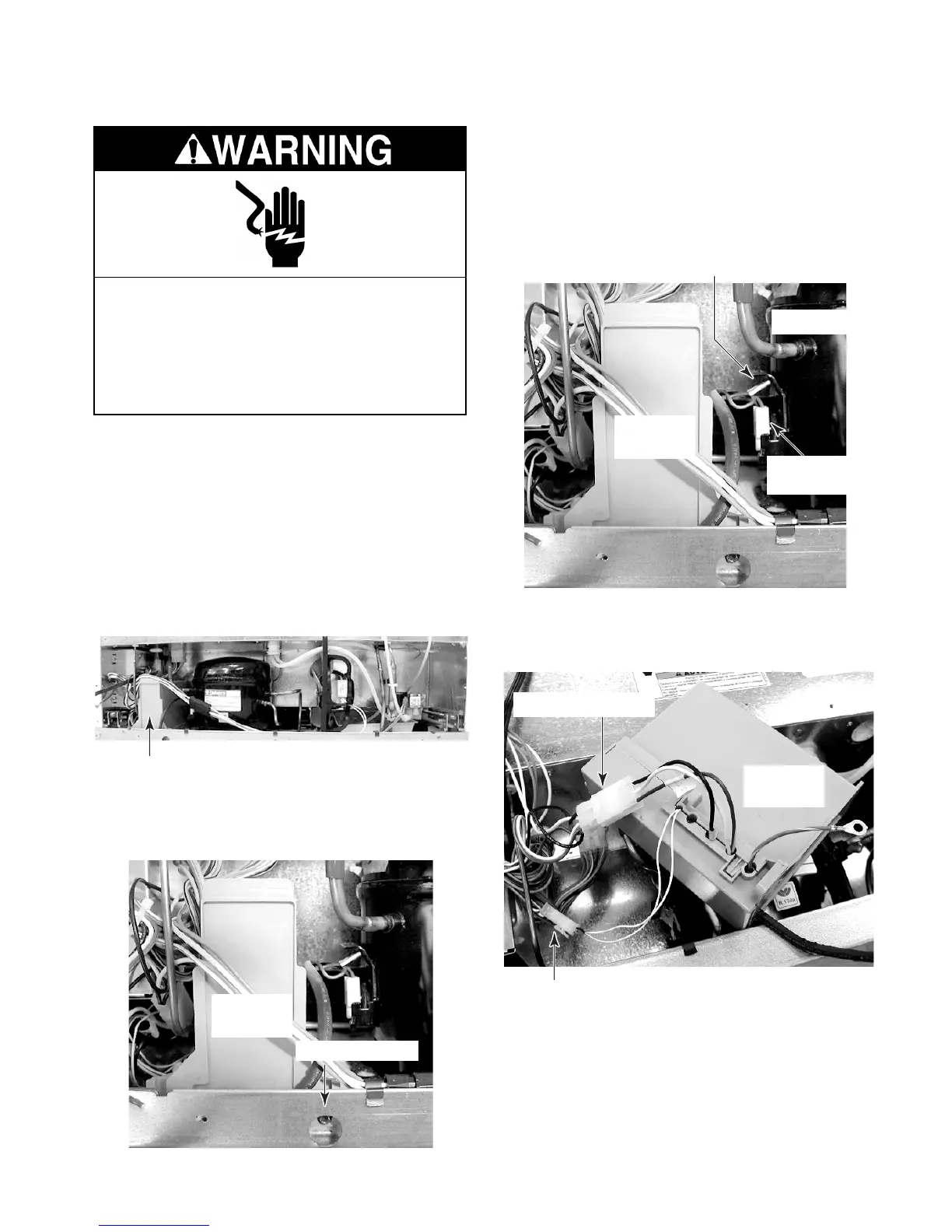
REMOVING THE INVERTER ASSEMBLY
NOTE: Sharp edges may be present.
1. Unplug the refrigerator or disconnect the
power.
2. Pull the refrigerator out of its mounting
location.
3. At the rear of the unit, remove the hex-
head screws from the unit compartment
cover and remove the cover.
Electrical Shock Hazard
Disconnect power before servicing.
Replace all panels before operating.
Failure to do so can result in death or
electrical shock.
Inverter Assembly
7. Disconnect the 3-wire and 2-wire connec-
tors from the inverter.
Green Ground Wire
Inverter
Assembly
Inverter
Connector
Compressor
3-Wire Connector
2-Wire Connector
Inverter
Assembly
5. Remove the compressor terminal cover
(see step 5 on page 4-16 for the proce-
dure).
6. Disconnect the inverter output 3-wire con-
nector and ground wire from the compres-
sor.
4. Remove the hex-head mounting screw
from the inverter assembly and lift the
assembly out of the unit.
Inverter
Assembly
Mounting Screw



 To Next Page