4
www.kitronik.co.uk
11
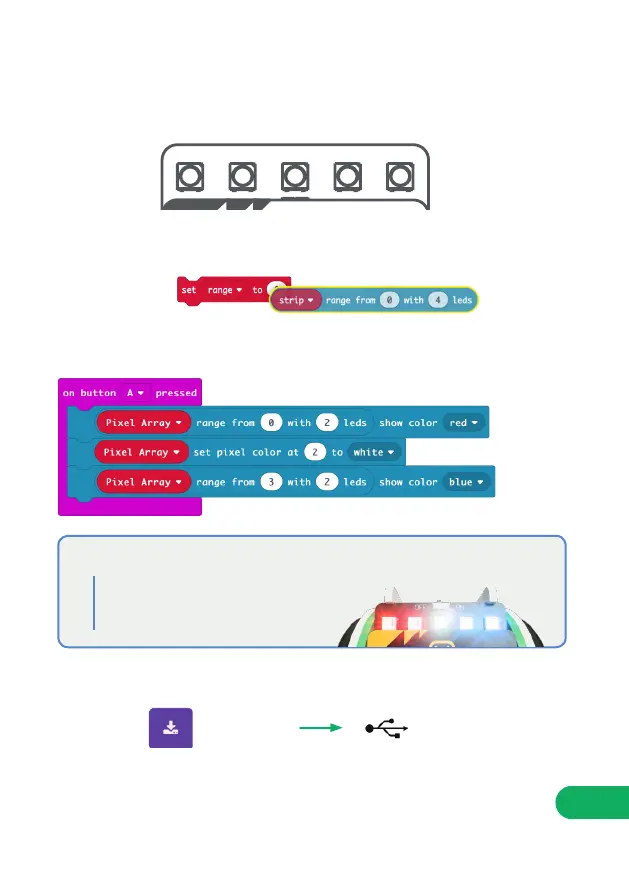
As well as addressing all the pixels at once it is possible to set them
individually, or as a group. The first pixel always has an address of 0 (see
diagram below).
STEP 12: Change the code under ‘On button A pressed’ to the following.
REMEMBER: To show a change you must use a block with ‘show’ in it.
UploadDownload
NOTE: To get the ‘range from’ blocks, you may need to disassemble the ‘set
range’ block.
You may also need to click on ‘More’ under the ‘neopixel’ toolset to access
the ‘set pixel colour at’ block.
0 1 2 3 4
STEP 13:
STEP 14: Press A and watch the lights!
Set the first two pixels to red,
the middle pixel to white and
the last two to blue.
WHAT THIS MEANS


 To Next Page