35
ۣૐ ۞ইૐҴૐ ೠҴসӏѺ ಿ҃మ
d. Afteradjustingdesiredtemperature,
if‘DialButton’ispressed,thecurrent
temperaturesettingwillbestored.
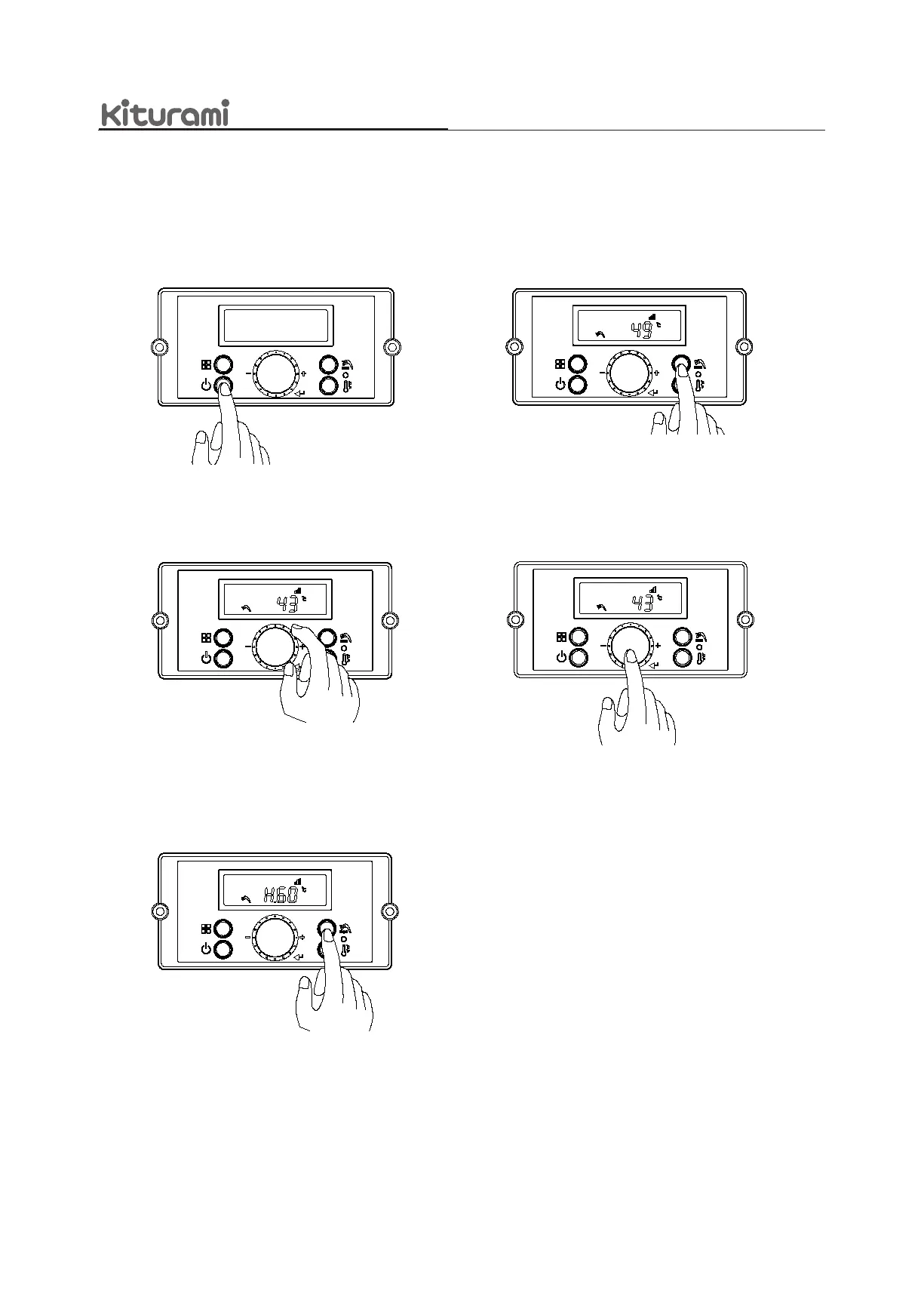
a. Pressthe‘PowerButton’ON.
b. Pressandholdthe‘DHWTemperatureSetting
Button’for5secondsforDomesticHot
Watertemperaturesetting.
8.2 Adjusting the Hot Water Temperature
e. IfwanttogethigherDHWtemperature
over50°C,pressandholdthe‘Temperature
SettingButton’againfor5seconds.
Afteradjustingdesiredtemperature,
if‘DialButton’ispressed,thecurrent
temperaturesettingwillbestored.
c. The‘DHWIcon’and‘currentDHWsetting
temperature’willbeblinking.DHWtemperature
settingcanbeadjustedbyturningthe‘Dial
Button’from
35°C~49°C in 0.5°C intervals.



 To Next Page