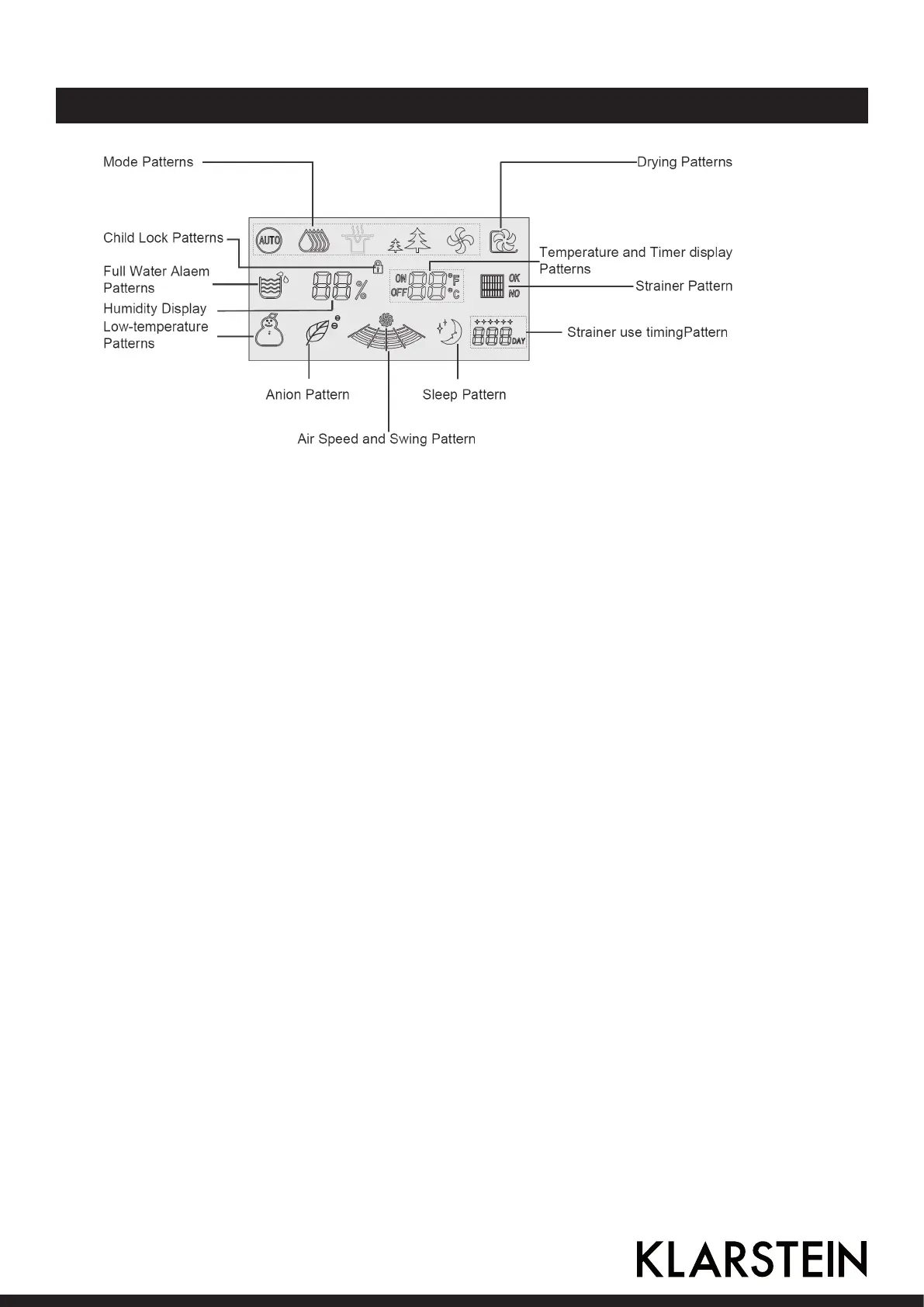
Display Screens
DRYING PATTERN:
ickers in internal drying mode.
CHILD LOCK PATTERN:
Press MODE for over 2s to start child lock function.
FULL WATER ALARM PATTERN:
Full water alarm status ickers with alarm sound.
HUMIDITY DISPLAY PATTERN:
Energization status, i.e. display relative ambient humidity.
LOW-TEMPERATURE PATTERN:
Display when ambient temperature is lower than 15°C, and ickers when ambient temperature is
lower than 2°C.
ANION PATTERN:
Starting state tree leaf displays, and upper icon ickers.
AIR SPEED AND SWING PATTERN:
Fast and slow rotation of air blades represents changes of air speed, and swing of vertical bars to
left/right means air swing.
SLEEP PATTERN:
Starting sleep state pattern displays, and upper icon ickers.
STRAINER USE TIMING PATTERN:
Strainer pattern: Temperature and timer pattern.
14 15



 To Next Page