Installation
The optimal temperature range for use is 16-32°C, and relative humidity is 30-85%. If ambient
temperature is lower than 5°C, both temperature and humidity are lower. When weather is dry the
dehumidier is forced and cannot dehumidify, and low-temperature icon (snowman) ickers. When
ambient temperature is 5-15°C, although temperature is low, too, dehumidication can be perfor-
med, but low-temperature icon displays constantly, so no dehumidication is suggested.
• This dehumidier has air purication function,
which enables you to obtain freshness beyond
eight hours.
• Maintaining and mildew proof function, the de-
humidier under the condition of no use for long
time can start internal drying function to blow
heat exchanger dry in favor of maintenance and
mildew resistance
• Before running please pour o water in tank.
During running please do not open windows and
doors as much as possible so as to save energy.
• During use of this dehumidier if big noise is
found, it is suggested to insert cushions or dam-
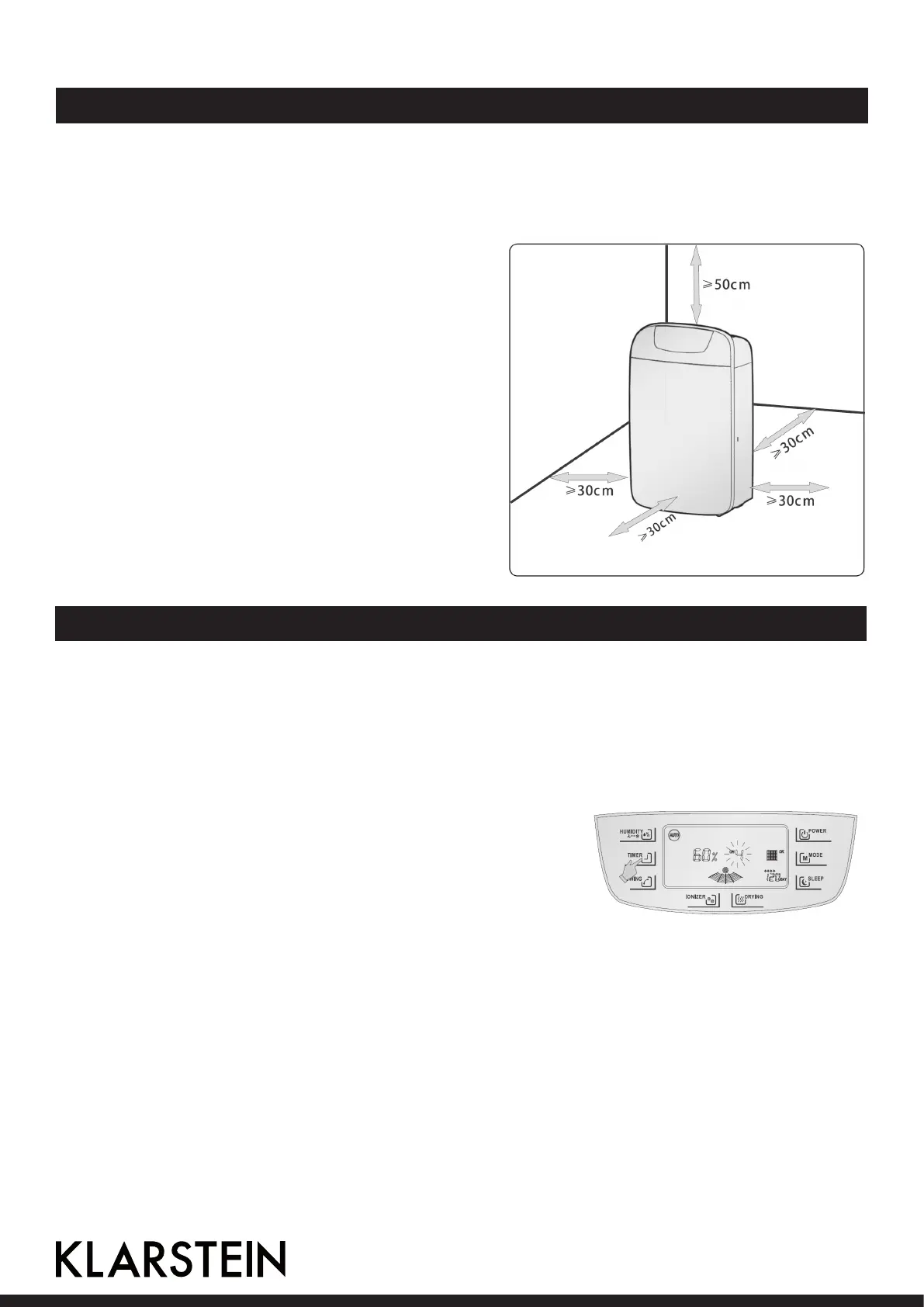
ping rubber plates or carpet. When installing the
dehumidier, see to leave a certain space around
the dehumidier, specically over 50cm on the
top and over 30cm in front, back, left and right
directions, as shown in the picture.
Use and Functions
Getting Started
Press POWER, the dehumidier starts operation. This dehumidier is complete with power-down
memory function. On the condition of direct interruption of power without shutdown, the dehumidi-
er automatically operates in the state before interruption after reenergization.
Setup of Startup at Fixed Time
In standby state touch TIMER slightly, 88 on LCD will icker,
and slightly touch TIMER to adjust time, every one touch
increases one hour (press and hold TIMER to increase time
continuously). After over 24 hours numeral returns to 1 for
circulation, after the set time expires, the dehumidier auto-
matically starts. During timing if time is to be changed, touch
TIMER again to cancel timing and set up once more.
Timing Shutdown
During operation of the dehumidier, slightly touch TIMER, 88 on LCD will icker for 5 times for
conrmation, at the moment touch TIMER to adjust the set time as required, and the method is the
same as that for startup.
16



 To Next Page