19
EN
CONTROL PANEL, INDICATORS AND BUTTONS
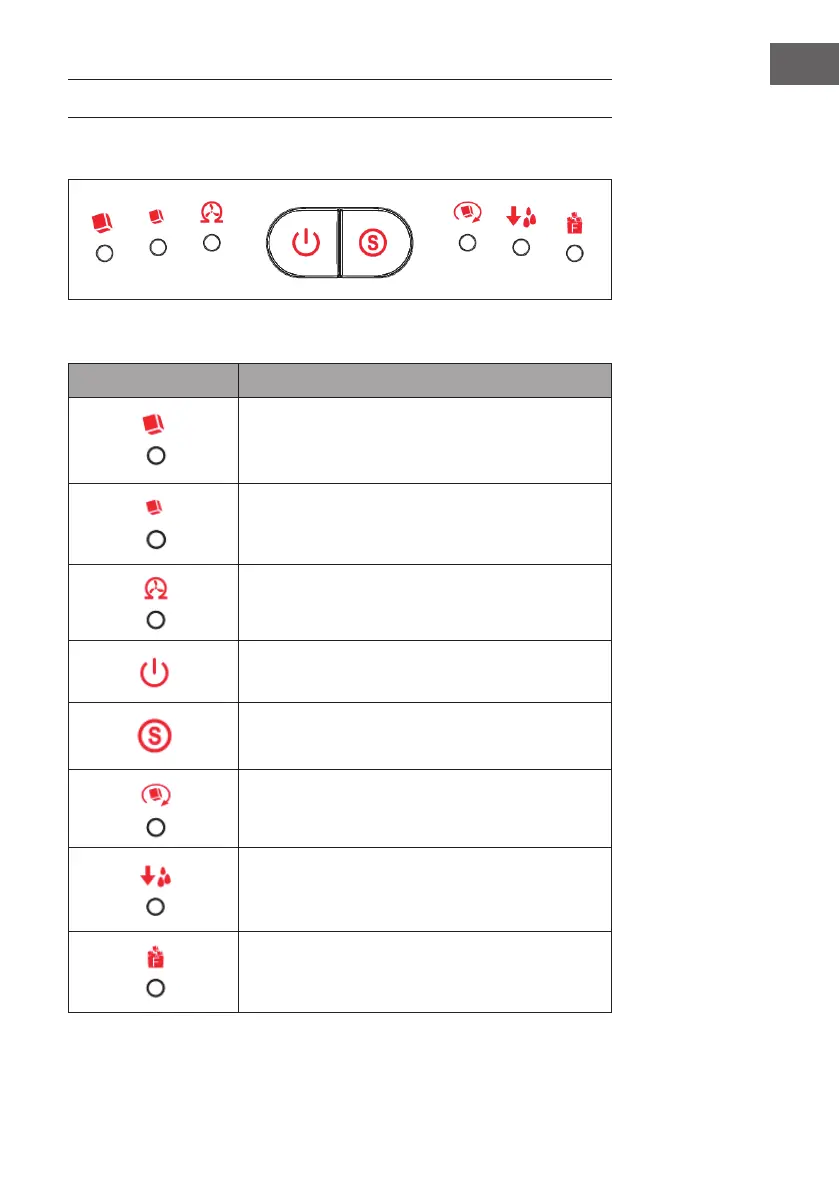
Control Panel
Indicators and Button Functions
Indicators and Buttons Functions
Large ice cubes (indicator):
The indicator lights in green when you select large ice.
Small ice cubes (indicator):
The indicator lights in green when you select small ice.
Cleaning (indicator):
The indicator lights in green when the appliance needs
to be cleaned.
Start/Stop (button):
Start or stop the appliance.
Size selection (button):
Select the desired ice cube size (large or small).
Ice making (indicator):
The indicator lights in green when making ice.
Water reservoir empty (indicator):
The indicator lights in red when there is a lack of water
in the water reservoir.
Ice basket full (indicator):
The indicator lights in red when the ice basket is full.



 To Next Page