24
EN
TROUBLESHOOTING
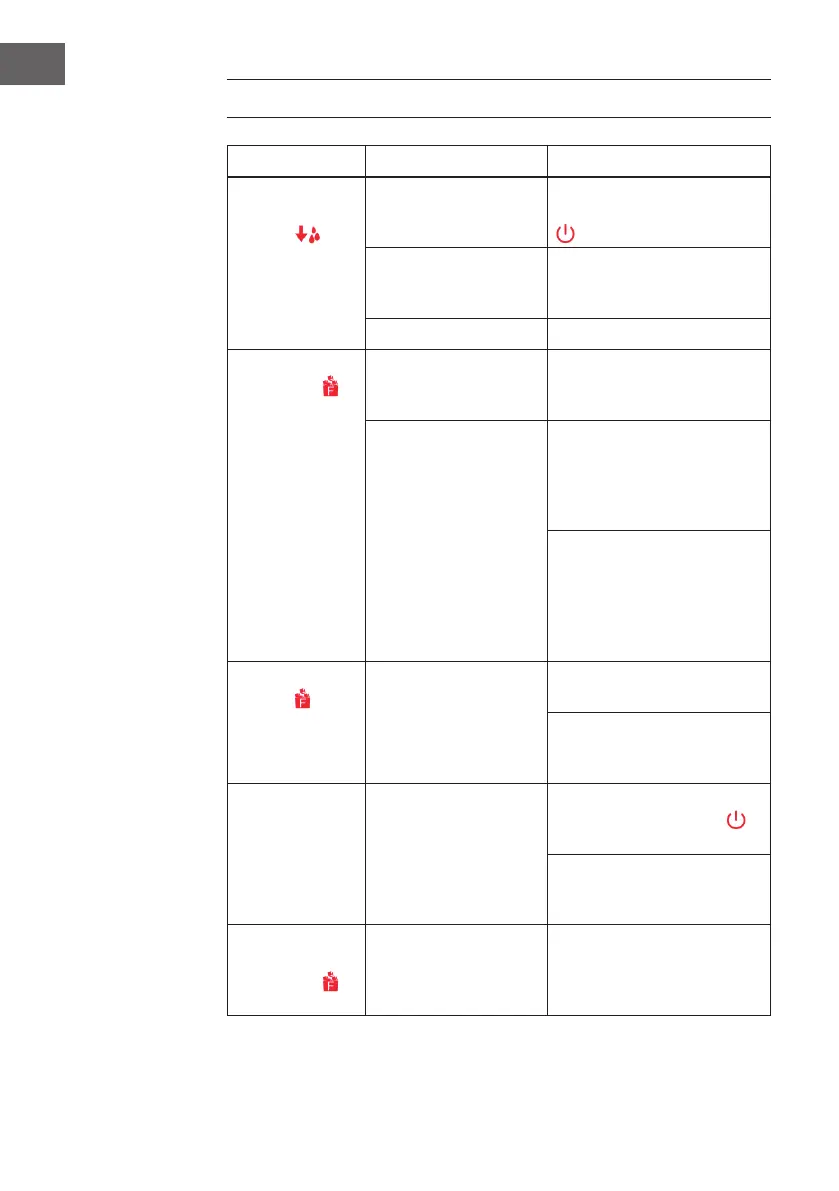
Problem Possible Cause Solution
The “Water
reservoir empty”
indicator
turns
on.
Low water level or lack of
water.
Stop making ice, rell water and
then press the Start/Stop button
.
The water screen at the
bottom of the water
reservoir is blocked.
Clean the appliance.
Pump malfunction. Contact customer service.
The “Ice basket
full” indicator
lights up.
The Ice basket is full
and the infrared light is
blocked by the ice.
Remove the ice from the ice
basket.
The infrared light emitting
diode and the infrared
light receiving diode do
not work.
Wipe up the foreign objects on
the infrared light emitting diode
and the infrared light receiving
diode and restart the ice cube
maker.
Contact customer service if the
infrared light emitting diode and
the infrared light receiving diode
still do not work after wiping up
the foreign objects on them and
restarting the ice cube maker.
The “Ice basket full”
indicator
blinks.
The ice shovel is blocked. Remove the ice that is blocking
the ice shovel.
Contact customer service if no ice
is blocking the ice shovel and the
indicator blinks.
The ice cube maker
stops working.
The ice tray is not in the
right position.
Remove the ice in the ice tray and
press the Start/Stop button
to
restart the appliance.
Contact customer service if the
appliance still does not work
after restart.
The ice basket is full
but the “Ice basket
full” indicator
does not illuminate.
The “ice full” condition
can not be detected as
the infrared light module is
interfered by the sunlight.
Unplug the appliance and move
it to a place which is not exposed
to the sunlight, then plug the
appliance and activate it again.



 To Next Page