28
EN
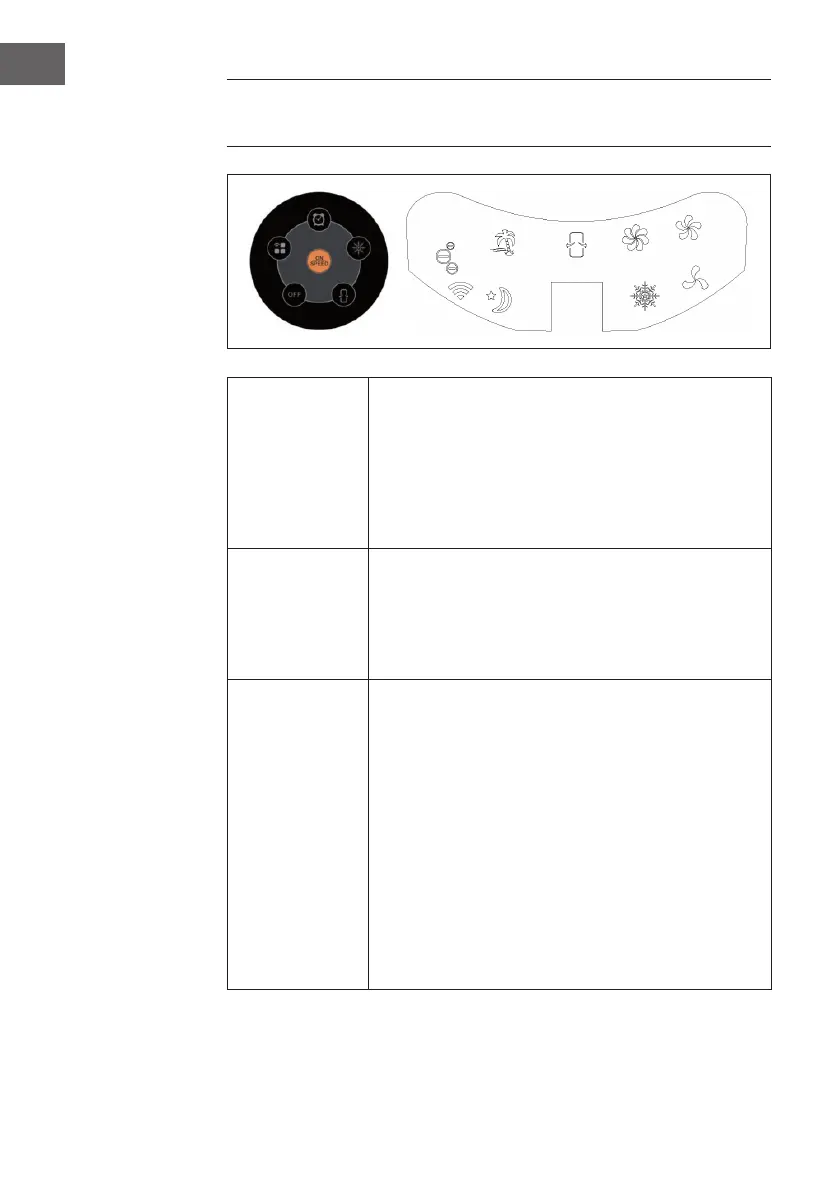
BUTTON FUNCTIONS AND DISPLAY
INDICATORS ON THE APPLIANCE
ON/SPEED &
OFF
After the tank is lled with water, connect the tower
evaporative cooler to a power outlet. The unit will beep twice,
indicating that the cooler is in standby mode at this time. Press
the ON/SPEED button to turn on the tower evaporative cooler.
To adjust the fan speed, press the ON/SPEED button again
until your desired speed has been reached. To turn the tower
evaporative cooler off and revert back to standby mode, press
the OFF button.
COOLER/
HUMIDIFYER
After the desired fan speed has been selected, press the
COOLER/HUMIDIFIER button to activate the cooling/
humidifying function. This powers the water pump, cools
the air and adds moisture to your air at the same time. The
snowake icon will also be visible on the display panel once
the cooling/humidifying function has been selected.
MODE
Setting the airow mode is optional. To set the airow mode,
press the MODE button.
• Manual Mode: Indicated by the three circular icons on
the display panel, this allows you to set the fan speeds
manually.
• Sleep Mode: Indicated by the moon icon on the display
panel, this setting will gradually lower the fan speed
at different intervals. If the fan speed is set to high, the
cooler will run for 30 minutes on high speed, 30 minutes
on medium speed and then continue to operate on low
speed.
• Natural Mode – Indicated by the palm tree icon on the
display panel, this setting will adjust the airow speed
between low, medium and high.






 To Next Page