35
EN
CLEANING AND MAINTENANCE
• Regular cleaning and maintenance is important to increase the life of the appliance.
• Switch off the appliance and always unplug the appliance before cleaning it.
Cleaning the appliance
Clean the surface of the appliance with a damp cloth. Do not use abrasive cleaners or
harsh detergents and solvents.
Cleaning the water tank
• Pull out the water tank as described in the instructions.
• Clean it with a damp cloth and washing-up liquid and remove any deposits.
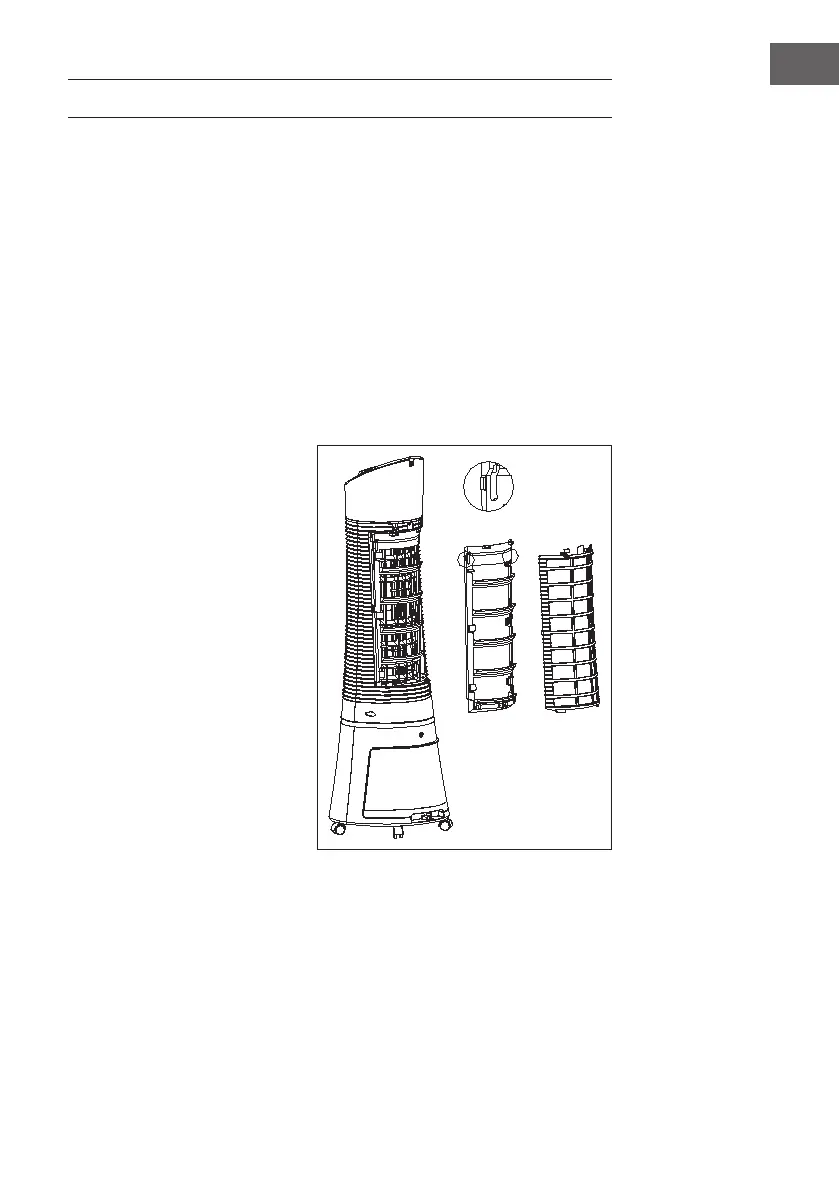
Cleaning the dustproof lter and the Cooler Master lter
To avoid overloading the dust
protection lter, clean the lter at
least once a month.
1. Remove the dustproof lter and
turn the cooling pad knob as
shown in the illustration.
2. Clean the dustproof lter with a
detergent or a soft brush.
3. Switch off the appliance, clean
the cooling pad in detergent
water, then rinse it with water
and let it dry.
Install lters
1. Reinstall the lters in the following order, one after the other: Water tank,
CoolerMaster and dustproof lter.
2. Connect the appliance to make sure it is working.
3. Check that the dustproof lter is correctly installed.






 To Next Page