9
OPERATING INSTRUCTIONS
OPTIONS
Press and hold the Functions / Options Button
6
for 1 second to
enter the Options menu. Press the Up/+
7
and Down/-
8
Buttons
to scroll through the different options. Press the Laser / Power-ON
Button
1
to select. Press the Clear/Power-OFF Button
5
to go back:
Reference: Change the reference point to the top surface, tripod mount
position, or bottom surface of the unit.
NOTE: Remove unit from case
for tripod mounting or when referencing from bottom sruface.
Sound: Turn the sound on or off.
Memory: Press the Up/+
7
and Down/-
8
Buttons
to scroll through the last 30 measurements.
Units:
Select Feet + Inches (fractional),
Feet (decimal), Inches (fractional), or Meters.
Rounding:
When Units are set to Feet + Inches,
select the fraction to which each measurement will
be rounded: 1/16", 1/8", 1/4", or 1/2".
FUNCTIONS:
Press the Functions / Options Button
6
once to select a function, then press the Up/+
7
and Down/-
8
Buttons to scroll through the
different functions. Press the Laser / Power-ON
Button
1
or the Functions / Options Button
6
to select. Press the Clear/Power OFF Button
5
to
go back.
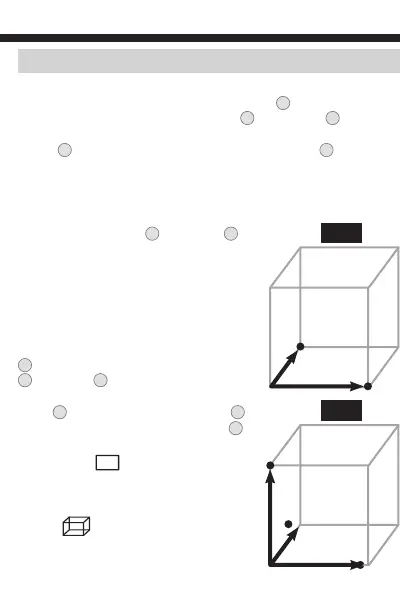
Area (FIG. 1) : Measure the desired
length, then the desired width. Perimeter
will be displayed on Line 3, Area will be
displayed on line 4.
Volume (FIG. 2): Measure the desired
length, width, then height.
a
b
FIG. 1
a
c
FIG. 2
b






 To Next Page