8
MAINTENANCE
BATTERY REPLACEMENT
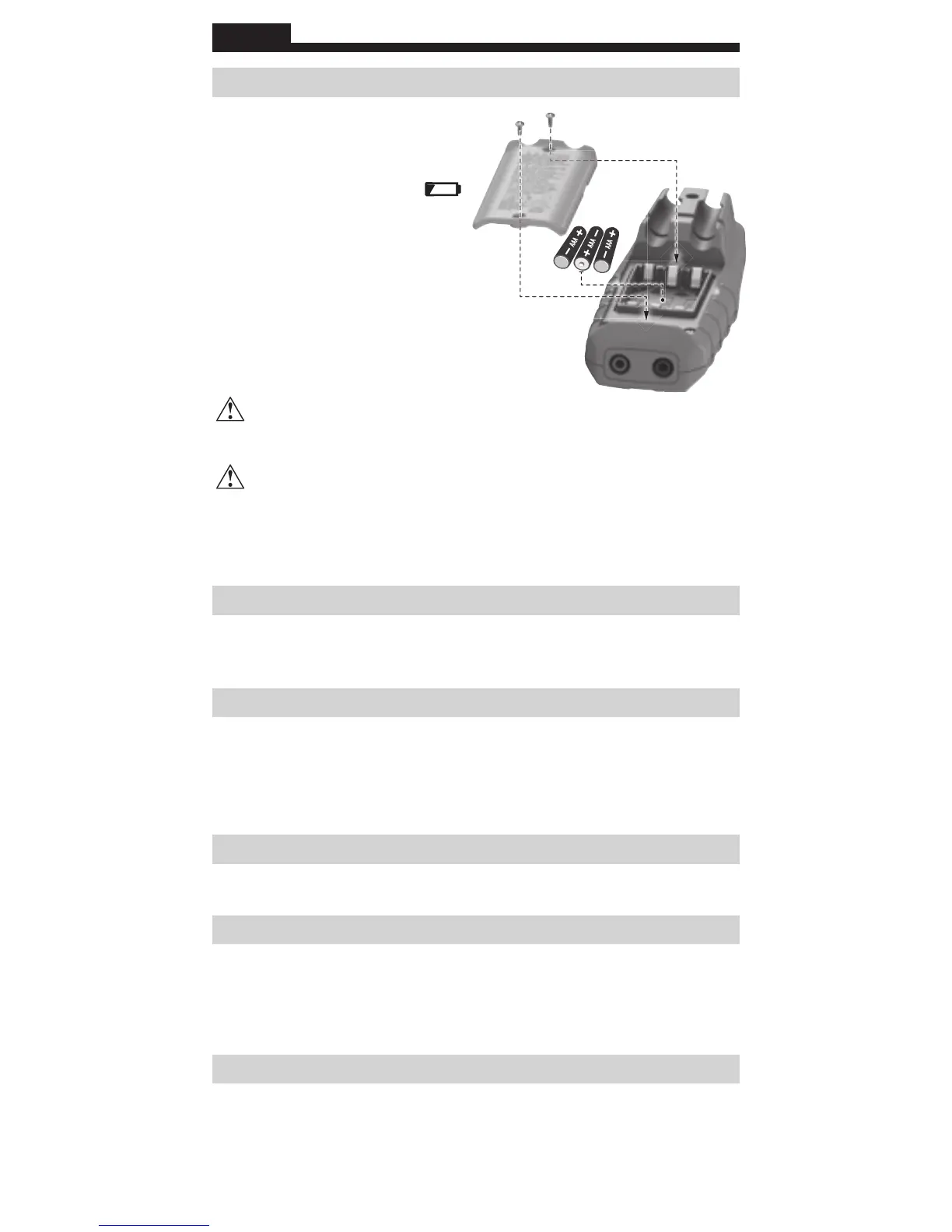
When the Low Battery indicator
shows low battery strength ( ),
batteries must be replaced.
1. Remove 2 screws from
battery door.
2. Replace 3 x 1.5V AAA batteries
(note proper polarity).
3. Replace battery door and
fasten securely with screws.
T
o avoid risk of electric shock, disconnect leads from any voltage
source before removing battery door.
To avoid risk of electric shock, do not operate tester while
battery door is removed.
NOTE: There are no user-serviceable parts inside tester.
CLEANING
Disconnect test leads. Clean the instrument by using a damp cloth.
Do not use abrasive cleaners or solvents.
STORAGE
Do not expose to high temperatures or humidity. After a period of
storage in extreme conditions exceeding the limits mentioned in
the General Specifications section, allow the instrument to return to
normal operating conditions before use.
WARRANTY
www.kleintools.com/warranty
DISPOSAL / RECYCLE
Do not place equipment and its accessories in the trash. Items must
be properly disposed of in accordance with local regulations. Please
see www.epa.gov or www.erecycle.org for additional information.
CUSTOMER SERVICE
KLEIN TOOLS, INC.
450 Bond Street Lincolnshire, IL 60069
1-877-775-5346
customerservice@kleintools.com
www.kleintools.com
ENGLISH




 To Next Page