6 FPGA configuration using Quartus-II JTAG support (Pluto-II/-3)
6.1 JTAG requirements
To use the JTAG port, you need a compatible JTAG cable (like an Altera ByteBlaster-MV/II or USB-Blaster) connected to
your board's JTAG connector (chapter 10).
6.2 JTAG configuration
Follow these steps:
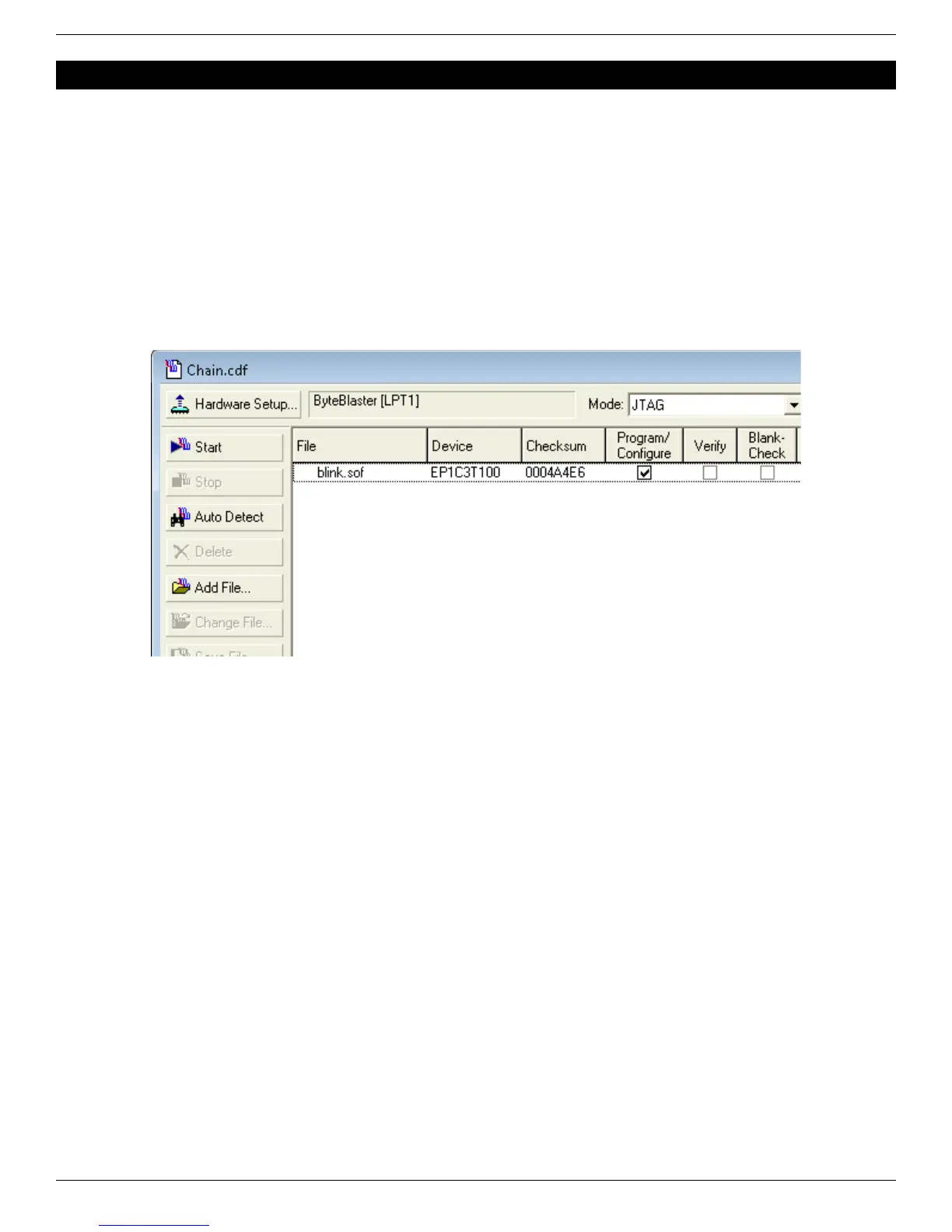
● In Quartus-II, open the “Programmer” window (Menu → Tools → Programmer)
● Click on the “Hardware Setup” button and select the JTAG cable you’re using.
● Select “JTAG” in the “Mode” drop-down list.
● Load the “.sof” file.
● Check the “Program/Configure” check-box and click “Start”.
Note how JTAG configuration is accomplished through the Quartus-II software using SOF files instead of RBF files. Both
files are generated by Quartus-II – more details in paragraph 7.2.
The boot-PROM can also be programmed using JTAG, check chapter 13 for more information.
FPGA RS-232 development boards Page 10


 To Next Page