KDC270/280
Quick Guide
See Reference Manual for more detailed information
Visit store.koamtac.com to purchase additional products and accessories.
QG_KDC270_KDC280_20201014 p7
Usage
3.1 Using Keyboard Wedge (HID Keyboard)
This option is only available using Bluetooth connection with HID profile.
Once the KDC is paired with the host, open any application with a text field and tap on the text field. Scan any
barcode and it will populate in the text field.
3.2 Using KTSync – Android/iOS
You can use KTSync to utilize your KDC alone or with a native application. This is only available using
Bluetooth connection with SPP or MFi.
a) Download and install KTSync from the Google Play Store or the Apple App Store
.
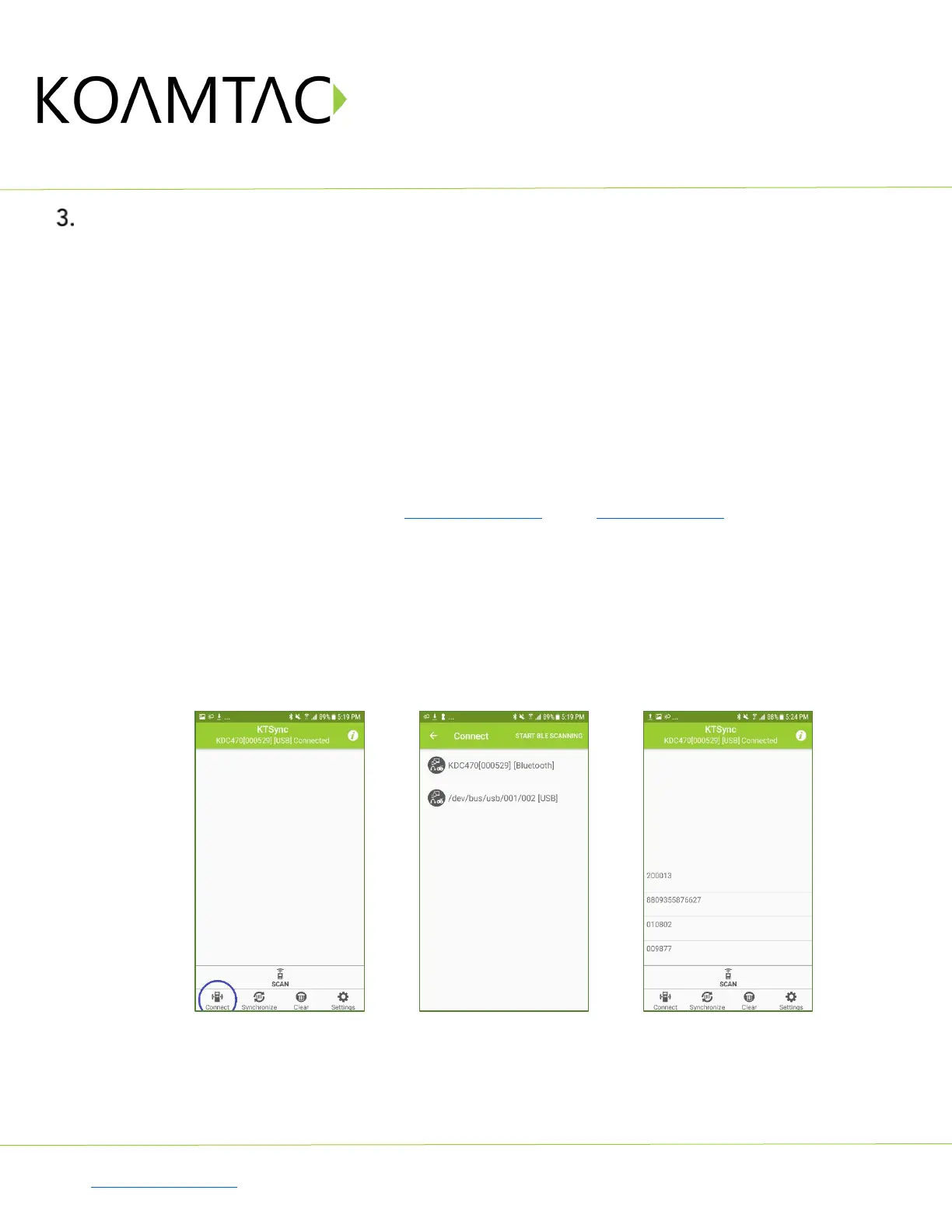
b) Open KTSync and tap on the “Connect” option on the bottom left to view a list of available devices.
(Fig. 1)
c) From the device list, select your KDC – ensuring that the serial number displayed in brackets matches
the serial number on the back of your KDC. (Fig. 2)
d) Upon successful connection, KTSync will display “Connected” next to the name of your KDC at the top
of the application. (Fig. 3)
e) To test your connection, scan any barcode. If the connection is successful, the barcode data will display
on the screen. (Fig. 3)
< Fig. 1 > < Fig. 2 > < Fig. 3 >



 To Next Page