KDC270/280
Quick Guide
See Reference Manual for more detailed information
Visit store.koamtac.com to purchase additional products and accessories.
QG_KDC270_KDC280_20201014 p8
3.3 Using KTSync Keyboard – Android
Once your KDC is connected to KTSync, you can use your KDC as a keyboard.
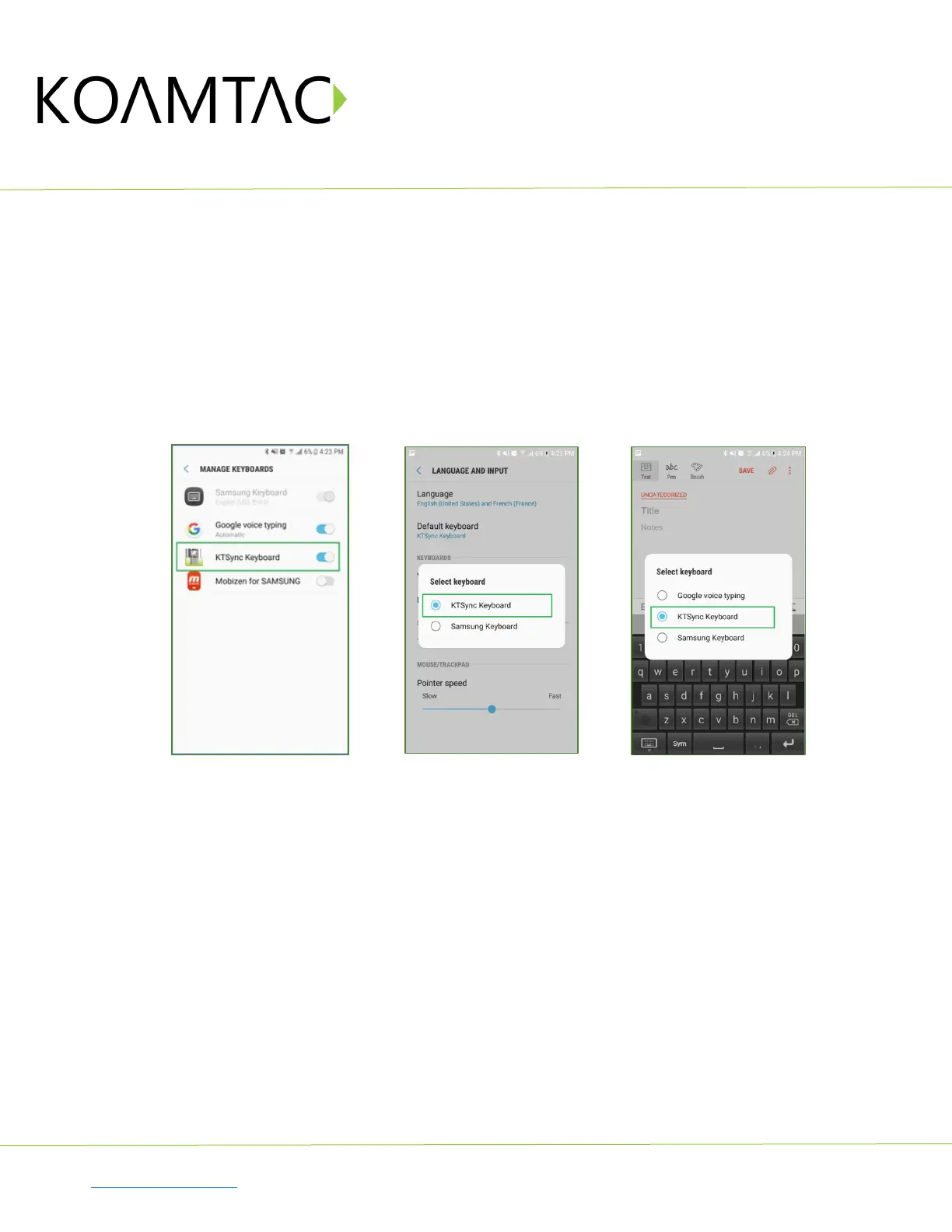
a) While KTSync is running in the background, navigate to Settings > Language & Input > Virtual
Keyboard > Manage keyboards
b) Tap on “KTSync Keyboard” to enable it.
c) Change “KTSync Keyboard” to the default keyboard. (Fig. 4)
To switch back to the previous keyboard, simply change the default keyboard again. Or, when a text field is
selected swipe down from the top of the screen to bring up the notification panel. Select ‘choose input
method’ and you can select the default keyboard from here. (Fig. 5)
< Fig. 4 > < Fig. 5 >



 To Next Page