EasyManua.ls Logo

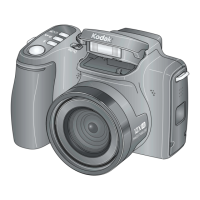
Kodak EasyShare Z712 IS - User Manual

Kodak EasyShare Z712 IS
75 pages
Print Icon
To Next Page IconTo Next Page
Loading...
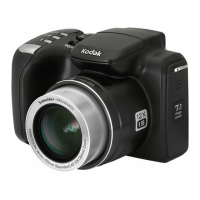
Kodak EasyShare Z712 IS
zoom digital camera
User’s guide
www.kodak.com
For interactive tutorials, www.kodak.com/go/howto
For help with your camera, www.kodak.com/go/z712support

Table of Contents

Other manuals for Kodak EasyShare Z712 IS

Questions and Answers

  • J
    Jeffrey CarsonJul 29, 2025
    What to do if my Kodak EasyShare Z712 IS Digital Camera memory card is not recognized?
    • C
      Cheryl JohnsonJul 29, 2025
      If your Kodak Digital Camera memory card is not recognized or the camera freezes with the card, the card may be corrupted. Try formatting the card in the camera. Alternatively, change the image storage location to internal memory.
  • S
    Steven BryantAug 3, 2025
    What to do if I cannot take a picture with my Kodak EasyShare Z712 IS Digital Camera?
    • C
      cwhiteheadAug 3, 2025
      If you can't take a picture with your Kodak Digital Camera, try the following: * Turn the camera off, then on again, ensuring it's not in Favorites mode. If prompted, set the language and date/time. * Press the Shutter button all the way down. * Insert a new or charged battery. * Wait until the AF/AE indicator turns green before taking another picture. * If the memory is full, transfer pictures to your computer, delete pictures, change the image storage location, or insert another card.
  • T
    Timothy WrightAug 8, 2025
    What to do if an error message appears on my Kodak Digital Camera EVF/LCD?
    • G
      grahamshannonAug 8, 2025
      If you see an error message on the EVF/LCD of your Kodak Digital Camera, here are some troubleshooting steps: * Follow the prompts on the EVF/LCD. * Remove the memory card from the camera. * Turn the camera off, then on again. * Remove the battery and wipe the contacts with a clean, dry cloth. * Insert a new or charged battery.
  • C
    crystalwalkerAug 13, 2025
    What to do if the storage location is almost or entirely full on Kodak EasyShare Z712 IS Digital Camera?
    • A
      Amber CunninghamAug 13, 2025
      If the storage on your Kodak Digital Camera is almost or entirely full: * Transfer pictures to your computer. * Delete pictures from the card or insert a new card. * Change the image storage location to internal memory.
  • C
    Claudia GouldAug 18, 2025
    Why doesn't the flash fire on my Kodak EasyShare Z712 IS?
    • J
      julia79Aug 18, 2025
      If the flash does not fire on your Kodak Digital Camera: * Open the flash unit. * Check the flash setting and change it as needed. * Note that the flash may not fire in all modes.
  • B
    bflynnAug 23, 2025
    How to fix picture orientation on Kodak EasyShare Z712 IS?
    • C
      Christopher McbrideAug 23, 2025
      To ensure accurate picture orientation on your Kodak Digital Camera, set the Orientation Sensor to ON.

Summary

Setting up your camera

Loading the battery

How to insert various types of batteries into the camera.

Turning on the camera

Steps to power on the digital camera for the first time.

Setting the language and date;time

Initial configuration of language and date/time settings.

Storing pictures on an SD or MMC card

Guide to using memory cards for picture storage.

Taking pictures;videos

Taking a picture

Basic procedure for capturing a still photograph with the camera.

Taking a video

Steps required to record video clips using the camera.

Working with pictures;videos

Deleting pictures and videos

Steps to remove unwanted photos and video clips.

Doing more with your camera

Capture modes

Overview of different shooting modes for various scenarios.

Using the Setup menu

Customizing camera settings for personalized operation.

P, A, S, and M modes

Detailed explanation of Program, Aperture, Shutter, and Manual modes.

Transferring and printing pictures

Installing the software

Guide to installing the Kodak EasyShare software on your computer.

Transferring pictures

Connecting the camera to a computer to move photos and videos.

Printing pictures

Various methods and options for printing captured images.

Troubleshooting

Camera problems

Solutions for common issues encountered with the camera's operation.

Computer;connectivity problems

Troubleshooting steps for connection issues between camera and computer.

Picture quality problems

Advice for resolving issues related to image clarity and appearance.

Appendix

Camera specifications

Detailed technical specifications of the Kodak EasyShare Z712 IS camera.

Important safety instructions

Crucial safety warnings and precautions for using the product.

Battery life

Information on battery types, expected life, and extending usage.

Limited warranty

Details regarding the product's warranty coverage and limitations.

Kodak EasyShare Z712 IS Specifications

General IconGeneral
Camera TypeCompact
Effective Pixels7.1 MP
Image Resolution3072 x 2304
Lens TypeSchneider-Kreuznach Variogon
Optical Zoom12x
Digital Zoom4x
Display Size2.5 inches
LCD Screen Resolution230, 000 pixels
Video Resolution640 x 480
Image Sensor1/2.5" CCD
Focal Length6.3 - 75.6 mm
Aperture Rangef/2.8 - f/4.8
ISO Sensitivity80, 100, 200, 400, 800, 1600, Auto
Storage MediaSD

Related product manuals