Need help?
Do you have a question about the Kodak Smile+ and is the answer not in the manual?
Overview of the user guide, product operation guidelines, and limited warranty information.
Details the function of the power, shutter, and reset buttons.
Covers the viewfinder, filter lens, printing slot, and strap loop.
Explains LED indicators, battery status light, and USB-C port.
Instructions for charging the device and preparing it for first use.
Step-by-step instructions for correctly inserting Zink photo paper.
Details the process of the first photo print and proper paper handling.
Information on using microSD cards for photo storage and transfer.
Guidelines for storing and handling Zink photo paper to ensure print quality.
Instructions on how to turn on the Kodak Smile+ camera.
Procedures for safely turning off the camera.
How to select and apply different photo effects using the lens.
Steps for taking photos and the automatic printing process.
Methods for moving photos from the camera to a computer.
Specifies the compatible Kodak Zink 2x3 photo paper for the camera.
Step-by-step instructions for establishing Bluetooth connection with the app.
How to print images from a mobile device using the app's features.
Tips on resetting, SD card usage, flash, and printing.
Recommendations for achieving better print results with calibration.
Solutions for common printing issues like paper jams and feed failures.
How to clean the camera and protect its paper path.
Guidance on keeping camera firmware and the mobile app up-to-date.
Explains the meaning of various LED indicator light patterns for camera status.
Addresses camera uniqueness, auto-printing, and cleaning sheets.
Covers Bluetooth, app interaction, and memory card functionality.
Solutions for blank prints, flash operation, and charging.
Information on optional straps and the function of calibration sheets.
Safety guidelines regarding water, movement, eye safety, and environment.
Advises on ventilation, avoiding particles, temperature limits, and device handling.
Details the built-in battery, charging indicators, and time required.
Information on battery life in extreme conditions and proper disposal methods.
Provides contact details for customer support and assistance.
Regulatory compliance information and statements regarding FCC rules.
Information and guidance on the responsible disposal of electronic waste.
Procedures for receiving warranty service, including proof of purchase.
Lists the conditions and damages that are not covered by the product warranty.
Details specific items and causes of damage excluded from warranty coverage.
Outlines "as-is" warranty provisions and limitations on company liability.
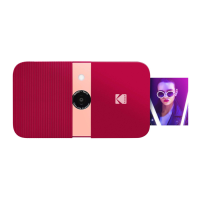
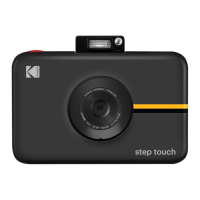
The Kodak Smile+ Digital Instant Print Camera is a portable device designed for capturing and instantly printing photos. It combines the functionality of a digital camera with an integrated Zink printer, allowing users to take pictures and have them printed on sticky-backed photo paper immediately. The camera is intended for household use and offers a blend of classic instant photography with modern digital features.
The primary function of the Kodak Smile+ is to capture digital images and print them instantly. It features a lens with interchangeable filters (Natural, Retro, and Star) that can be rotated to apply different effects to photos before printing. The camera is equipped with an auto flash that activates automatically in low light conditions, ensuring proper exposure for each shot. Photos are printed on Kodak 2x3 Zink photo paper, which is sticky-backed, allowing users to peel and stick their prints.
The camera has limited internal memory, capable of storing up to three photos at a time. For extended storage and editing capabilities, a microSD™ card (up to 256GB) is strongly recommended. Photos saved on a microSD™ card can be transferred to a computer via the included USB-C cable or by inserting the card into a card reader.
Bluetooth connectivity is a key feature, enabling the camera to connect to the Kodak Smile app on Android™ (OS v. 5.0 and above) and iPhone® devices. This app extends the camera's functionality, allowing users to print photos directly from their mobile devices, edit photos with filters and stickers, and use the camera as a printer for existing phone photos.
Getting started with the Kodak Smile+ involves charging the camera and loading Zink paper. The camera charges via a USB-C cable, with a battery LED indicator turning solid green when fully charged. Loading Zink paper requires opening the camera door, placing the blue calibration sheet barcode-down at the bottom of the stack, and then placing the plain sheets glossy-side up on top. It's crucial to load only one 10-pack of paper at a time and avoid touching the glossy side to prevent fingerprints. The blue calibration sheet automatically processes first to calibrate the printer for optimal print quality.
To turn the camera on, the power button on the top is pressed for three seconds. Taking a photo involves pressing the shutter button until an alert sound is heard. The camera automatically focuses and activates the flash as needed. After a photo is taken, the Smile+ automatically begins printing. The filter lens on the front can be rotated to select different effects (Standard, Retro, Star) before taking a picture; it's important to ensure the lens clicks into place and aligns with the indicator dot for clear photos.
The Kodak Smile app enhances the user experience by allowing users to print photos from their phone's gallery, personalize them with filters and stickers, and then send them to the camera for printing. Connecting to the app involves enabling Bluetooth on the mobile device, opening the app, and pairing with the camera. The camera's MAC address, found on the rating label, helps identify it during pairing.
Maintaining the Kodak Smile+ involves several practices to ensure optimal performance and longevity. Regular cleaning of the device is recommended using a dry microfiber cloth to remove fingerprints, dust, and dirt. Keeping the lens cover on when not in use helps prevent dust and debris from entering the paper path slot.
Print quality can be improved by running a blue calibration sheet through the printer, which cleans the paper path rollers and calibrates the printer. If prints show streaks, this step is particularly useful. Users should also inspect the photo paper for wrinkles, bends, or tears and ensure it's loaded correctly with the glossy side up and the blue calibration sheet barcode-down at the bottom. Proper lighting conditions are also important for good photo quality.
Firmware updates are crucial for maintaining camera performance. These updates can be performed through the Kodak Smile app when the mobile device is connected to the internet and the camera is paired. The app will display an update screen if new firmware is available, and the camera should remain plugged in during the update process. Keeping the Kodak Smile app itself updated to the latest version is also important.
Battery care is essential for the device. The camera has a built-in, non-removable 7.4V lithium-ion battery that takes up to 2 hours to fully charge. It should be charged using the included USB-C cable and a wall adapter, as charging via a computer or laptop is not recommended due to significantly longer charging times. The battery LED indicator glows red while charging and turns green when full. Users should avoid exposing the battery to extreme temperatures (cold or heat) and never attempt to disassemble or remove the battery, as this poses a risk of explosion and voids the warranty. When the battery power drops below 10%, the LED indicator blinks red, and printing is disabled; at 2% power, the camera automatically shuts off. Proper disposal of the lithium-ion battery at a designated recycling center is necessary to prevent environmental harm.
In case of printing errors like paper jams or misfeeds, the LED indicators will blink red. Users should open the camera, clear the jam, replace the paper if necessary, and restart the camera. If multiple consecutive photos are printed, the camera may need time to cool down, indicated by a rapidly blinking white LED; printing will automatically resume once cooled.
 General
| Bluetooth | Yes |
|---|---|
| Megapixel | 5 MP |
| Sensor type | - |
| Picture size | 50.8 x 76.2 mm |
| Photo effects | Filter |
| Product color | Pink |
| Image sensor size | - \ |
| Compatible memory cards | MicroSD (TransFlash) |
| Maximum image resolution | - pixels |
| Flash modes | Auto |
| Fastest camera shutter speed | - s |
| Battery type | Built-in |
| USB connector type | USB Type-C |




 To Next Page