TP-6833 2/16 29Section 2 Installation
Relays with Time Adjustment Switches
This section applies to relays equipped with switches for
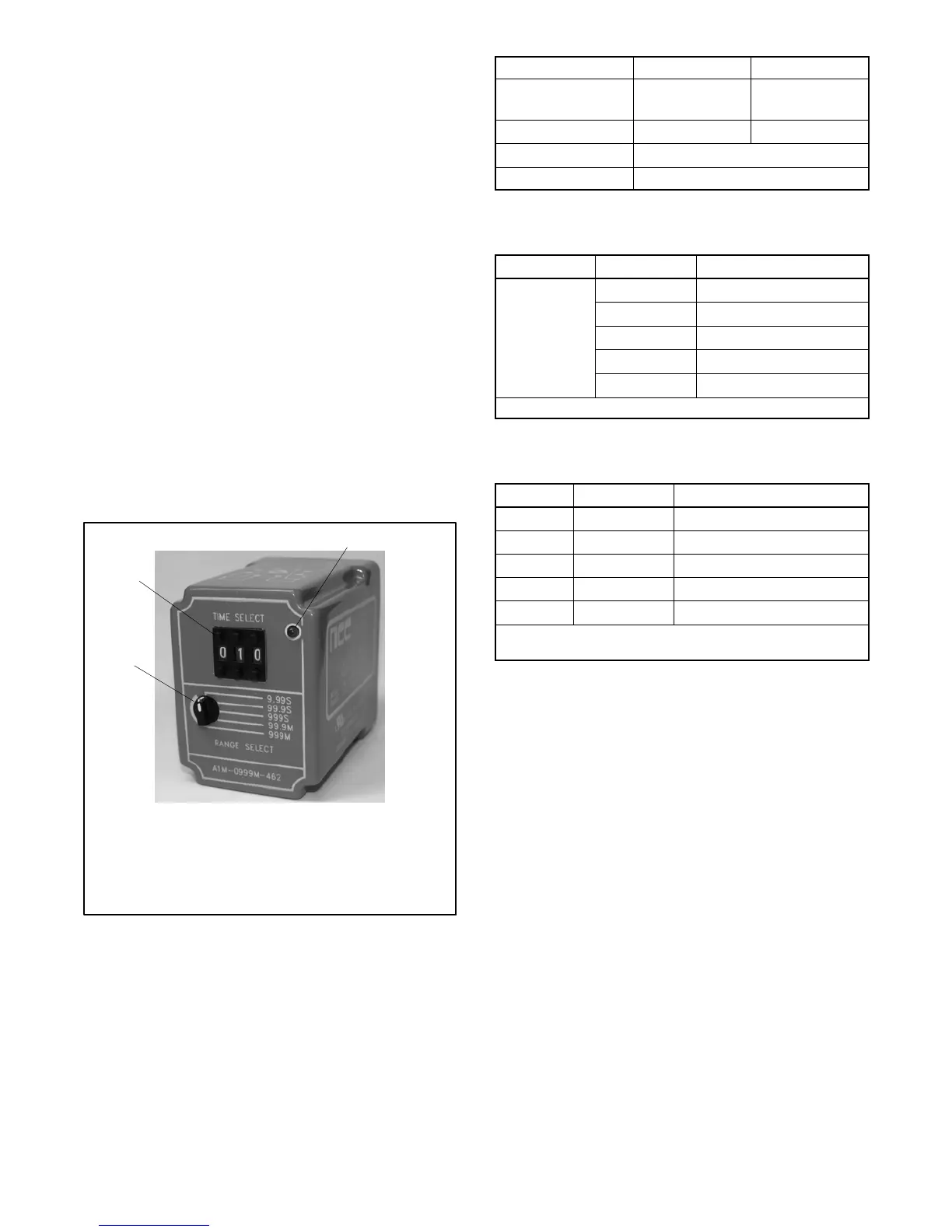
time adjustment, shown in Figure 2 -29. Relay
specifications are shown in Figure 2-30.
A three-digit time selection switch and a range selection
switch on the relay assembly allow adjustment of the
time delay. See Figure 2-29. The relay time delay is
adjustable between 0.05 seconds (50 ms)* and 999
minutes. Set the range and the time as shown in
Figure 2-31. The typical setting is 0.10 seconds (100
ms). If it is necessary to set the relay to a longer time,
ensure that the time setting is in accordance with
applicable codes.
A timing light on the relay flashes during the time delay
and turns on continuously after time out.
Setting the Time Delay (adjustment switch style)
To set the time delay, select the range based on seconds
or minutes and the numbers after the decimal point.
Then use the pushbuttons to set the time. Some
examples are shown in Figure 2-32.
1. Time select pushbuttons
2. Relay timing LED
3. Range selection switch
Note: See Figure 2-26 for relay location on the field connection
assembly.
3
IMG_0732
1
2
Figure 2-29 Extended Transfer Time Relay
(adjustment switch style)
* S ettings less than 0.05 s (50 ms) are not recommended.
Relay 12VDC 24VDC
Input Power
(customer-supplied)
12 VDC 24 VDC
Relay Marking A1M-0999M-466 A1M-0999M-462
Output Type Relay contacts, DPDT (2 form C)
Rating 10 amp max. resistive @ 240 VAC
Figure 2-30 Relay Specifications
(adjustment switch style)
Time Select Range Select Time Setting
001--999
9.99 S 0.01 to 9.99 seconds *
99.9 S 0.1 to 99.9 seconds
999 S 1 to 999 seconds
99.9 M 0.1 to 99.9 minutes
999 M 1 to 999 minutes
* S ettings less than 0.05 s (50 ms) are not recommended.
Figure 2-31 Relay Transfer Time Settings
(adjustment switch style)
Range Time Select Time Setting
9.99 S 010 0.10 seconds (100 ms) [
99.9 S 001 00.1 seconds (100 ms) [
999 S 001 1 second
99.9 M 025 2.5 minutes
999 M 020 20 minutes
[ 100 ms is the typical setting. Do not use settings less than
50 ms.
Figure 2-32 Examples of Transfer Time Settings
(adjustment switch style)


 To Next Page