Atollspeed Touch Screen Series – Original Instructions
This document is property of Kolb Huizhou Ltd. 22
7.2 Home screen
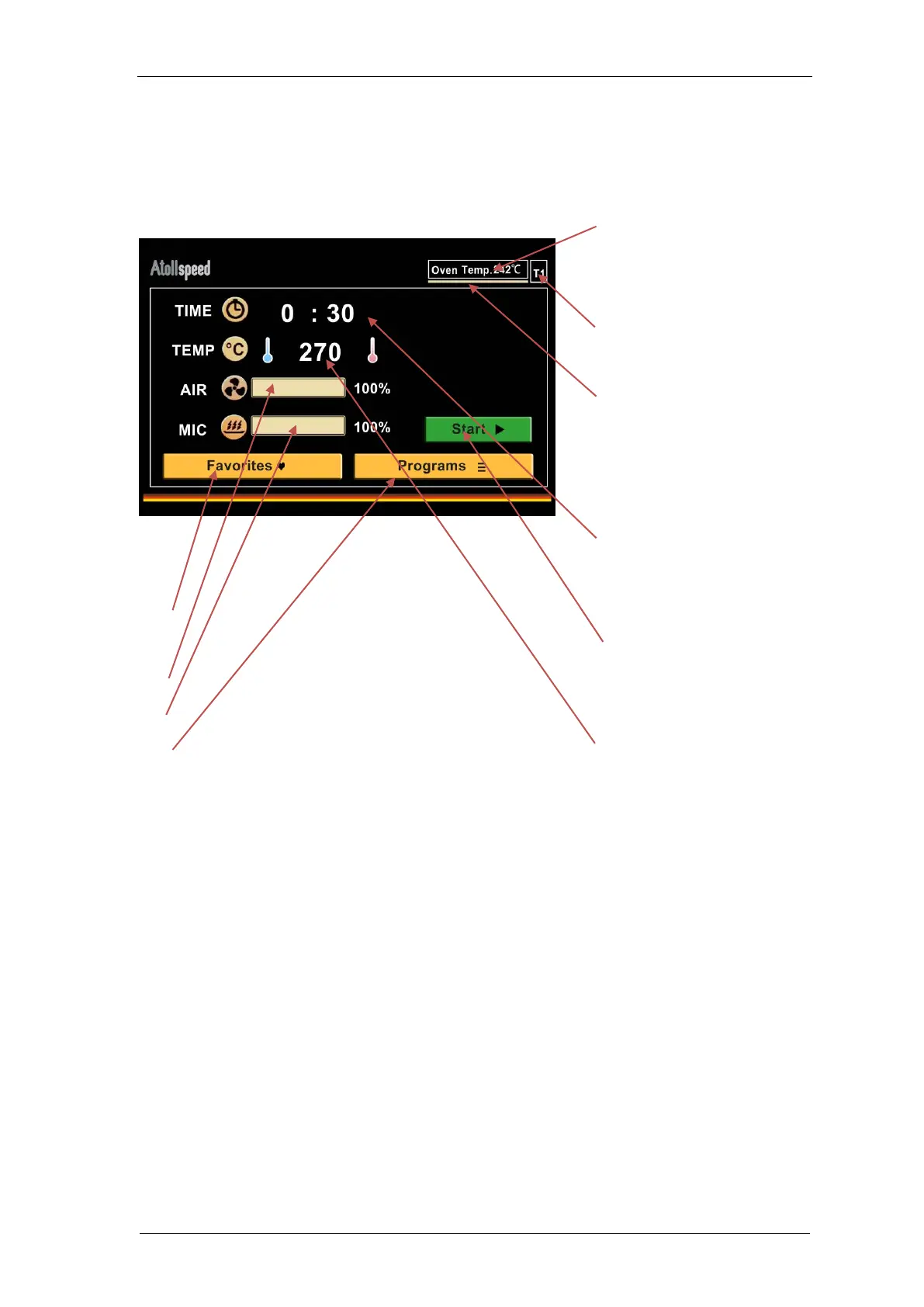
Home screen allows the user to start baking instantly or access all functions important for baking
within a few clicks.
Actual temperature inside the
baking chamber. (Preheat
temperature in User settings)
T1/T2 toggle between primary and
secondary preheat temperature
Pre-/Reheat Timer: Timer bar can
be set to indicate when the
temperature of the tray has
recovered.
Timer for Baking time: tab on
minutes or seconds separately, then
enter by NUM pad (max 9:59)
Start Button starts baking with
selected Time, Temp, Air speed and
Microwave
Baking Temperature for the next
baking procedure (max. 280 ºC)
Favorites enters to one screen with favorite
programs
Air Speed slider 10% - 100%
Microwave Power slider 0% - 100%
Program button opens the menus with the saved
programs
On this screen NUM-pad is used to enter Time and
Temperature or recall saved programs. For example you
can press number one, then press number four on NUM
pad to enter program number 14 quickly means Group 1,
Program 4.


 To Next Page