Vers. 111422 48
TORQUE & ANGLE menu
Note: carefully choosing the right combination of speed and downshift settings for the
application will maximize the precision and lifetime of the tool while minimizing your
assembly cycle time. Review the Determining the appropriate program settings section.
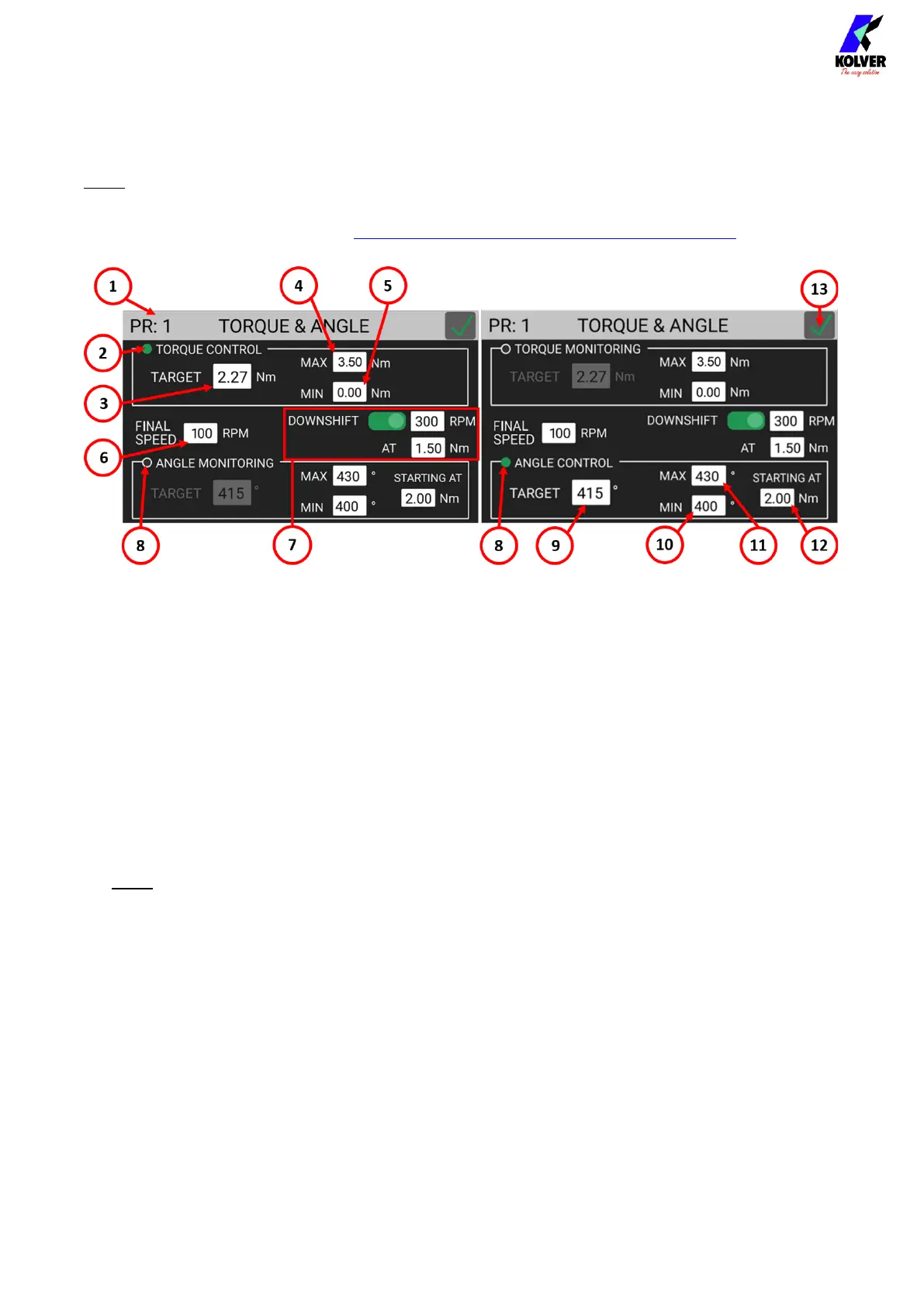
(1) Program Number
Indicates the program that is currently being edited. You can select a different program
to edit from the previous screen.
(2) TORQUE CONTROL / ANGLE MONITORING flag
Tap to select Torque Control and Angle Monitoring mode.
In this mode, the screw is tightened down to the target torque, and the angle (the
number of revolutions of the screw, in degrees) reached at the target torque is
measured. The STARTING AT (12) setting controls the starting point for the angle
measurement (at torque threshold, at lever pressed, or at external signal received).
(3) TARGET Torque
Tap to set the target torque. Only available in Torque Control/Angle Monitoring mode.
For prevailing torque settings, see the Ramp & Time menu.
Note: continuous use at or over 80% of the screwdriver’s nominal torque range is not
recommended.
(4) MAX Torque
If the torque measured at the end of the tightening exceeds the MAX Torque value, the
tightening will be considered unsuccessful (NOK) and a corresponding error will be
raised. Applicable to Torque Control as well as Angle Control modes.
(5) MIN Torque
If the torque measured at the end of the tightening is below the MIN Torque value, the
tightening will be considered unsuccessful (NOK) and a corresponding error will be
raised. Applicable to Torque Control as well as Angle Control modes.
(6) FINAL SPEED
Tap to select the tightening speed of the screwdriver, in RPM.


 To Next Page