39
Issue 1.0 16/12/99
7 PROGRAMMING AND CONFIGURATION
This Service Manual only contains programming and configuration information for
those features of the autopilot which are not normally available to the end user. For
details of normal programming and configuration please refer to the appropriate user
manual AP12 or AP14
7.1 Master Reset Procedure.
A master reset is available to ‘empty’ the pilot’s memory and return all settings to fac-
tory standard:
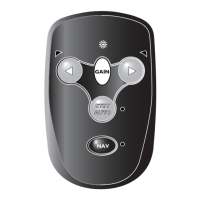
a. Hold down Port / Starboard / Gain / and Nav keys.
b. Turn power on. (All LEDs should light).
c. Press Auto.
The procedure may need to be repeated to ensure that the unit has reset properly.
When a full reset has been achieved, entering Auto will cause the diagnostic LED to
flash 8 times accompanied by ‘beeps’ on the buzzer.




 To Next Page