14 OPERATION MANUAL
OPERATING PROCEDURES
1) When Using Replenishment Tanks
Mix the fixer and developer solutions according to
the directions on the packages.
2) Replacing Chemical Solution
When replacing the chemical solution in the
processor the replenishment button (beaker) is used
to supply new chemical solution. Developer and
fixer solutions must be replaced once a month (See
SERVICE AND MAINTENANCE).
The replacement procedure is:
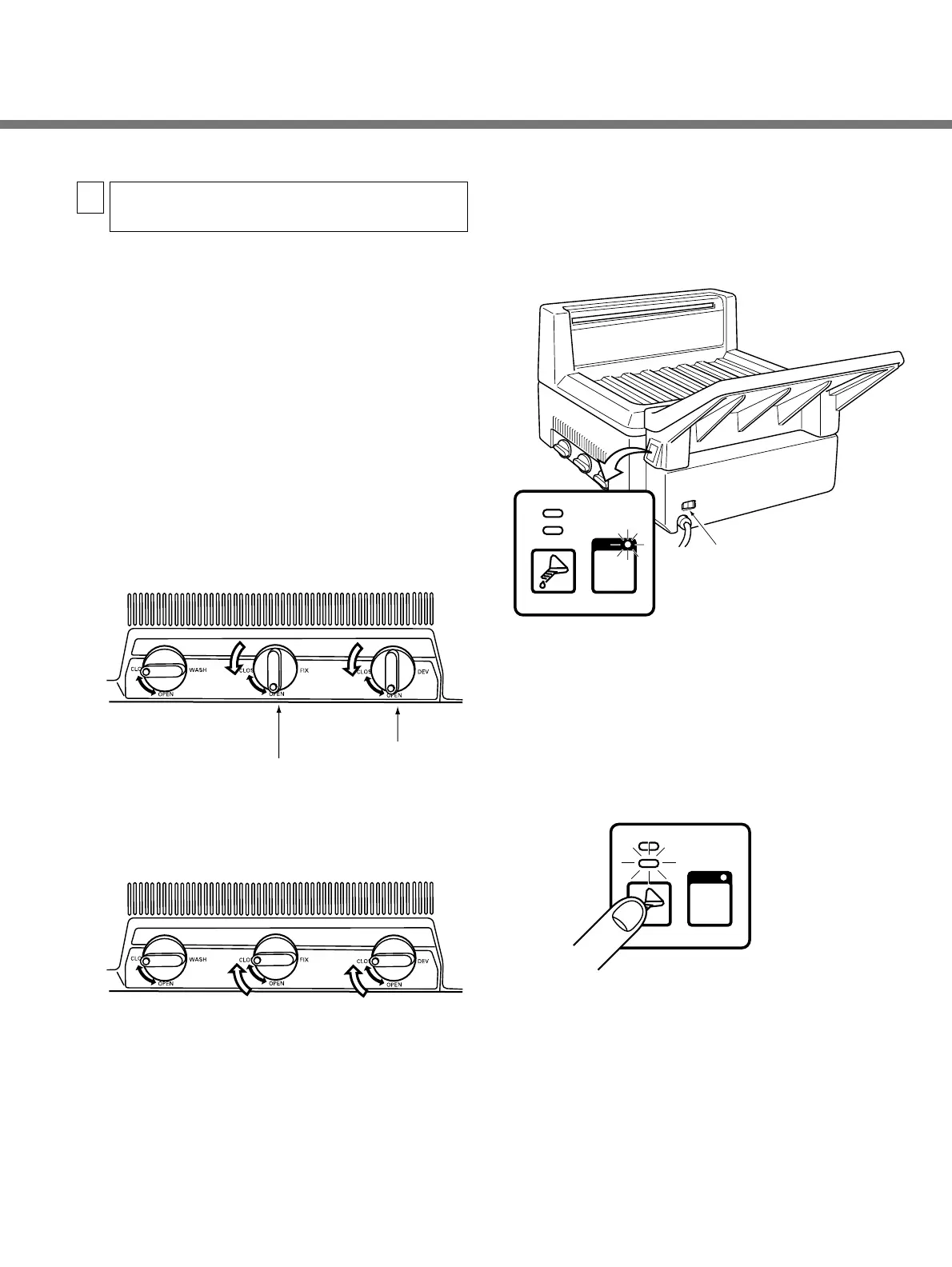
q Remove the top cover.
w Open the developer and fixer drainage valves to
empty the tanks.
e After the tanks become empty, close the valves.
r Turn the power breaker ON (Left on front below the
feed tray).
● The RUN button lamp will go on.
• Do not press the RUN button.
t Press the replenishment button (beaker) until the
READY lamp begins flashing (about 5 seconds).
● It will take about 22 minutes for the tanks to be
filled. As soon as the tanks are filled, the READY
lamp will stop flashing.
Chemical Mixing, Replacing and
Replenishing
5


 To Next Page