4. Mark points
You can store a desired time location and move
instantly to that time. Up to one hundred Mark
points can be stored in each song.
■ Storing a Mark point
Here’s how to use the Mark function to store the
current time. A time location that has been stored
in this way is called a “Mark point”.
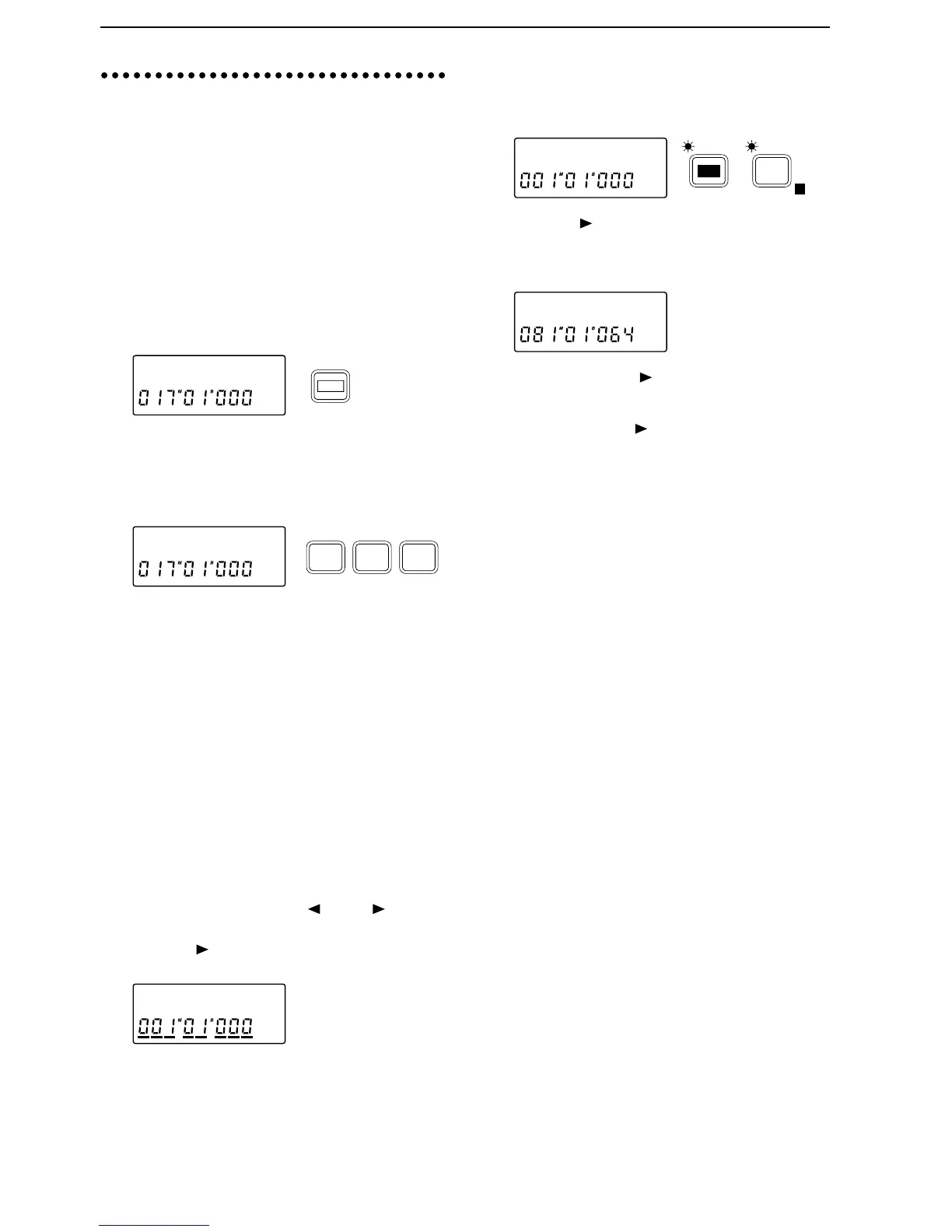
1 Move the current time to the desired location.
2 Press the [STORE] key twice to prepare for storing.
The display will indicate “Mark”.
3 Press any one of the [IN/LOC 1], [OUT/LOC 2] or
[TO/LOC 3] keys. The display will indicate
“Mark
→M✽✽✽ (stored number)”, and the current
time will be stored as a Mark point. Release the
key, and the previous page will reappear.
Storing during playback or recording
During playback or recording, you can perform the
above steps 2 and following to store a Mark point.
The time location at the instant you press the [IN/
LOC 1], [OUT/LOC 2] or [TO/LOC 3] key will be
stored.
Storing using a foot switch
1 Press the [SYSTEM] key several times to access the
“Fsw” display, and then rotate the [VALUE] dial to
select Mark.
2 A Mark point will be stored at the instant you
press the foot switch. You can store Mark points
during playback or during recording.
■ Moving to a Mark point
1 Simultaneously press the [ ] and [ ] keys to
move the cursor below the location counter.
2 Press the [ ] key several times so that the cursor is
displayed below the entire location counter.
3 Rotate the [VALUE] dial to select the Mark points
that have been stored, and move the current time.
■ Deleting a Mark point
1 Press the [EDIT] key, and then press the [SYSTEM]
key several times to access the “Mark” display.
2 Press the [ ] key to access the “Del” display, and
rotate the [VALUE] dial to select the Mark that you
wish to delete. If you select All, all Mark points
will be deleted.
3 Press and hold the [ ] key for approximately one
second to execute the operation. When the Mark
has been deleted, the display will indicate “Com-
pleted”. Press the [ ] key to restore the previous
display.
Markø
STORE
Mark˘M001
TO /
LOC 3
OUT /
LOC 2
IN /
LOC 1
01:SngNam
Mark ˙
E
SYSTEM
EDIT
DeløM004 ?


 To Next Page