Creating and
selecting songs
To record a new song, you must first cre-
ate a new song. This section explains how
to create and name a song, and how to select songs in
EDIT SONG/TRACK .
1. Creating a new song
1
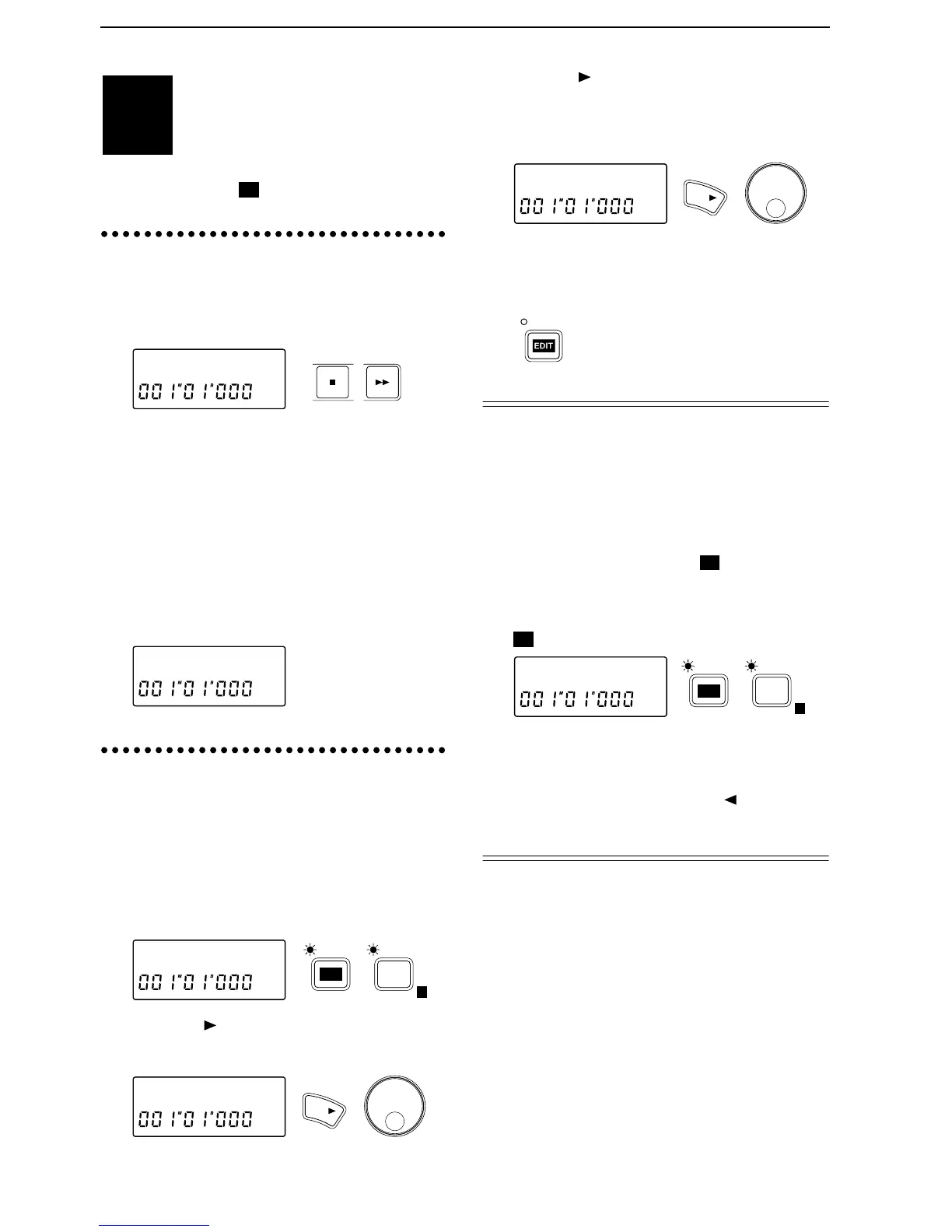
After selecting the last-numbered song, hold down
the [STOP] key and press the [FF] key.
The display will indicate “NoDATA”.
2
Use one of the following procedures to create a
song.
•
Change the song name from “NoDATA”.
In our example here, we will create a song by
changing the song name. Refer to “2. Naming a
song”.
•
Record audio data on a track. The display will
indicate “NEWSONG” as the song name.
•
Specify the tempo or time signature. A tempo
map will be created in the tempo track, and the
display will indicate “NEWSONG” as the song
name.
2. Naming a song
In order to distinguish your new song from other
songs, it is recommended that you give it a name.
1
Press the [EDIT] key (the indicator will light), and
then press the [SONG/TRACK] key to access the
“Edit Song” display.
If this display does not appear, press the [SONG/
TRACK] key until the “Edit Song” appears.
2
Press the [ ] key, and then press the [SONG/
TRACK] key several times to get the “Renam” dis-
play.
3
Press the [ ] key several times to move the cursor
to the location where you wish to change the name,
and use the [VALUE] dial to input alphabetical
characters or symbols to specified the desired
name.
4
When you finish inputting the name, press the
[EDIT] key (the indicator will go off) to exit the
EDIT SONG/TRACK page. The name will be final-
ized when you exit this page.
Selecting another song
There are two ways to select songs. One way is to
hold down the [STOP] key and press the [FF] key
to select the next song number, or to hold down the
[STOP] key and press the [REW] key to select the
previous song number (refer to “Listening to the
demo songs”, step
2
). The other way is to select the
song in EDIT SONG/TRACK .
1
After pressing the [EDIT] key, press the [SONG/
TRACK] key several times to get a song name dis-
play such as “I04:KORG1”. (EDIT SONG/TRACK
)
2
Rotate the [VALUE] dial to select the song number.
3
If you have connected an external drive such as a
hard disk drive or removable disk drive and wish
to select a song from it, press the [ ] key and then
rotate the [VALUE] dial to select the connected
drive.
STEP2
03:NoDATA
STOP FF
03:NEWSONG
EditSong ˙
SONG /
TRACK
E
EDIT
Renam˘I03˙
YES
KORG1 œ
YES
I03:KORG1
SONG /
TRACK
E
EDIT


 To Next Page