5
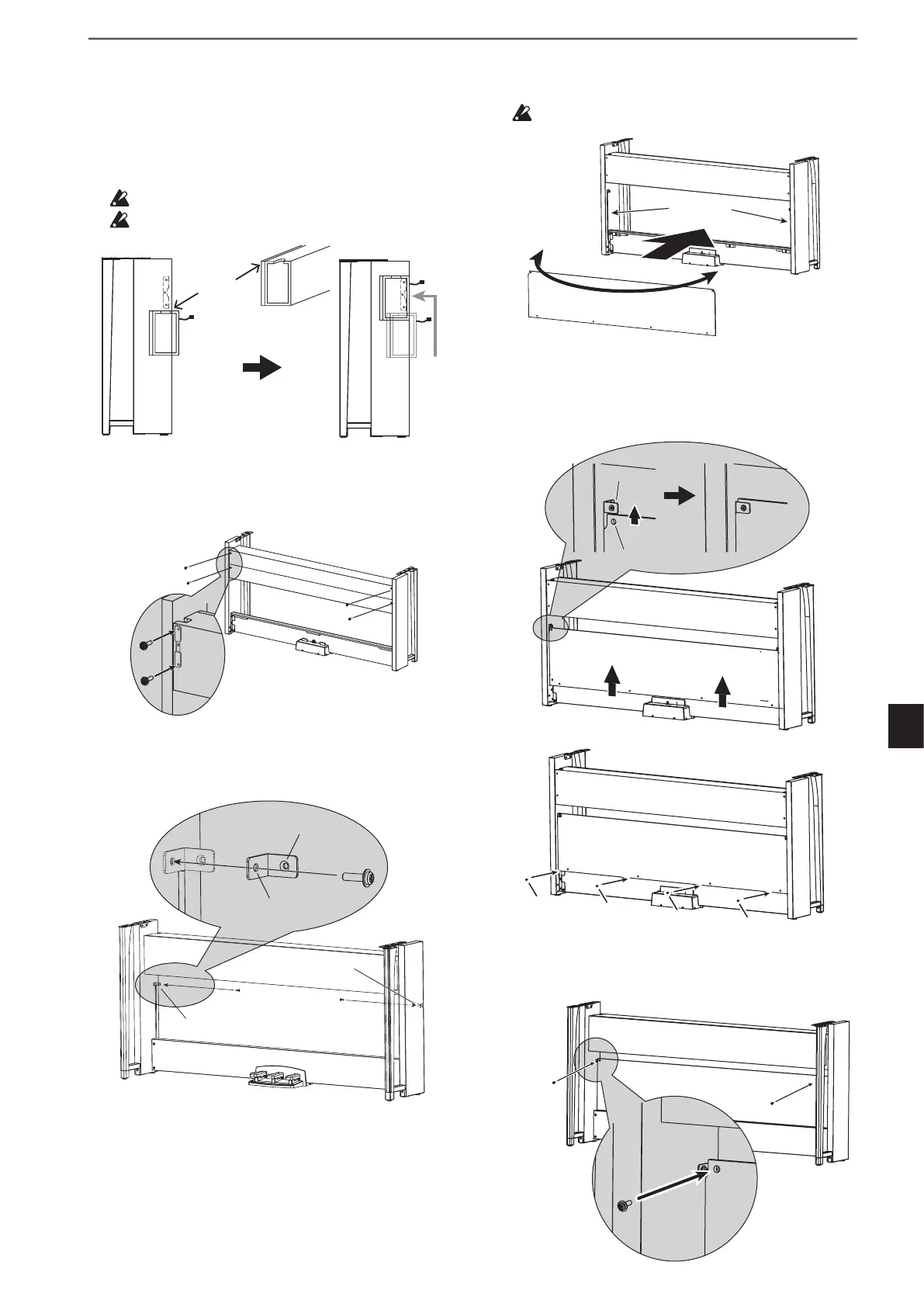
5. Lift up the speaker box so that the brackets (A) on
the left and right side panels pass through the dents
in the speaker box. When the brackets (A) are fully
hidden within the speaker box, push the speaker box
forward so the rear of the speaker box is nearly ush
with the edges of the side panels. Then, the speaker
box can be released.
Lift the speaker box from below the bracket.
Becarefulnottopinchyourngers.
6. Align the bracket holes in the left and right side pan-
els with the holes in the speaker box, and then secure
them with the four screws (M4, long) so the gaps on
the left and right sides are equal.
7. Aach the brackets at the holes (under the speaker
box) in the left and right side panels with the screws
(M4, short).
Speaker cord
Lift the dent.
Bracket (A)
Lift the speaker box
from below, then
hang it onto the bracket.
Lift the speaker box
from below, then
hang it onto the bracket.
Screws
(M4,long)
rews
Screw
(M4,short)
Screw
(M4,short)
Bracket
Bracket
Unthreaded hole
Threaded hole
8. Slightly bend the rear panel and insert it into the
grooves in the left and right side panels.
Becarefulnottopinchyourngers.
9. Lift up the rear panel to align the holes in the rear
panel and the brackets installed in step 7, and then
temporarily fasten the boom of the rear panel with
the four screws (M4, short).
10. Fasten the rear panel and the brackets (through the
holes aligned in step 9) with two screws (M4, short).
Grooves
Rear panel
Rear panel
Hole in the rear panel
Bracket
rews (M4, short)
rew
t)
Screw
(M4, short)


 To Next Page