9
Listening to a Piano Song
Two types of performances have been prepared for each
Piano Song: one with the Italian grand piano sound and
one with the Pleyel piano sound. Listen to and compare the
two performances.
Various functions useful for practice are available, such as
changing the tempo or muting the right- or left-hand part
to focus on one hand. (Refer to “Piano Song List” on page
98.)
1. Press the PIANO SONG buon.
ThePIANOSONGbuonlightsupandthenumberfor
the piano song (001) appears in the display.
The PIANO buon lights up and the PLEYEL buon
blinks.
2. Press the PIANO buon or PLEYEL buon to select
the desired sound.
For the Italian grand piano sound, press the PIANO
buon;for the Pleyelpianosound,press the PLEYEL
buon.
The buon for the selected sound lights up, and the
otherbuonblinks.
You can select either the Italian grand piano sound
or the Pleyel piano sound.
3. Press the Play/Pause buon to begin playback of the
Piano Song.
Whenplaybackoftherstpianosongisnished,play-
back continues sequentially with the second, third, etc.
When playbackofthefortieth pianosong isnished,
playbackbeginsagainwiththerstpianosong.
If no sound was selected in step 2, the Piano Song
with the PIANO sound automatically begins to
play back after about 3 seconds.
4. Use the Play/Pause buon to toggle between playback
(buon lit) and pause (buon blinks).
5. Press the Stop buon to end playback and return to
the beginning of the song.
6. Press the DISPLAY buon, and then, after the SONG
LED is lit, press the + or – buon beside the display to
select a song.
7. To change the sound, press the PIANO buon or
PLEYEL buon, and then press the Play/Pause buon.
8. Press the PIANO SONG buon again to exit playback
of Piano Songs.
Playback will begin automatically after the Piano Song
number is changed. However, playback will not begin
automatically after the sound (PIANO or PLEYEL) is
changed.Inthatcase,press the Play/Pausebuonto
begin playback of the Piano Song.
5
1,8
6
6
3,4
2
2
Listening to the Demos
Built into the Poetry are 60 preprogrammed songs. Of
these, 10 are Sound Demo Songs that highlight the quality
of various internal sounds. The other 50 are familiar Piano
Songs and etudes.
During playback of a sound demo song, you can play
using the keyboard; however, the sound cannot be
changedbyusingthesoundbuons.
Duringplaybackofasounddemosong,theseingsfor
eects(reverbandchorus)cannotbechanged.
Listening to a Sound Demo Song
The Poetry features 10 built-in Sound Demo Songs that use
dierentsounds.ListentotheSoundDemoSongstohear
their typical sounds. (Refer to “Sound Demo Song List” on
page 98.)
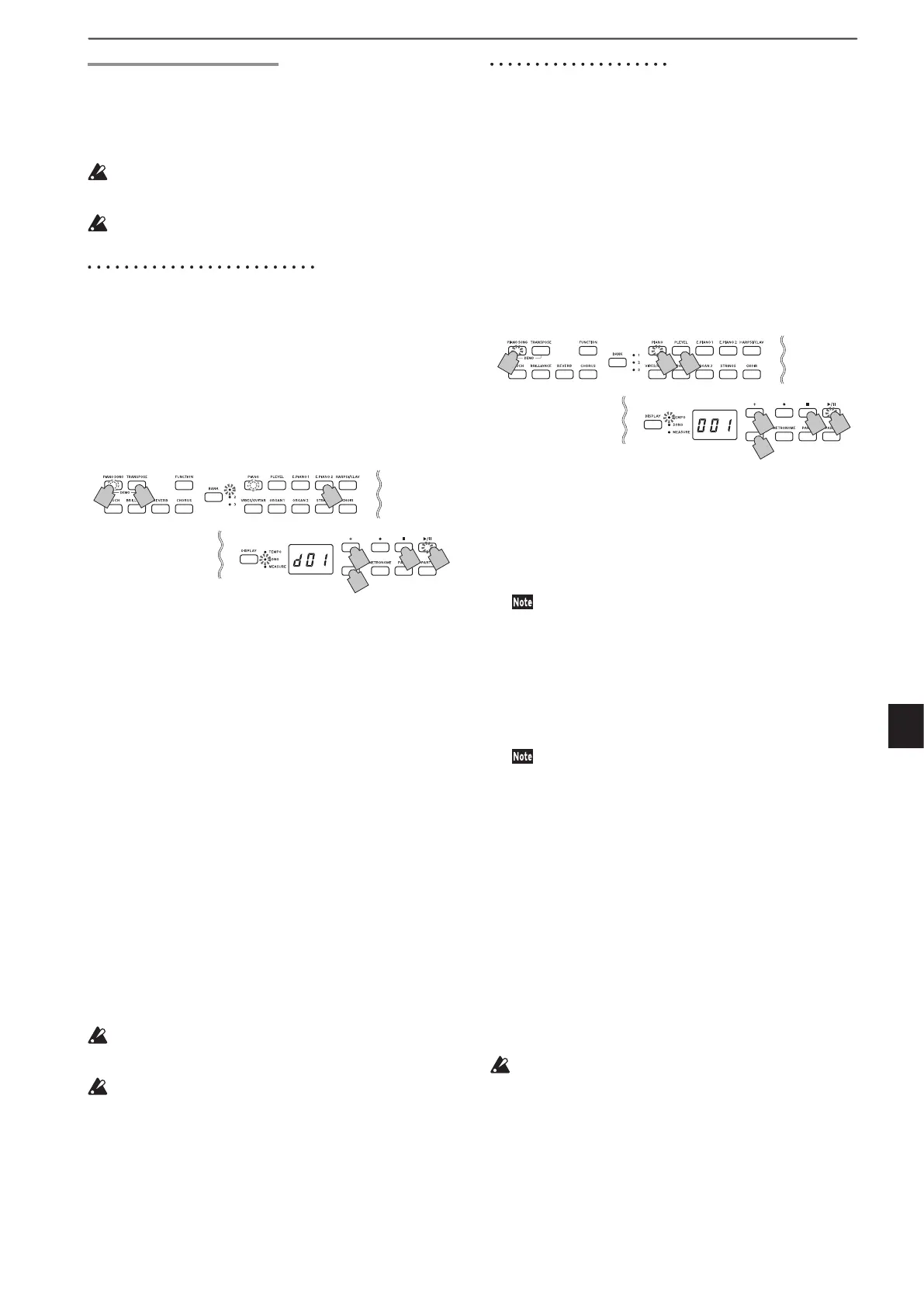
1. Simultaneously press the PIANO SONG buon and
the TRANSPOSE buon.
ThePIANO SONGbuonblinks, and the sound but-
tons are lit sequentially. In addition, the number for the
sound demo song (d01) appears in the display.
After about 3 seconds, the PIANO buon blinks, the
Play/Pausebuonlightsup,andplaybackoftheSound
Demo Song begins.
When playbackof Sound DemoSong d01is nished,
the remaining Sound Demo Songs will play back se-
quentially.Whenplaybackofd10isnished,playback
beginsagainwithd01.Atthistime,thesoundbuonfor
the song being played back blinks.
2. When the sound buons are blinking sequentially,
press the sound buon for the demo song that you
want to hear.
Ifadierentsoundbuonispressed,evenwhileasongis
being played, playback of the corresponding demo song
will begin after a few seconds. In addition, a song can be
selectedbypressingthe+or-buonbesidethedisplay.
3. Press the Stop buon to end playback, and press the
Play/Pause buon to return to the beginning of the
song.
While the song is stopped, the PIANO SONG buon
blinks,andthesoundbuonslightupsequentially.
4. Press the PIANO SONG buon again to exit playback
of Sound Demo Songs.
The tempo cannot be changed during playback of a
Sound Demo Song. In addition, the metronome cannot
be used.
The playback of a Sound Demo Song cannot be paused.
2
2
3
1
1,4
2
3


 To Next Page