Initializing the Services
Kramer Brain run inside a dedicated service. KC-Virtual Brain1 supports a single running
service. The Service instance is a Docker software container (a virtual computer) capable of
running a Kramer Control Brain. The service is installed at once.
When you first run KC-Virtual Brain1, the message “Missing required service” will be shown
on the screen until you initialize the service.
To initialize the missing Service (Brains):
1. Navigate to the Services option in the left menu. The Services screen opens.
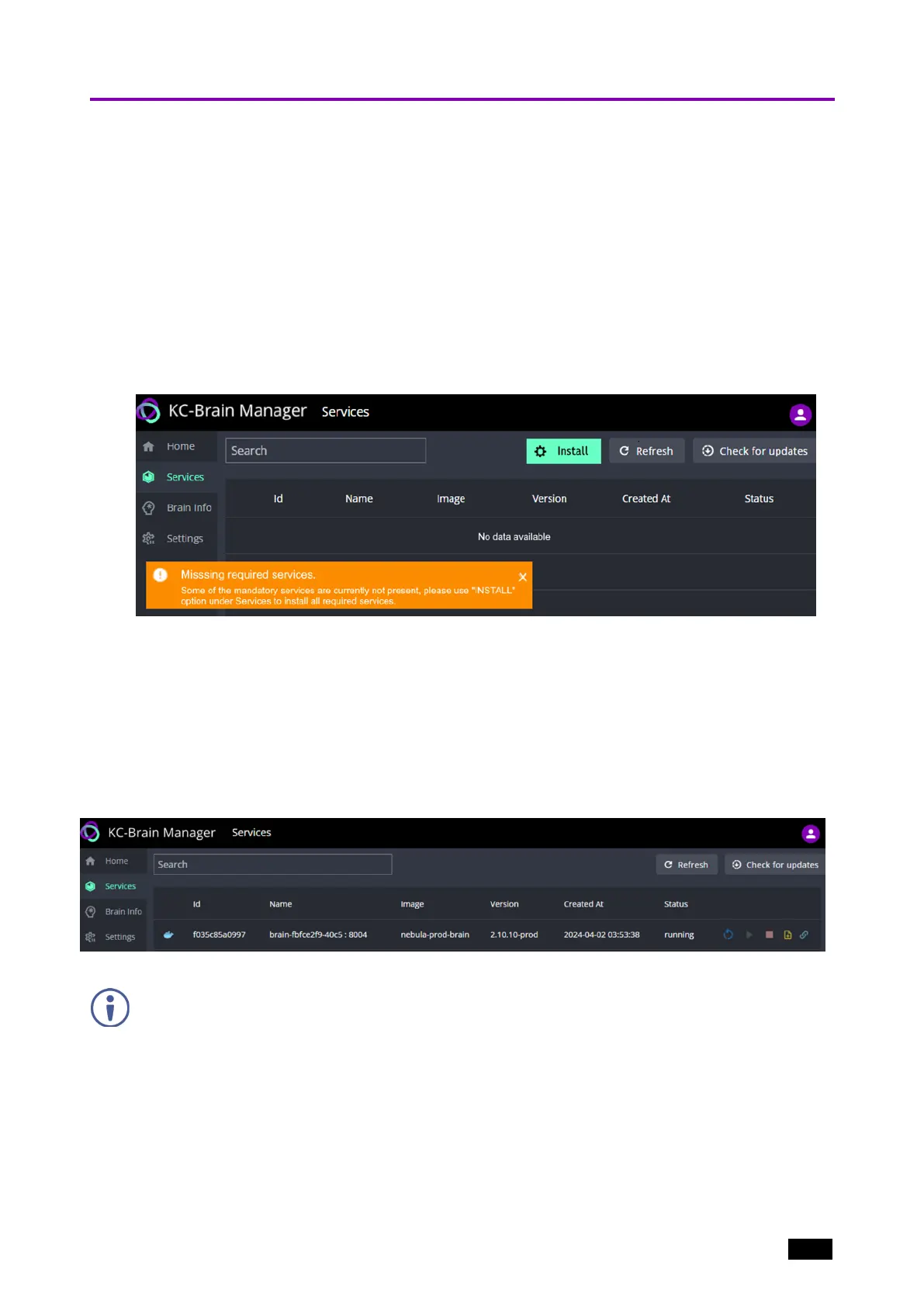
2. If the Service has not been installed, the Services page will show an Install button at
the top right of the screen (in green).
Figure5: The Services page before installation of the service.
3. Click Install and the system will install and activate the Service.
If connected to the Internet, KC-Virtual Brain1 will download the latest Kramer
Control version from the Kramer AWS ENV (Amazon Web Services Environment) as
part of the provisioning process.
If not connected to the internet, KC-Virtual Brain1 will run the factory installed version
of Kramer Control.
The Services page will show the service running after the install.
Figure6: The Services page with services installed.
KC-Virtual Brain1 is shipped with a license installed and the Service is configured to ensure that during
initialization the license is automatically activated.
Kramer Electronics Ltd.
KC-Virtual Brain1 - Essential First Steps 12



 To Next Page