Settings – Network
The device must reboot to save changes to network settings. Incorrect settings
may make the device inaccessible.
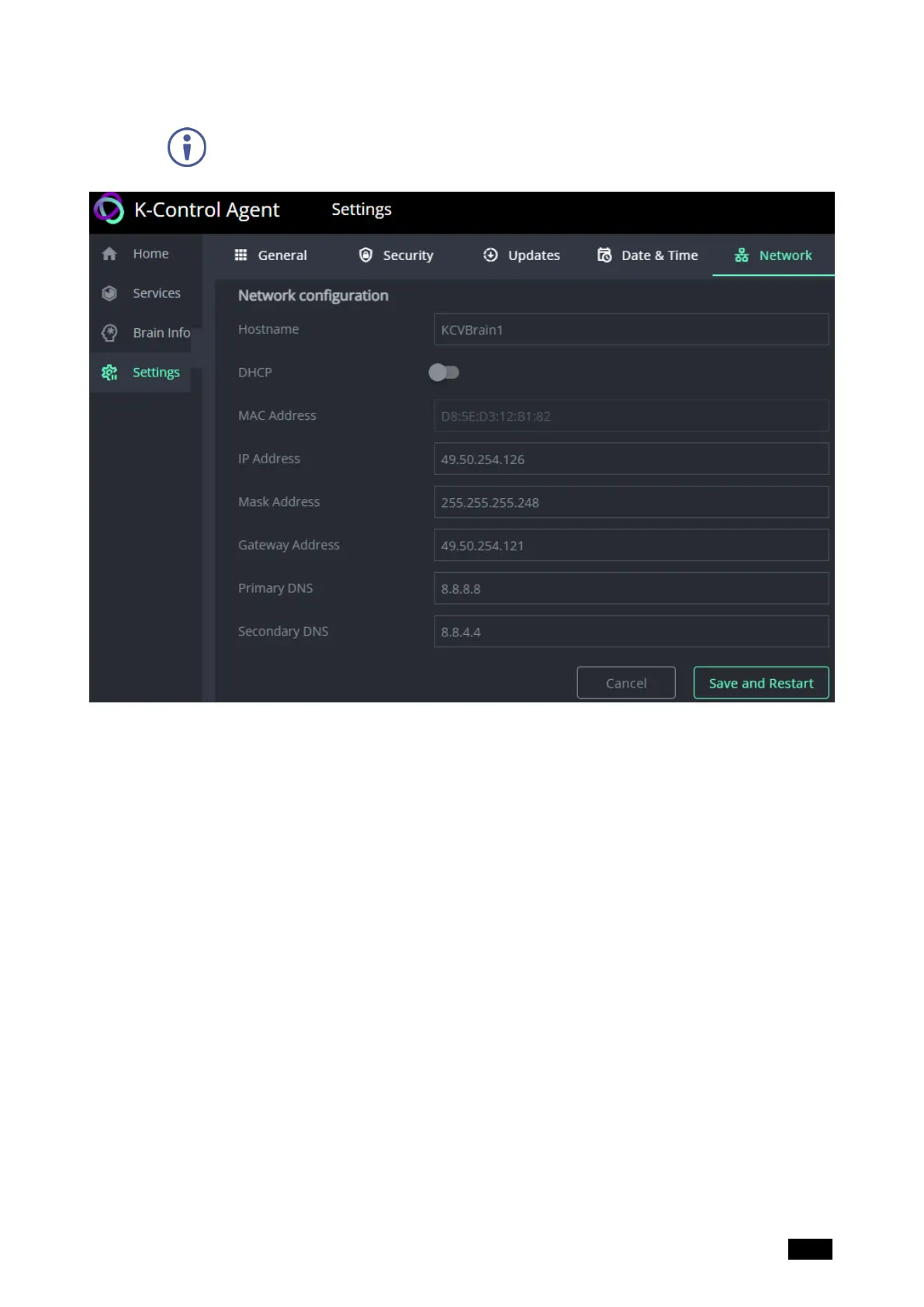
Figure21: The Settings page’s Network tab
To set a static IP: Disable DHCP, enter the desired IP address, then Save and Restart.
n
Hostname – The network name allocated to the KC-Virtual Brain1.
n
DHCP – If enabled, then the device IP is allocated by the network’s DHCP server. If
disabled or no DHCP is available, the device will seek to obtain IP 192.168.1.39.
n
MAC Address – The KC-Virtual Brain1’s permanent unique device identifier (not
editable).
The following 3 fields can only be updated if DHCP is disabled:
o
IP Address – The KC-Virtual Brain1’s address on the local network. Enter the IP
address in a browser to access the embedded web menu.
o
Mask Address – The network subnet to which the KC-Virtual Brain1 belongs.
o
Gateway Address – Address of the router interface to which KC-Virtual Brain1 is
connected.
n
Primary DNS – The IP address of the network’s domain name server.
n
Secondary DSN – The network address of the secondary/backup domain name server
(if used).
Kramer Electronics Ltd.
KC-Virtual Brain1 - The Management Pages 27



 To Next Page