7
3
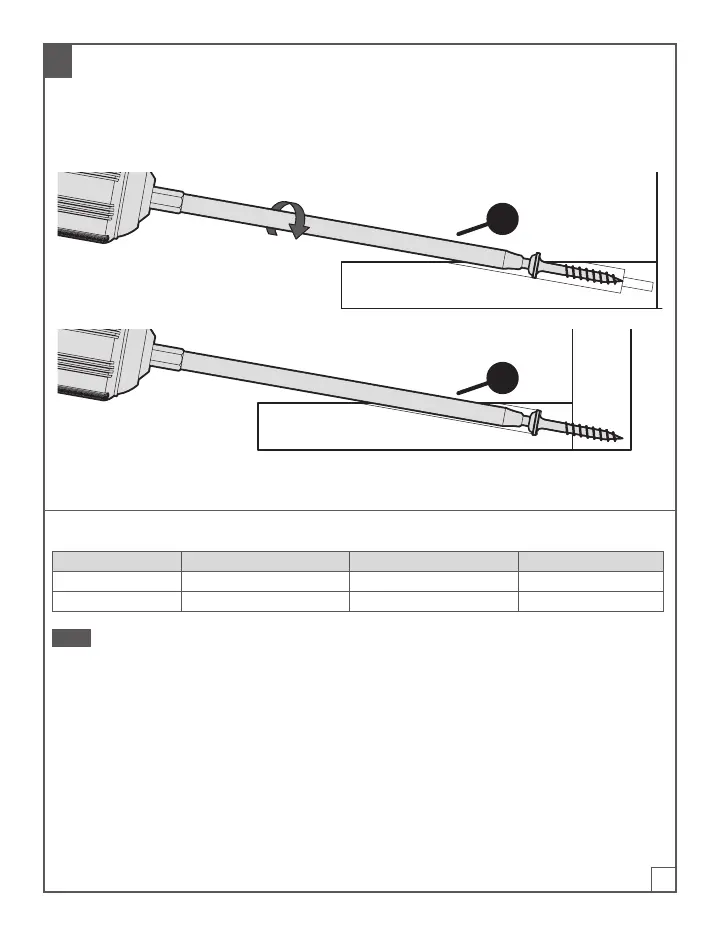
Drive the Screws
a. Place a screw on the driver bit (E).
b. Position the screw in the pilot hole.
c. Drive the screw until fully seated without over driving the screw.
E
E
Set-Up and Screw Length Chart For Kreg XL Screws
Material Thickness Easy-Set Stop Collar Material Thickness Stop Screw Length
1-1/2" (38 mm) 1-1/2" (38 mm) 1-1/2" (38 mm) 2-1/2" (64 mm)
3-1/2" (89 mm) 3-1/2" (89 mm) 3-1/2" (89 mm) 4" (102 mm)
Note Use of Standard size pocket hole screws will result in weaker joints.
To learn more about selecting and purchasing Kreg Screws, visit: www.kregtool.com/screws.


 To Next Page