EasyManua.ls Logo

KRESS Mission Mega RTKn 9 - User Manual

KRESS Mission Mega RTKn 9
48 pages
Print Icon
To Next Page IconTo Next Page
Loading...
Owner's Manual
Question and Answer IconNeed help?

Do you have a question about the KRESS Mission Mega RTKn 9 and is the answer not in the manual?

Overview

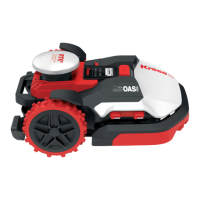
The Kress Mission™ RTK is a robotic lawnmower designed for domestic lawn mowing, aiming to maintain a healthier and better-looking lawn through frequent operation. It can be programmed to operate at any time or frequency, depending on the lawn size. It is not intended for digging, sweeping, or snow cleaning.

Important Safety Information:

The robotic lawnmower can be dangerous if used incorrectly. Users must read the owner's manual carefully and understand its content before operation. Always keep a safe distance from the machine when operating. The disabling device must be activated before working on or lifting the machine. Never ride on the machine. The appliance is a Class III device.

Technical Specifications (KR233 / KR236):

  • Rated Voltage: 20V Max.
  • No Load Speed: 3200/min (KR233) / 3600/min (KR236)
  • Cutting Area: 3 acre (12000m²) (KR233) / 6 acre (24000m²) (KR236)
  • Cutting Diameter: 13.8'' (35cm)
  • Cutting Height: 1.18'' – 3.54'' (30mm-90mm)
  • Cutting Height Positions: 13
  • Battery Type: Lithium-ion
  • Battery Model: KA3010 (KR233) / KA3210 (KR236)
  • Charging Time (approx.): 84 min (KR233) / 30 min (KR236)
  • Charger Model: KA3727 (KR233) / KA3724 (KR236)
  • Charger Rating:
    • KR233: Input: 120V~60Hz, 230W, Output: 28V, 7.0A
    • KR236: Input: 120V~60Hz, 640W, Output: 32V, 20.0A
  • Machinery Weight: 49.6 lbs (22.5 kg) (KR233) / 48 lbs (21.8 kg) (KR236)
  • Protection Degree: III
  • App: Y
  • Frequency bands for Bluetooth: 2400-2483.5 MHz
  • Maximum Output Power for Bluetooth: 8 dBm
  • Maximum Slope within the Work Surface: 40%

Antenna Technical Data:

  • Rated Voltage: 5V±2%
  • Operating Temperature: -40°C~85°C
  • Storage Temperature: -40°C~85°C
  • RF Output Power (Max) for various bands: 25dBm

4G-GPS Technical Data:

  • GNSS GPS Band L1: 1575.42+/-1.023
  • Calileo Band E1: 1575.42+/-1.023
  • BDS Band E11: 1561.098+/-2.046
  • GLONASS Band G1: 1579.5~1605.8

Component List:

  1. Ultrasonic Sensor
  2. Charging Strips
  3. Rear Driving Wheel
  4. Rain Sensor
  5. STOP Button
  6. Display
  7. Keypad
  8. ON/OFF Key
  9. START Key
  10. Front Wheel
  11. Blade Turning Disc
  12. Battery Pack
  13. Handle
  14. Cutting Blade
  15. Charging Pile
  16. Contact Pins
  17. Charging Base
  18. Power Adapter
  19. Charging Base Fixing Nails
  20. RTK Antenna
  21. Hex Key
  22. Wrench for RTK antenna
  23. Magnetic Strip
  24. Staples
  25. Hexagon Screwdriver
  26. Buckle

Usage Features:

The Mission™ RTK utilizes a virtual boundary system, which needs to be established and regularly maintained. Before each working cycle, the machine checks for the virtual boundary and will shut down if it's not detected. The RTK antenna senses when the machine approaches the virtual boundary or an obstacle, prompting it to select a new direction.

Battery Life and Charging:

The device uses a 20V Li-Ion Battery. For proper storage, the battery should be fully charged and kept in a cool, dry place between -20°C and +60°C. The recommended operation temperature is between 0-55°C. Battery lifespan is influenced by mowing season length, daily mowing hours, and maintenance during storage. The Mission™ RTK can be charged manually by connecting the charging base to a power supply (green light turns on) and then docking the powered-off mower. The green light on the charging base will flash, indicating charging has begun. For KR236, a warning indicates high temperature, do not touch.

Winter Hibernation:

To extend the life of the Mission™ RTK, winter hibernation is recommended. Before storage, thoroughly clean the mower, fully charge the battery, and turn off the power. Always store the mower indoors, protecting its underside from water. When reactivating after winter, ensure charging strips and contact pins are clean, using a fine-grade emery cloth if needed. Verify date and time settings via the app.

Maintenance Features:

Regular cleaning and inspection are crucial. Never operate the mower with a defective on/off switch. Always switch off the machine before any service or maintenance.

  • Blade Replacement: The Mission™ RTK's blades are razor sharp and rotate in both directions. They should be checked weekly for chips or damage and replaced if necessary. When replacing blades, always replace ALL blades and use new screws to ensure balance and prevent serious injury. Wear protective gloves. To replace, flip the mower over, remove the battery cover and battery, then remove the screws fixing the blade discs and blades. After replacing, ensure blades spin freely.
  • Cleaning:
    • Body: Regular cleaning extends the mower's life. Hose water cleaning is supported, preferably with a spray bottle. Use a soft brush or clean cloth, avoiding solvents or polishes. Remove all grass clippings and debris.
    • Underside: Power off the mower and wear protective gloves. Flip the mower over to expose the blade disc, chassis, front wheel, and driving wheels. Clean thoroughly with a soft brush or moist rag. Hose water cleaning is supported. Rotate the blade disc to ensure free rotation and check that blades spin freely around fixing screws. Remove any stuck debris to prevent cracks in the blade disc, which can decrease mowing output.
    • Contact Pins and Charging Strips: Periodically clean the contact pins on the charging base and the charging strips on the mower with a cloth to remove grass clippings or debris, ensuring successful charging.

Troubleshooting:

The manual provides a troubleshooting guide for common issues such as the charging base LED not turning on, incorrect docking, running out of power, overrunning boundaries, startup failures, geo-fence alarms, getting stuck on obstacles, and log reading issues. Solutions range from checking power connections and magnetic strip placement to rebuilding maps, updating software, and avoiding shaded areas. If problems persist, contact the dealer.

Environmental Protection:

Li-ion batteries must be recycled. Do not burn batteries or dispose of them as unsorted municipal waste, as they can enter the water cycle and harm the ecosystem. Positec Inc. partners with RBRC Corporation for battery recycling; call 1-800-822-8837 for free disposal service.

KRESS Mission Mega RTKn 9 Specifications

General IconGeneral
BrandKRESS
ModelMission Mega RTKn 9
CategoryLawn Mower
LanguageEnglish

Related product manuals